
Overview
The TOTABLE function converts an Excel array into an Excel table and places that table into the specified cell range.
While some Velixo functions have built-in support for table mirroring (e.g., the GI and SI.QUERY functions), the TOTABLE function is provided to help you create tables when using functions which do not include this built-in support.
Syntax
=TOTABLE(
    Array,
    KeyColumnIndex,
    DataIncludesHeader,
    OutputColumn1,
    OutputColumn2,
    ...,
    OutputColumnN
)
Arguments
The TOTABLE function uses the following arguments:
|
Argument |
Required/ Optional |
Description |
|
|
Required |
The array which is to be converted to a table.
|
|
|
Required if more than one Output Column is specified. |
if user-entered values (not those returned by a Velixo function) are be included in the resulting table, you must specify which columns in the input array represent unique keys (uniquely identify each row of the data).
|
|
|
Optional |
|
|
|
Required |
If no other Output Column is specified, this argument contains the cell location where the table is to be placed.
|
|
|
Optional |
If more than one Output Column is specified, this argument specifies the cell in which the second column of the array is to appear within the table. |
|
... |
|
|
|
|
Optional |
If more than one Output Column is specified, this argument specifies the cell in which the last column of the array is to appear within the table. |
Examples
These and other examples of creating tables with Velixo functions can be found in Table Mirroring.
Example 1 - convert entire array to table (with columns in same order) - Full Mirroring Mode
=TOTABLE(
    B10#,
    ,
    ,
    P9
)
Description
Creates a table (based on the results of the array defined in cell B10) and places that table starting in cell P9.
Result
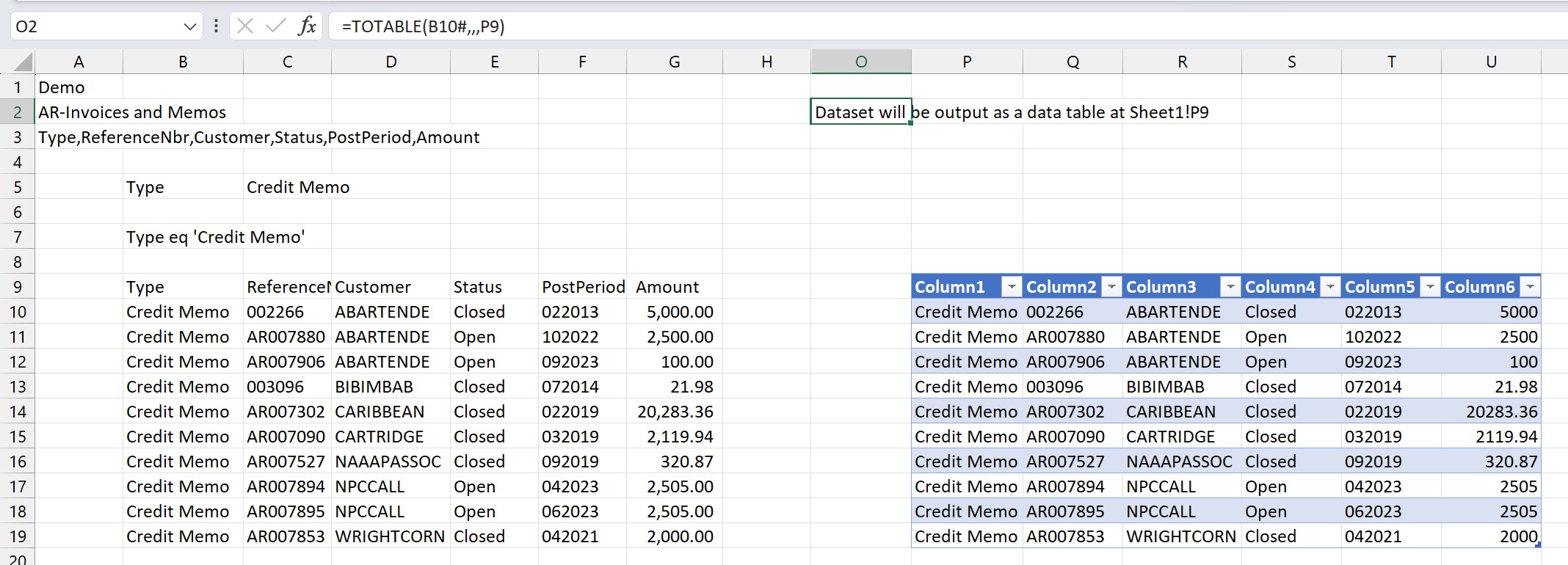
This method is referred to as Full Mirroring Mode - meaning that the entire results (and ONLY the results) from the original array are included in the resulting table.
Example 2 - convert entire array to table (changing column order) - Per-Column Mirroring Mode
=TOTABLE(
    B10#,
    {2,1},
    FALSE,
    K9,
    M9,
    I9,
    L9,
    N9,
    J9
)
Description
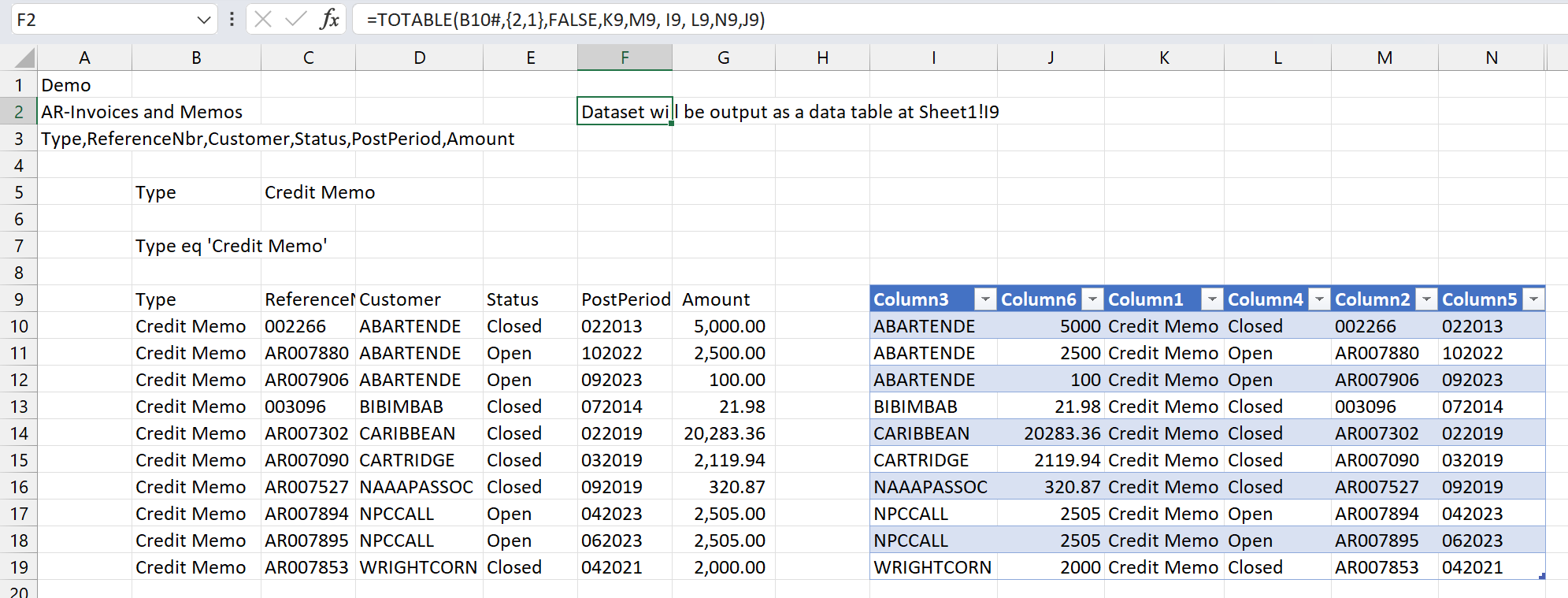
Creates a table (based on the results of the array defined in cell B10) as follows:
-
The second and first columns of the original array (when combined) uniquely identify each row in the array t
-
The
KeyColumnIndexargument is set to: {2,1}
-
-
Header information is assumed to not be included in the array defined in cell B10
-
The
DataIncludesHeaderargument is set toFALSE
-
-
The first column of the original array will be placed in column K -
OutputColumn1is set to K9 -
The second column of the original array will be placed in column M -
OutputColumn2is set to M9 -
The third column of the original array will be placed in column I -
OutputColumn3is set to I9 -
The fourth column of the original array will be placed in column L -
OutputColumn4is set to L9 -
The fifth column of the original array will be placed in column N -
OutputColumn5is set to N9 -
The sixth column of the original array will be placed in column J -
OutputColumn6is set to J9
This technique - where we both...
-
specify the keys columns AND
-
specify the order for each and every column in the table (not just the starting cell)
... is referred to as per-column mirroring mode
Result
Example 3 - include (and maintain) user-entered data with the table - Per-Column Mirroring Mode
In this example, we have added a calculation to the end of our table:

In order to maintain those calculated values when we refresh our report, we need to use per-column mirroring mode.
=TOTABLE(
    A6#,
    {1,2,3,4},
    ,
    I5,
    J5,
    K5,
    L5,
    M5,
    N5
)
Description
This function creates a table (based on the results of the array defined in cell A6) as follows:
-
The first through fourth columns of the original array (when combined) uniquely identify each row in the array
-
The
KeyColumnIndexargument is set to: {1,2,3,4}
-
-
Header information is assumed to be included in the array defined in cell A6 (the
DataIncludesHeaderargument is left blank - which defaults toTRUE) -
The columns in the table will be in the same order as they appear in the original array (the specified results are to be placed in columns I through N).
By using per-column mirroring mode, when the report is refreshed, the user-specified calculations in the highlighted column will be maintained (even if the results end up displaying different records).