Overview
The FINANCIALPERIODOFFSET function returns the ERP financial period (in MM-YYYY format and based on the Master Financial Calendar) that is a specific number of periods before or after the listed period.
Syntax
=FINANCIALPERIODOFFSET(
    ConnectionName,
    Period,
    PeriodOffset,
    Company
)
Arguments
The FINANCIALPERIODOFFSET function uses the following arguments (see our article on using arrays or cell ranges as arguments):
|
Argument |
Required/Optional |
Description |
|
|
Optional |
Provide one of the following values:
OR Omit the argument to return results for all compatible connections with default aggregation settings. |
|
|
Required |
The starting financial period, in MM-YYYY format |
|
|
Required |
The number of financial periods to add or subtract from the starting financial period. |
|
|
Optional |
The ID of the company whose financial calendar is to be used for determining the results. This argument is used when the Multiple Calendar Support feature is enabled within Acumatica. The company financial calendar of the specified company will be used. If left blank, the Master Financial Calendar will be used. |
Examples
Example 1
=FINANCIALPERIODOFFSET(
    "demo",
    "12-2019",
    -3
)
Description
Returns the third Acumatica financial period before period 12-2019.
Result
09-2019
Example 2
=FINANCIALPERIODOFFSET(
    "demo",
    "09-2018",
    5
)
Description
Returns the fifth Acumatica financial period after period 12-2018.
Result
01-2019
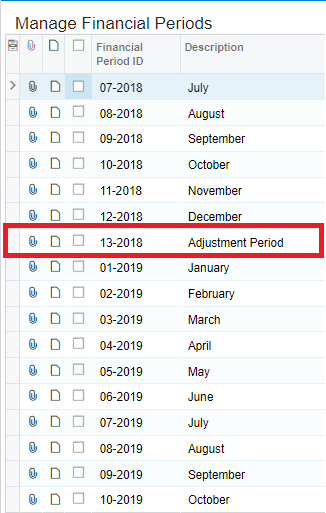
This function will include any adjustment periods defined within Acumatica: