
Overview
The EXPANDCONNECTIONRANGE function lets you retrieve a list of all Velixo connections within the workbook.
Syntax
=EXPANDCONNECTIONRANGE(
    ConnectionName,
    ErpType,
    IncludeType
)
Arguments
|
Argument |
Required/Optional |
Description |
|
|
Optional |
Search expression for filtering connection names, supports Velixo filtering techniques. |
|
|
Optional |
Limits results to the provided ERP types. Accepts the following values:
|
|
|
Optional |
Include connection types in the results – Default value: |
Examples
List all connections and their types
=EXPANDCONNECTIONRANGE(
    ,
    ,
    "TRUE"
)
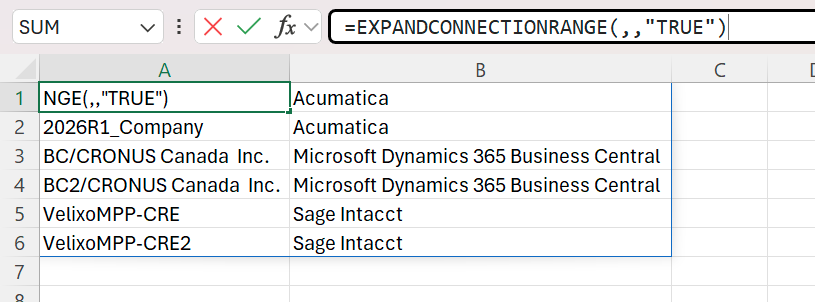
Description:
Returns all connection names for the workbook along with their ERP types.
List all connections of one type
=EXPANDCONNECTIONRANGE(
    ,
    "acumatica"
)
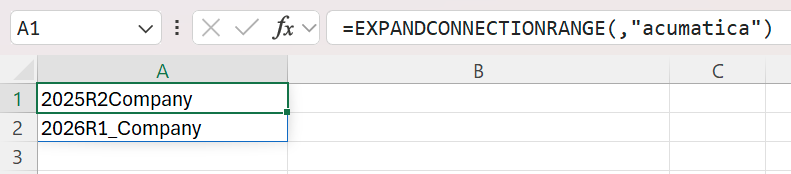
Description: Returns all connection names for the ERP of type Acumatica.
List all connections of one type
=EXPANDCONNECTIONRANGE(
    ,
    "intacct"
)
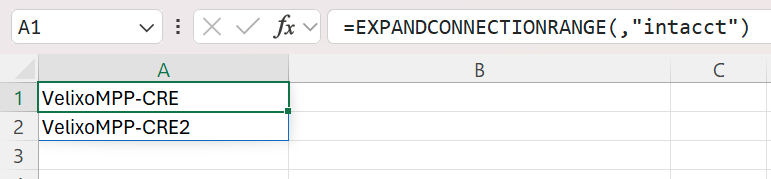
Description: Returns all connection names for the ERP of type Sage Intacct.
List all connections of one type
=EXPANDCONNECTIONRANGE(
    ,
    "bc"
)
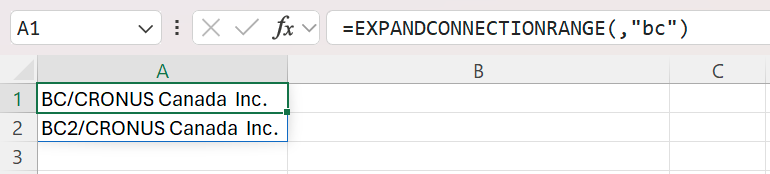
Description: Returns all connection names for the ERP of type Business Central.