Overview
The BRANCHNAME function returns the name of a specified branch ID.
Syntax
=BRANCHNAME(
    ConnectionName,
    Branch
)
Arguments
The BRANCHNAME function uses the following arguments (see our article on using arrays or cell ranges as arguments):
|
Argument |
Required/Optional |
Description |
|
|
Optional |
Provide one of the following values:
OR Omit the argument to return results for all compatible connections with default aggregation settings. |
|
|
Required |
The code of the branch. |
Example
=BRANCHNAME(
    "Demo",
    "PRODWHOLE"
)
Description: Returns the name of PRODWHOLE branch.
Result: Products Wholesale
Empty List
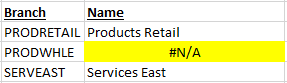
If a non-existent branch code is specified, the BRANCHNAME function will display the message Branch 'xxxxx' not found...
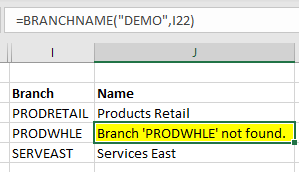
or, if you have configured Velixo reports to return zero values under certain circumstances...

... your report will display Excel's #N/A error: