
Overview
When refreshing a report, the following message appears in a cell containing a Velixo function:
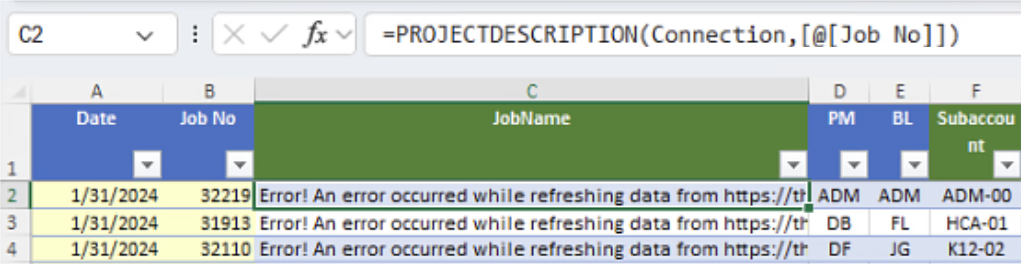
When the message is copied and pasted, the full message reads:
"Error! An error occurred while refreshing data from https://velixo.acumatica.com/OData/Company/VelixoReportsPro-Projects.
Please ensure:
1. That you can connect to the site from your browser.
2. That the site is not under maintenance.
3. That you have the necessary access rights to that inquiry.
4. That your network connection is stable.
Could not convert string to integer ABCDEFG.Path 'value[0].BranchID', line 4, position 54."
Cause
The "Could not convert" message indicates that something has modified the underlying generic inquiry within the ERP (in this example, the VelixoReportsPro-Project inquiry), preventing the data from being accessed.
Resolution
Replace the inquiry (mentioned in the message) with the current version available from Velixo.
If you are using Velixo NX or Acumatica 2024R1 (or higher), a system administrator can update the Customization Project.
If you are using Velixo Classic with an older version of Acumatica, you may be able to recreate all inquiries from the Connection Manager:
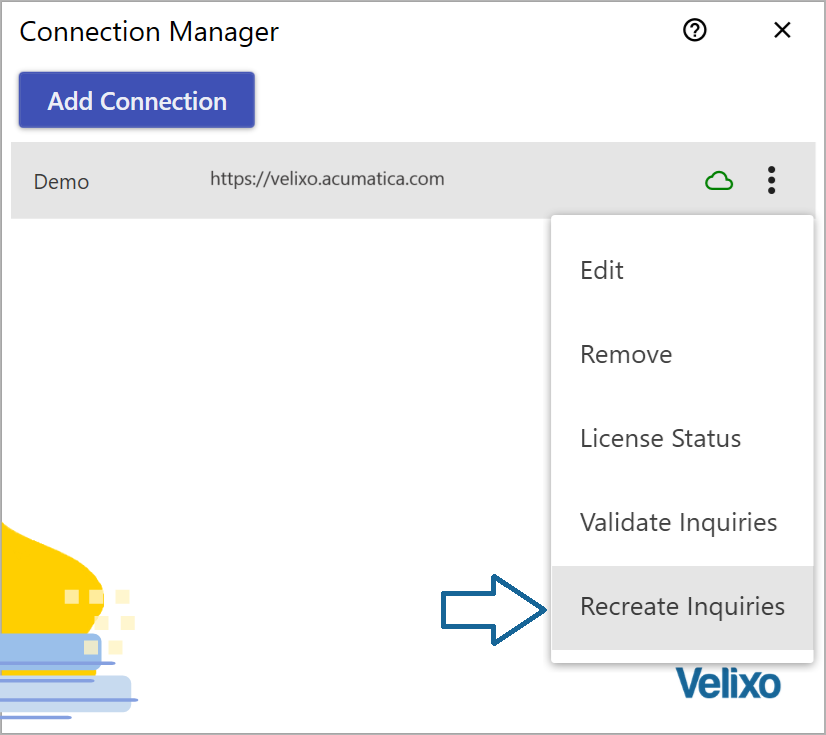
or a system administrator can update the Customization Project.