
Description
When showing the dash between subaccount segments in a report...
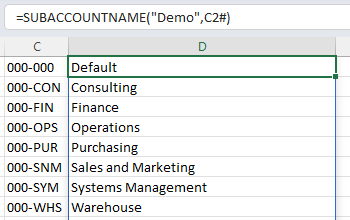
...instead of the functions returning results, a message is returned stating that there is no match to the subaccount:
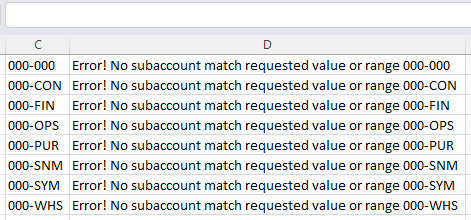
("Error! No subaccount match requested value or range")
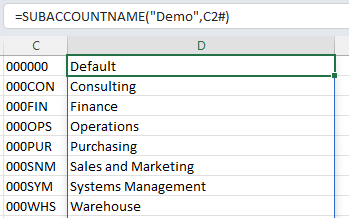
However, if the dash is removed, the functions work:
Background
Acumatica does not return any information about whether a segmented key is configured for an entity. But if an entity has a segmented key, Acumatica returns values without any dashes between segments (even if, in the Acumatica interface, that value is displayed with dashes - such as 000-000).
So the rule of thumb that Velixo uses is this:
-
Velixo assumes subaccounts have segmented keys
-
While Velixo keeps believing that, it IGNORES any dashes in user input. The user can enter 0-00000, or 0-0-0-0-0-0, or 000-000, anything the user wants. Acumatica sends the data without dashes (000000).
(we can see this if we use the EXPANDSUBACCOUNTRANGE function; the results are always shown without dashes between the segments).
Cause
However, all of this breaks down if someone enters a manual dash *inside* a segment in Acumatica - such as 0-0-000 or (this example contains a dash INSIDE the first segment),
What Acumatica sends a value such as "0-0000" to the report, Velixo can no longer assume the entity has a segmented key. At that point, Velixo has no option but to immediately stop ignoring dashes and has to assume that the dash is an actual part of the subaccount (instead of just a delimiter between segments).
Just the presence of a subaccount like this in the ERP (even if it is not being used) forces Velixo to operate under an entirely different paradigm.
Resolution
It is necessary to review the subaccounts to find any that do not match the defined segments:
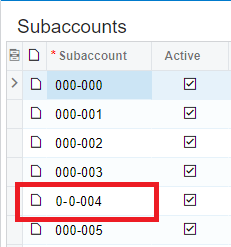
Then, the only resolution to this issue is to rename or delete the subaccounts which contain an extra user-entered dash [and modify any underlying transaction(s) using that subaccount].