
Symptom
When refreshing a report that contains a GI formula, Velixo shows an error indicating missing permissions / no access to a specific generic inquiry (GI).
At the same time, logging in to Acumatica as the same user and opening the GI manually works correctly.

Cause
This issue occurs in Acumatica Versions 2025R2 and older. It has been resolved in Acumatica 2026R1.
This behavior is caused by a known Acumatica issue that occurs:
-
when inserting/importing a GI from XML, or
-
when copying an existing GI.
Because of this corrupted access-rights state, Acumatica itself can still display the GI when opened directly. At the same time, the OData endpoint for the same GI is broken, causing Velixo's GI function (which uses OData) to fail with a permission error.
To confirm this cause, open the faulty GI in Acumatica and navigate to Tools → Access Rights. If you're presented with an error stating “Sequence contains no elements”, consider the cause confirmed.

Workaround
Ensure your user has the rights to access the Generic Inquiry in question. Then, follow the steps below.
-
Open the GI in Acumatica.
-
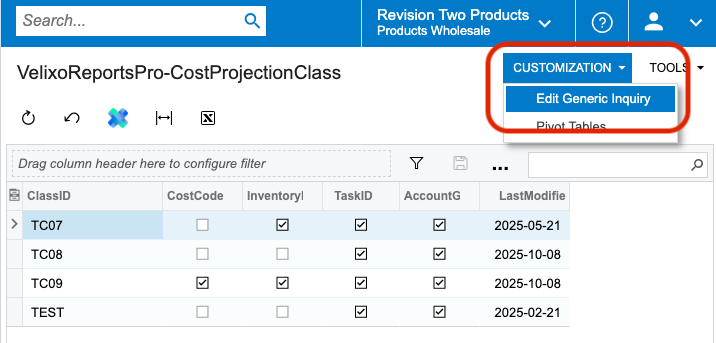
Go to Customization → Edit Generic Inquiry.
-
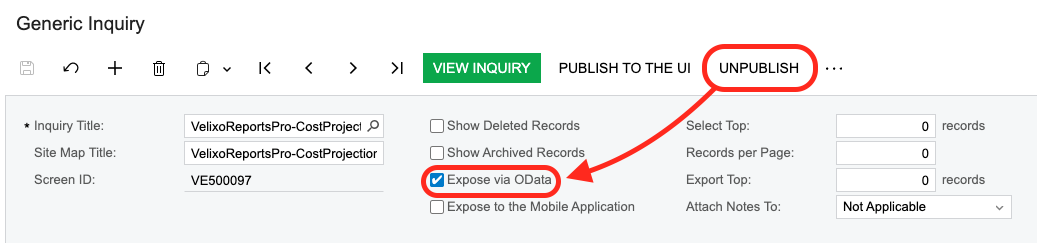
Click UNPUBLISH, confirm by clicking OK, and uncheck the Expose via OData checkbox.
-
Click PUBLISH TO THE UI, confirm by clicking PUBLISH, check the Expose via OData checkbox, and click the Save icon.

Related articles