Overview
The GILOOKUP function returns the value of a single field from a Generic Inquiry by specifying the keys of the single row to locate.
Syntax
This is the syntax for this function:
=GILOOKUP(
    ConnectionName,
    Name,
    Column,
    Key,
    OtherKey1,
    ...
)
Arguments
This function has the following arguments:
|
Argument |
Required/Optional |
Description |
|
|
Optional |
Provide one of the following values:
OR Omit the argument to return results for all compatible connections with default aggregation settings. |
|
|
Required |
The name of the generic inquiry. To search for generic inquiry names, use the Inquiry Title lookup on the Generic Inquiry page in Acumatica. Use only letters, numbers, spaces, hyphens ( |
|
|
Required |
The specific field to be returned from the inquiry data |
|
|
Required |
The values for every key column of the generic inquiry. They will be used to locate the data row in the generic inquiry result set. |
|
|
Optional |
Second key used for filtering. |
|
…. |
|
|
To query a generic inquiry that has parameters, provide a two-column range in the Name argument instead of the inquiry name. The range holds one row with the key giName and the inquiry name, and one row for each parameter with its name and value. Type giName exactly, with no spaces around it; otherwise, GILOOKUP treats each cell of the range as a separate inquiry name. For details, see Generic inquiries with parameters in the GI article.
Additional Notes
For each Generic Inquiry that you use with the GILOOKUP function, you will need to explicitly specify the inquiry's key columns in the Generic Inquiries Options section of the Velixo Options window.
Key columns are configured per inquiry name. They apply to every call to that inquiry, including calls with other parameter values, calls without parameters, and GI calls. Choose key columns that are unique for every set of parameter values you use. Otherwise, the function returns The key columns of inquiry '<inquiry>' are not unique….
Example
=GILOOKUP(
    "Demo",
    "AR-Invoices and Memos",
    "Status",
    "002263",
    "Overdue Charge"
)
Description
Assuming that Generic Inquiry Key Fields options for the AR-Invoices and Memos are configured as:

This function call returns the Status field for the record in the database where the ReferenceNbr field is 002263 and the Type field is Overdue Charge.
Result:
Closed

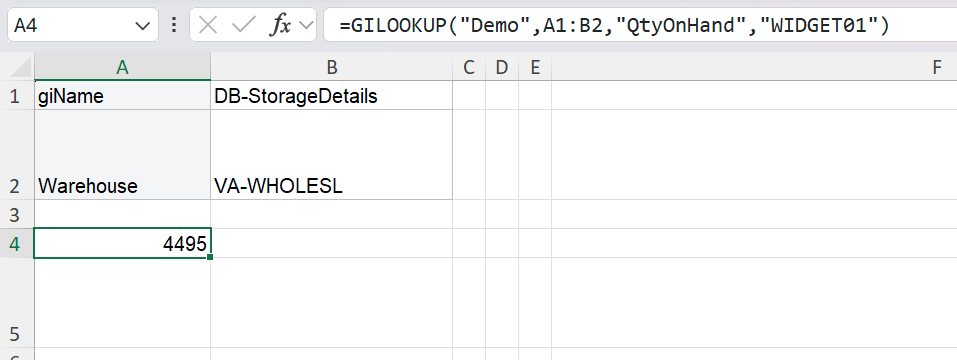
Looking up a value from an inquiry with parameters
=GILOOKUP(
    "Demo",
    A1:B2,
    "QtyOnHand",
    "WIDGET01"
)
Description: Cells A1:B2 contain giName / DB-StorageDetails and Warehouse / VA-WHOLESL. With InventoryID configured as the key column of DB-StorageDetails, the formula returns the quantity on hand of item WIDGET01 in the VA-WHOLESL warehouse.
Result: