
Overview
The EXPANDACCOUNTCLASSRANGE function returns all general ledger account class codes within the specified range
Velixo recommends the use of Microsoft 365 for this feature. Velixo Reports includes experimental support for Excel 2010 or higher. See the Prerequisites for additional information.
Syntax
=EXPANDACCOUNTCLASSRANGE(
    ConnectionName,
    Range
)
Arguments
The EXPANDACCOUNTCLASSRANGE function uses the following arguments (see our article on Filtering Velixo functions):
|
Argument |
Required/Optional |
Description |
|
|
Optional |
Provide one of the following values:
OR Omit the argument to return results for all compatible connections with default aggregation settings. |
|
|
Optional |
The range of account class codes to include in the results |
Example
=EXPANDACCOUNTCLASSRANGE(
    "Demo",
    "D*:FZ*"
)
Description
Returns all general ledger account class codes starting with the letters D through F
Result
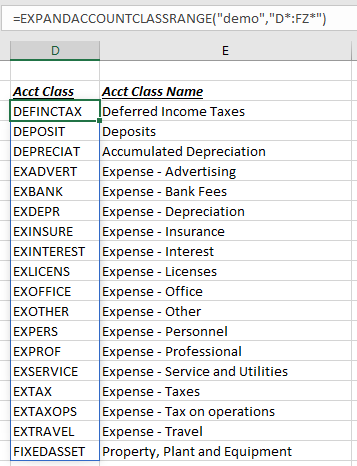
By using the letter Z in our Range, we can include those Account Classes that begin with the letter F (in this example the letter J would have also worked, since our last Account Class starting with the letter F has the letter I as the second letter). If we left off the Z, we would get only those Account Class Codes BEFORE the letter F (unless we happened to have a class code named just "F").