
Overview
The ACCOUNTENDINGBALANCE function calculates the ending balance of one or more general ledger account(s) as of a specific period - some organizations refer to this as the PeriodEndingBalance or PeriodClosingBalance for an account.
Syntax
=ACCOUNTENDINGBALANCE(
    ConnectionName,
    Ledger,
    AccountClass,
    Account,
    Subaccount,
    Branch,
    AsOf,
    IncludeUnposted,
    UseMasterFinancialCalendar,
    UseAccountCurrency
)
Arguments
The ACCOUNTENDINGBALANCE function uses the following arguments (see our article on Filtering Velixo Functions and using Excel arrays and cell ranges as arguments):
|
Argument |
Required / Optional |
Description |
|
|
Optional |
Provide one of the following values:
OR Omit the argument to return results for all compatible connections with default aggregation settings. |
|
|
Required |
Ledger ID. Leverage the ACU.EXPANDLEDGERRANGE function to obtain available values. Supports Velixo filtering techniques. |
|
|
Optional, though required if |
Account class ID. Leverage the EXPANDACCOUNTCLASSRANGE function to obtain available values. Supports Velixo filtering techniques. |
|
|
Optional, though required if |
General ledger account code(s). Leverage the EXPANDACCOUNTRANGE function to obtain available values. Supports Velixo filtering techniques. |
|
|
Optional |
Subaccount code(s). Leverage the EXPANDSUBACCOUNTRANGE function to obtain available values. Supports Velixo filtering techniques. |
|
|
Optional |
Branch ID(s). Leverage the EXPANDBRANCHRANGE function to obtain available values. Supports Velixo filtering techniques. |
|
|
Required |
The financial period, in MM-YYYY format
|
|
|
Optional |
1 - Include posted transactions only (default) 2 - Include Unposted transactions only 3 - Include Posted and Unposted transactions
|
|
|
Optional |
Use Acumatica's Master Financial Calendar instead of the financial calendar defined within the specific tenant associated with the connection being accessed (this can be useful for consolidation reports).
|
|
|
Optional |
Set to Accepted values: Default value: |
Examples
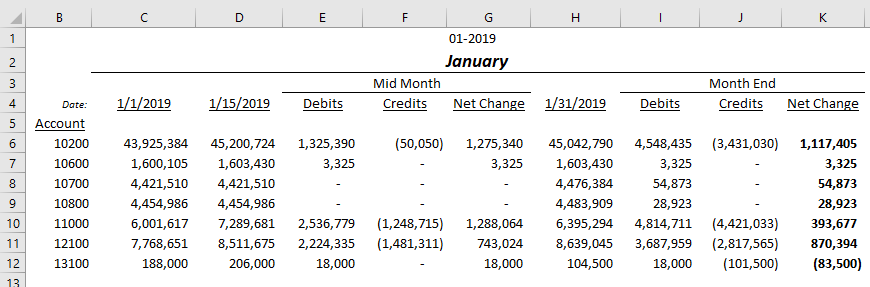
Given this data:
Example 1
=ACCOUNTENDINGBALANCE(
    "Demo",
    "ACTUAL",
    ,
    "10200",
    ,
    ,
    "01-2019"
)
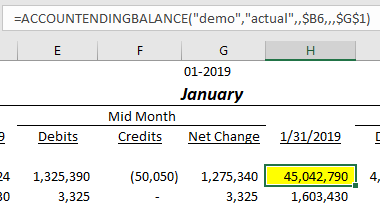
Description: Calculates the ending balance of posted transactions to General Ledger account #10200 (as noted in cell B6) for the 7th period of the year 2019 (as noted in cell G1).
Result: 45,042,790
Example 2
=ACCOUNTENDINGBALANCE(
    "Demo",
    "ACTUAL",
    ,
    "10700",
    ,
    ,
    $D$4,
    3
)
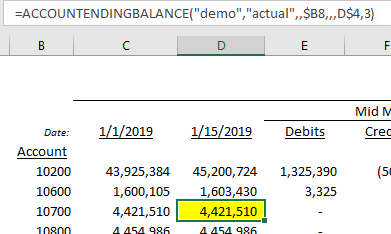
Description: Calculates the ending balance of the combined posted and unposted (as noted by the last argument: 3) transactions to General Ledger account #10700 (as noted in cell B8) as of January 15, 2019 (as noted in cell D4).
Result: 4,421,510
Limitations to filtering by date instead of the financial period
-
Don't filter the YTD Net Income account by date. This is the account set as YTD Net Income Account in Acumatica's General Ledger preferences. For this account, Velixo ignores the date and calculates the amount for the whole financial period that contains it, without an error. For example, an ending balance as of March 5 returns the balance as of the end of March. To calculate net income as of a date, use the workaround below.
Workaround: calculate net income as of a date
Instead of querying the YTD Net Income account, calculate net income as the total of your revenue accounts minus the total of your expense accounts. In the Account argument, enter your revenue account range, then your expense account range preceded by the subtraction operator (-). Because the two ranges don't overlap, Velixo subtracts the expense amounts from the revenue amounts. For more information, see Filtering using Velixo range expressions.
=ACCOUNTENDINGBALANCE(
    "Demo",
    "ACTUAL",
    ,
    "40000:49999;-50000:99999",
    ,
    ,
    $D$4
)
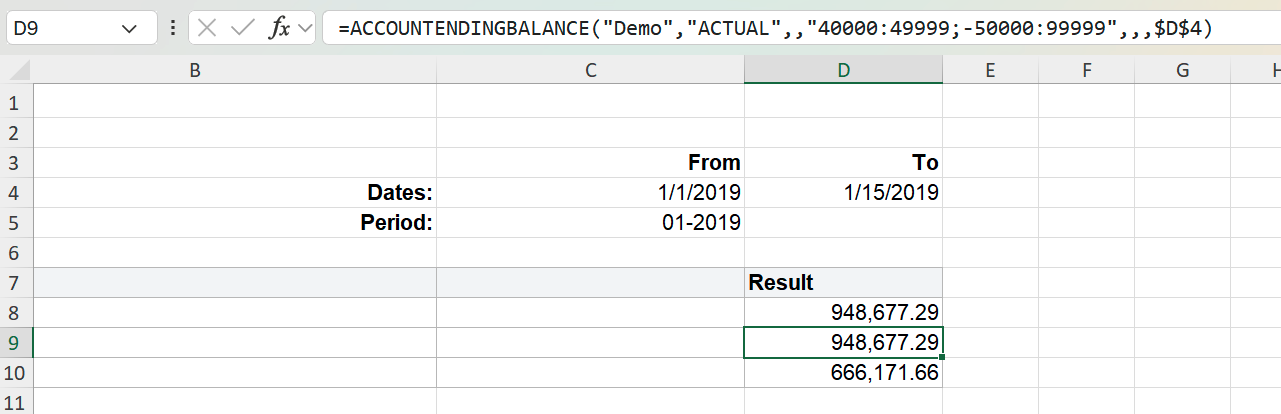
Description: Calculates net income as of January 15, 2019 (cell D4) as the ending balance of revenue accounts 40000 to 49999 minus the ending balance of expense accounts 50000 to 99999.
-
The account ranges come from the Demo chart of accounts. Replace them with the revenue and expense ranges from your own chart of accounts.
-
Make sure neither range includes your YTD Net Income account. Otherwise the workaround doesn't give the correct result.
-
To check that your ranges are complete, run the formula for a full financial period and compare the result with the YTD Net Income account balance for the same period. The two values should match.
-
The same workaround works with ACCOUNTTURNOVER and ACCOUNTBEGINNINGBALANCE. It doesn't apply to ACCOUNTTOTALDEBITS or ACCOUNTTOTALCREDITS.
If the Account balance sign option is set to Reversed, revenue amounts are returned as negative values, so subtracting expenses no longer gives net income. Instead, add both ranges without the subtraction operator, for example 40000:99999. If your ranges aren't contiguous, separate them with a semicolon, as in 40000:49999;50000:99999. For more information about this option, see Options.