
Overview
The ACCOUNTTOTALDEBITS function calculates the total debits of one or more general ledger account(s) for a given period.
Syntax
=ACCOUNTTOTALDEBITS(
    ConnectionName,
    Ledger,
    AccountClass,
    Account,
    Subaccount,
    Branch,
    FromPeriodOrDate,
    ToPeriodOrDate,
    IncludeUnposted,
    UseMasterFinancialCalendar,
    UseAccountCurrency
)
Arguments
The ACCOUNTTOTALDEBITS function uses the following arguments (see our articles on Filtering Velixo Functions and using arrays or cell ranges as arguments):
|
Argument |
Required/Optional |
Description |
|
|
Optional |
Provide one of the following values:
OR Omit the argument to return results for all compatible connections with default aggregation settings. |
|
|
Required |
Ledger ID. Leverage the ACU.EXPANDLEDGERRANGE function to obtain available values. Supports Velixo filtering techniques. |
|
|
Optional, though required if |
Account class ID. Leverage the EXPANDACCOUNTCLASSRANGE function to obtain available values. Supports Velixo filtering techniques. |
|
|
Optional, though required if |
General ledger account code(s). Leverage the EXPANDACCOUNTRANGE function to obtain available values. Supports Velixo filtering techniques. |
|
|
Optional |
Subaccount code(s). Leverage the EXPANDSUBACCOUNTRANGE function to obtain available values. Supports Velixo filtering techniques. |
|
|
Optional |
Branch ID(s). Leverage the EXPANDBRANCHRANGE function to obtain available values. Supports Velixo filtering techniques. |
|
|
Required |
The beginning financial period, in MM-YYYY format
|
|
|
Required |
The ending financial period, in MM-YYYY format.
|
|
|
Optional |
1 - Include posted transactions only (default) 2 - Include Unposted transactions only 3 - Include Posted and Unposted transactions
|
|
|
Optional |
Use Acumatica's Master Financial Calendar instead of the financial calendar defined within the specific tenant associated with the connection being accessed (this can be useful for consolidation reports).
|
|
|
Optional |
Set to Accepted values: Default value: |
Examples
Based on this data:
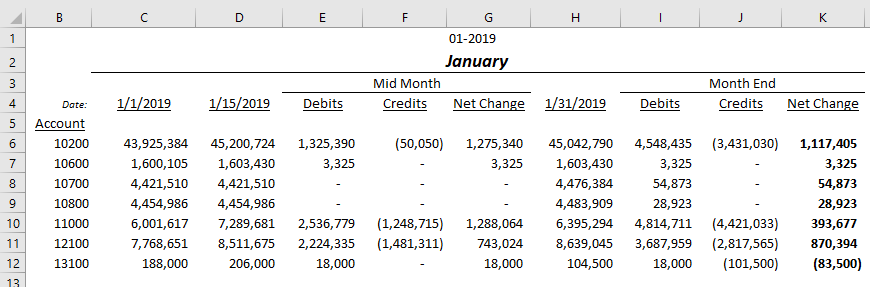
Example 1 - using Financial Period
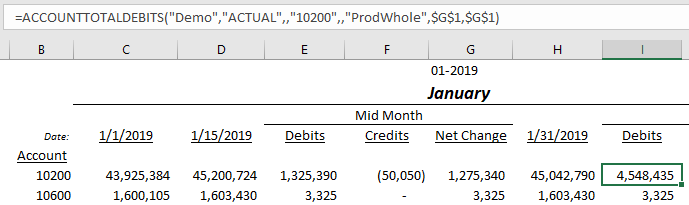
=ACCOUNTTOTALDEBITS(
    "Demo",
    "ACTUAL",
    ,
    "10200",
    ,
    "PRODWHOLE",
    $F$1,
    $F$1
)
Description: Calculates the total debits posted in general ledger account #10200 of the PRODWHOLE branch during the period of 01-2019.
Result: 4,548,435
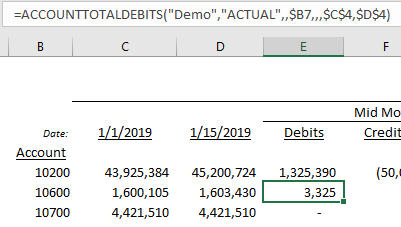
Example 2 - using cell references to dates
=ACCOUNTTOTALDEBITS(
    "Demo",
    "ACTUAL",
    ,
    $B7,
    ,
    ,
    $C$4,
    $D$4
)
Description: Calculates the total debits posted in general ledger account #10600 (as noted in cell B7) between January 1, 2019 and January 15, 2019 (as noted in cells C4 and D4).
Result: 3,325
Limitations to filtering by date instead of the financial period
-
Don't filter the YTD Net Income account by date. This is the account set as YTD Net Income Account in Acumatica's General Ledger preferences. For this account, Velixo ignores the dates and calculates the amount for the whole financial period that contains them, without an error. For example, total debits from March 1 to March 5 return the total debits for all of March. To calculate net income for a date range, use the workaround described in ACCOUNTTURNOVER.
-
Balances are calculated based on the total from the nearest financial period, and then adjusted based on the filtered transaction date
-
Balances will not reflect transactions within the specified date range but which have been posted to a different financial period.