
Overview
The ACCOUNTCONSOLIST function returns the list of GL account codes (if any) matching the specified consolidation account(s).
Syntax
=ACCOUNTCONSOLIST(
    ConnectionName,
    Account
)
Arguments
This ACCOUNTCONSOLIST function uses the following arguments (see our articles on Filtering Velixo Functions and using Excel arrays or cell ranges as arguments):
|
Argument |
Required/Optional |
Description |
|
|
Optional |
Provide one of the following values:
OR Omit the argument to return results for all compatible connections with default aggregation settings. |
|
|
Required |
The consolidation general ledger account(s) to include. |
Example
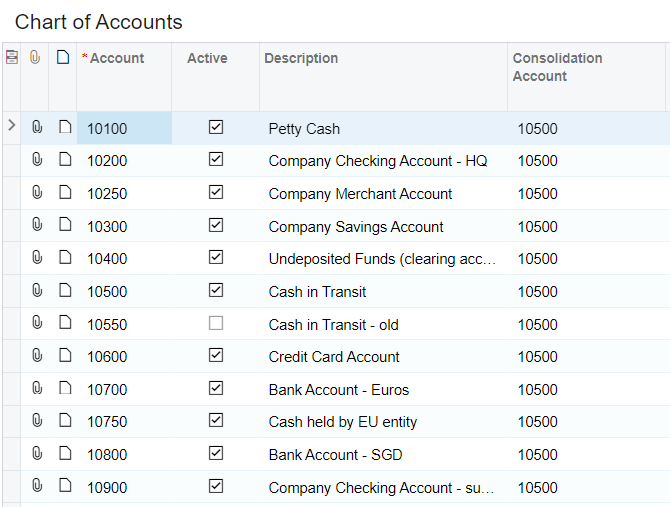
Let's assume this Chart of Accounts configuration within Acumatica:
=ACCOUNTCONSOLIST(
    "Demo",
    "10500"
)
Description: This function returns the semicolon-delimited list of accounts which have a consolidation account code of 10500

Empty Lists
If no Consolidation List exists for the specified account(s), the ACCOUNTCONSOLIST will either display the message Error! Consolidation Account 'xxxxx' not found:

or, if you have configured Velixo reports to return zero values under certain circumstances...

... your report will show Excel's #N/A error:
