Overview
The LASTREFRESHDATE function returns an Excel date/time value of when the specified connection was last refreshed.
With Velixo NX, please see the WORKBOOKLASTREFRESHDATEfunction.
Syntax
=LASTREFRESHDATE(
    Connection
)
Arguments
The LASTREFRESHDATE function uses the following argument:
|
Argument |
Required/Optional |
Description |
|
|
Optional |
Provide one of the following values:
OR Omit the argument to return results for all compatible connections with default aggregation settings. |
Example
=LASTREFRESHDATE(
    "Demo"
)
Description:
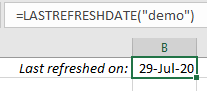
Returns the Excel date value for when the Demo connection was last refreshed.
Result:
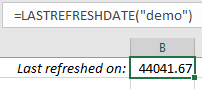
The results are returned as a serial number to match Excel's default treatment for dates. The cell can be formatted to any date format desired.