Overview
The SI.XQUERYLOOKUP function returns a field from the specified Sage Intacct REST API object, using key fields/values and an optional filter expression.
Syntax
=SI.XQUERYLOOKUP(
    ConnectionName,
    Object,
    Filter,
    FieldToReturn,
    KeyFields,
    KeyValue,
    OtherKeyValue1,
    OtherKeyValue2,
    OtherKeyValue3,
    OtherKeyValue4
    ...
)
Arguments
|
Argument |
Required/Optional |
Description |
|
|
Optional |
Provide one of the following values:
OR Omit the argument to return results for all compatible connections with default aggregation settings. |
|
|
Required |
A case-insensitive Sage Intacct REST API object name. |
|
|
Optional |
An optional filter to be used internally for SI.XQUERY.
|
|
|
Required |
The name of the field to be retrieved from Sage Intacct. Reference a field from a related object using dot ( Use SI.XOBJECTDEFINITION for a list of available field names. |
|
|
Required |
Specifies which field or fields uniquely identify the record to look up. Provide either:
Provide the matching value for each key field in |
|
|
|
The value that identifies the record, matching the first field listed in |
|
|
|
The value matching the second field listed in Add one |
|
... |
|
|
|
|
|
The value matching the final field listed in |
Examples
Simple lookup
=SI.XQUERYLOOKUP(
    "Sage",
    "construction-forecasting/wip-project",
    ,
    "estimatedCostAtCompletion",
    "id",
    "24"
)
Description:
Queries the Sage Intacct REST API construction-forecasting/wip-project object to retrieve its estimated cost at completion for project with ID 24
Result:

Lookup a field from a related object
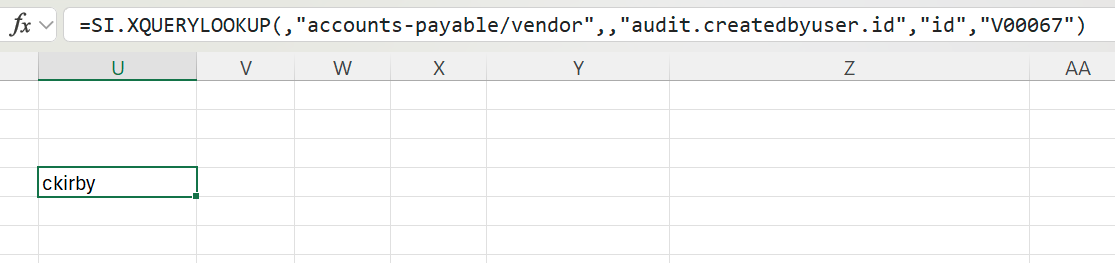
=SI.XQUERYLOOKUP(,"accounts-payable/vendor",,"audit.createdbyuser.id","id","V00067")
Description:
Queries the Sage Intacct REST API accounts-payable/vendor object to retrieve the field id from a related object (audit.createdbyuser) based on the id field value (V00067) from the current object.
Result: