Overview
The SI.WRITEBACK function sends one or more lines of values to the ERP. The function uses the fields specified in a pre-defined Object in the ERP.
Related articles
-
Getting started with Writeback - A general article on setting up and using writeback functions.
Syntax
=SI.WRITEBACK(
    ConnectionName,
    Object,
    Settings,
    RecordNo,
    FieldNames,
    ParentRecordReference,
    ParentRecordGroupName,
    OutputFieldNames,
    OutputRange,
    RangeOrDataItem,
    ...
)
Arguments
The SI.WRITEBACK function uses the following arguments:
|
Argument |
Required /
|
Description |
||||||
|
|
Required |
The name of the connection as configured in the Connection Manager. This function does not support the multiple connection functionality. |
||||||
|
|
Required |
The name of the Sage Intacct object (case insensitive).
|
||||||
|
|
Optional |
Considering the below example, you may reference cells: $P$6:$Q$8 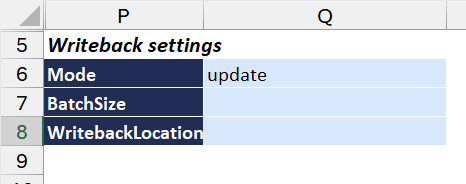
or use a formula instead:
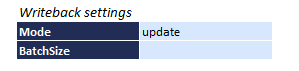
|
||||||
|
|
Required when the Mode argument is set to create, update, or recreate |
Indicates the record number to be used for creating, updating, or recreating a record within the ERP. |
||||||
|
|
Required |
A comma-separated string OR an Excel range containing the names of the fields for writeback. |
||||||
|
|
Optional |
A reference to a cell containing another SI.WRITEBACK function to indicate that the current record has a child → parent relationship with the other record. |
||||||
|
|
Optional in most cases.
|
The name of the XML grouping element for the child entries under the parent.
This argument is ignored if |
||||||
|
|
Required |
An Excel cell range (or a comma-separated string) containing the field names to retrieve from the resulting object. This argument is ignored when in "delete" mode |
||||||
|
|
Optional |
The Excel range which will receive the fields of a created/updated record. This argument is ignored when in "delete" mode |
||||||
|
|
Required |
The first set of data to be sent to the ERP. The values to be written must be specified in the same order as the column/field names specified in the |
||||||
|
... |
|
|
Tips
-
As an alternative to using the Platform Services → Object screen in Sage Intacct, you may also use the SI.QUERYand/or SI.OBJECTDEFINITION functions for determining the exact column names of a given Object to use in the Writeback function.
-
The WRITEBACKCOMMIT function should be used for creating/updating/recreating parent child records (such as: Projects), so that the
OutputRangevalue returned by the SI.WRITEBACK function can be used by subsequent SI.WRITEBACK in the same batch. -
WRITEBACKcannot be used to update existing journal transactions within Intacct.
Defaults for the ParentRecordGroupName argument
When ParentRecordReference is set, and the parent–child pair maps to a single XML group name, you can omit ParentRecordGroupName. Velixo automatically applies the default for that pair.
For example, when the child SI.WRITEBACK formula references a parent SI.WRITEBACK formula for APBILL, ParentRecordGroupName is optional — its only valid value is APBILLITEMS, so Velixo uses it by default.
Parent–child pairs with multiple possible group names
Specify ParentRecordGroupName explicitly for these pairs.
If you omit ParentRecordGroupName for the pairs below, Velixo creates the parent record but does not create the child, and no error is returned. To avoid losing child records, always specify ParentRecordGroupName for these combinations.
|
Parent object |
Child object |
Possible group names (specify one) |
|---|---|---|
|
|
|
|
|
|
|
|
Supported defaults
The table below lists the parent–child pairs for which Velixo applies a default group name when ParentRecordGroupName is omitted. The defaults apply to the standard API. With the Legacy API, the group name is always determined automatically, and any value provided is ignored.
Legacy writeback considerations
Starting with Velixo NX 2026.1, some Sage Intacct objects (for example, PODOCUMENT or OTHERRECEIPTS) can only be updated via Sage Intacct’s legacy, object‑specific functions instead of the generic Sage Intacct API. In such cases, Velixo automatically uses SI.WRITEBACK in legacy writeback mode.
As a result of this change, users whose SI.WRITEBACK formulas write back to objects PODOCUMENT, PODOCUMENTENTRY, and OTHERRECEIPTSENTRY need to update their formulas to keep writeback functional. Follow the steps outlined below to update your formulas.
-
For formulas using the
PODOCUMENTobject:-
Set the
APIargument tolegacy. -
In the
FieldNamesargument, useVENDORIDin place ofCUSTVENDID. -
In the
FieldNamesargument, remove the fieldSTATUS(it is no longer supported).
-
-
For formulas using the
PODOCUMENTENTRYobject:-
Set the
APIargument tolegacy. -
In the
FieldNamesargument, usePRICEin place ofUIPRICE. -
In the
FieldNamesargument, remove the fieldDOCPARID(DOCPARIDcan remain in the header).
-
-
For formulas using the
OTHERRECEIPTSENTRYobject:-
Set the
APIargument tolegacy. -
In the
FieldNamesargument, useAMOUNTin place ofTRX_AMOUNT. -
If required, add
LOCATIONIDtoFieldNames.
-
-
To link child lines to headers, leverage
ParentRecordReferenceinstead ofParentRecordGroupName. -
DOCIDorRECORD_URLvalues may remain blank despite successful writeback. To retrieve these values, use the SI.QUERYLOOKUP function.
For example,=SI.QUERYLOOKUP(,"PODOCUMENT",,"DOCID","RECORDNO","119")will retrieve theDOCIDfor thePODOCUMENTline with aRECORDNOvalue119: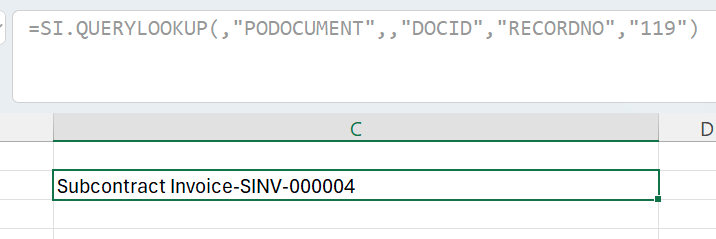
Fields available for legacy writeback objects
When creating SI.WRITEBACK formulas for legacy writeback objects, be sure to only use the field names listed below (click to expand):
Writeback scoped to document types
Some Sage Intacct objects act as containers for several document types (also refered to as transaction definitions) that share the same underlying tables. SODOCUMENT, PODOCUMENT, and INVDOCUMENT are the common examples. Each document type is a subtype of the base object, which can carry custom fields that exist only in that type – they are not present in the base object.
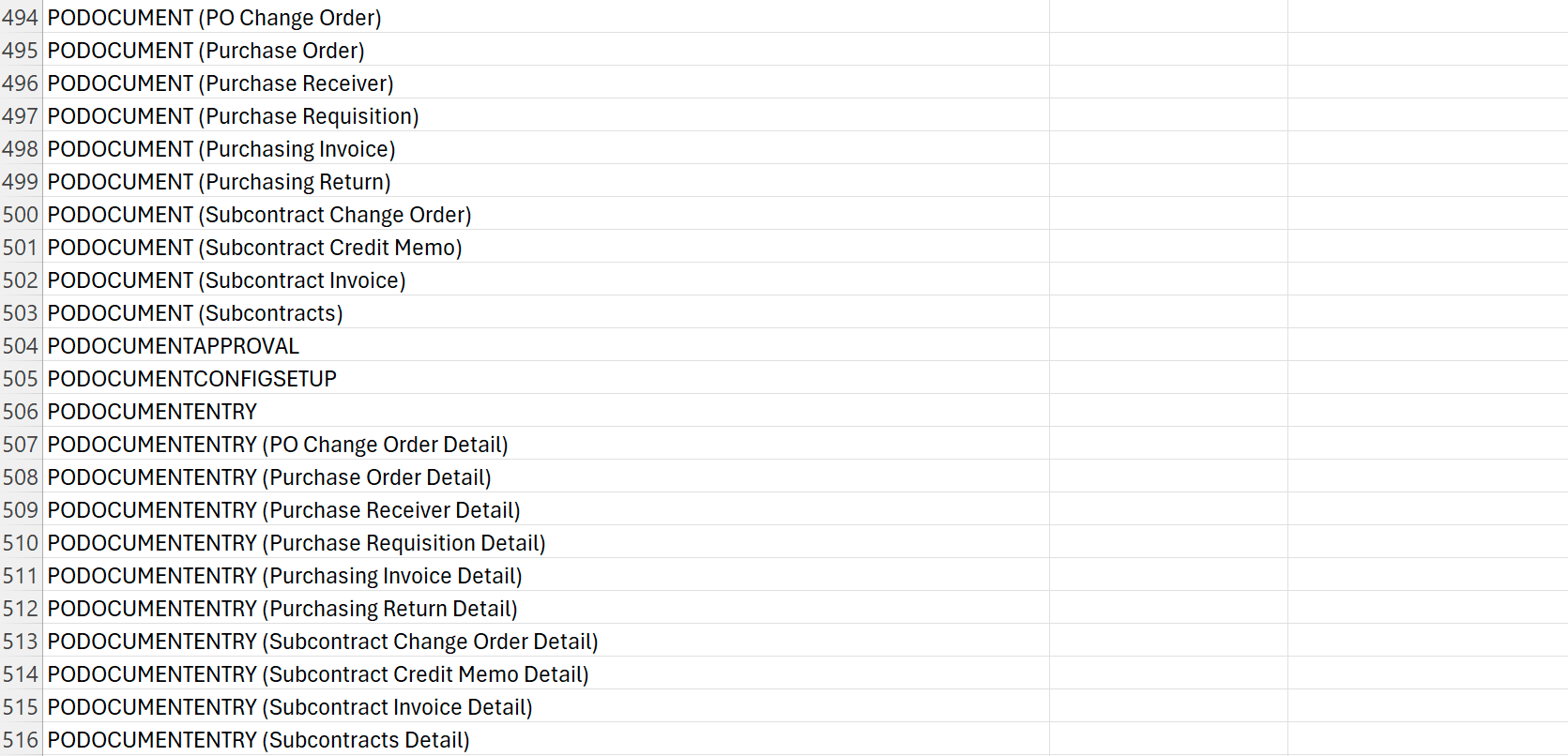
In SI.EXPANDOBJECTRANGE output, document types appear as the base object name followed by the document type in parentheses – for example, PODOCUMENT (Purchase Order) for the header object and PODOCUMENTENTRY (Purchase Order Detail) for the line object.
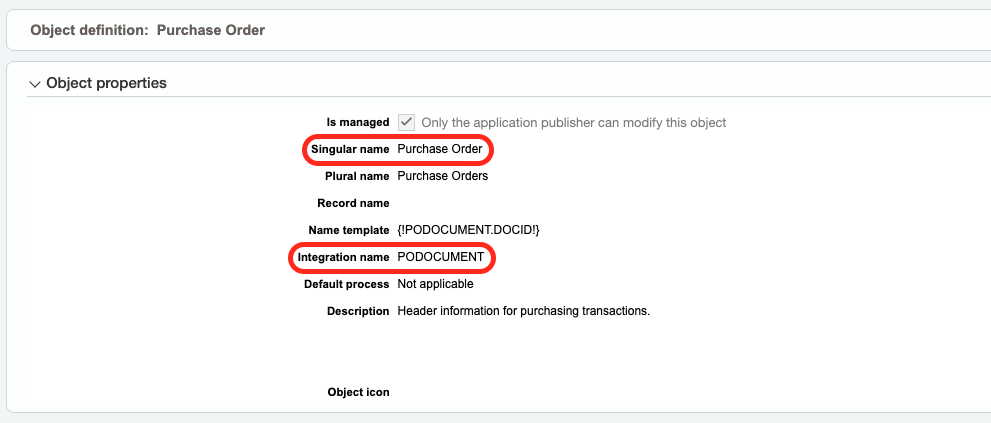
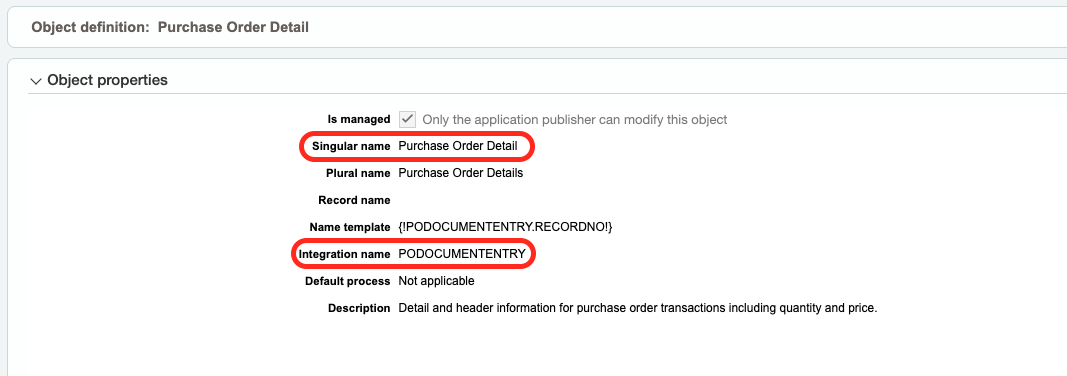
In the Sage Intacct interface, you can find the object and document type names by selecting an object in Platform Services → Object. The object name is referred to as Integration name, and the document type name is referred to as Singular name.
To write back to a document type and reach its custom fields:
-
Set the
Objectargument to the base object –PODOCUMENTfor the header,PODOCUMENTENTRYfor the lines. Do not put the parenthesized label (for example,PODOCUMENT (Purchase Order)) in theObjectargument – this returns an "Invalid Character in Name" error, because the space and parentheses are not valid in an object name. -
Add
DOCPARID(the text shown in parentheses in SI.EXPANDOBJECTRANGE output) to theFieldNamesargument. The header and the lines each use their own object'sDOCPARID:Purchase OrderforPODOCUMENTrows andPurchase Order DetailforPODOCUMENTENTRYrows. This selects the document type and makes its custom fields available for writeback. -
Link the lines to the header by referencing the header writeback formula cell in the
ParentRecordReferenceargument.
Refer to Example 5 for details.
Difference from querying
When you query a document type with SI.QUERY, you pass the document type directly as the object. When you write back, you keep the base object in the Object argument and identify the document type with the DOCPARID field.
Examples
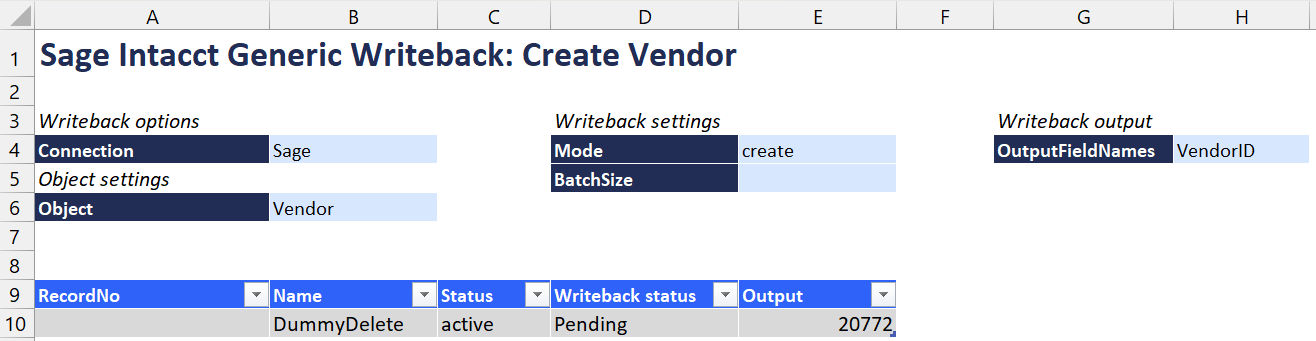
Example 1 - Creating a new Vendor record
=SI.WRITEBACK(
    $B$4,
    $B$6,
    $D$4:$E$5,
    ,
    Table1[[#Headers],[Name]:[Status]],
    ,
    ,
    $H$4,
    $E13,
    Table1[@[Name]:[Status]]
)
Example 2 - Updating an attribute of an existing Project
=SI.WRITEBACK(
    $B$4,
    $B$6,
    $D$4:$E$5,
    [@RecordNo],
    Table2[[#Headers],[ProjectID]:[ProjectType]],
    ,
    ,
    ,
    ,
    Table2[@[ProjectID]:[ProjectType]]
)
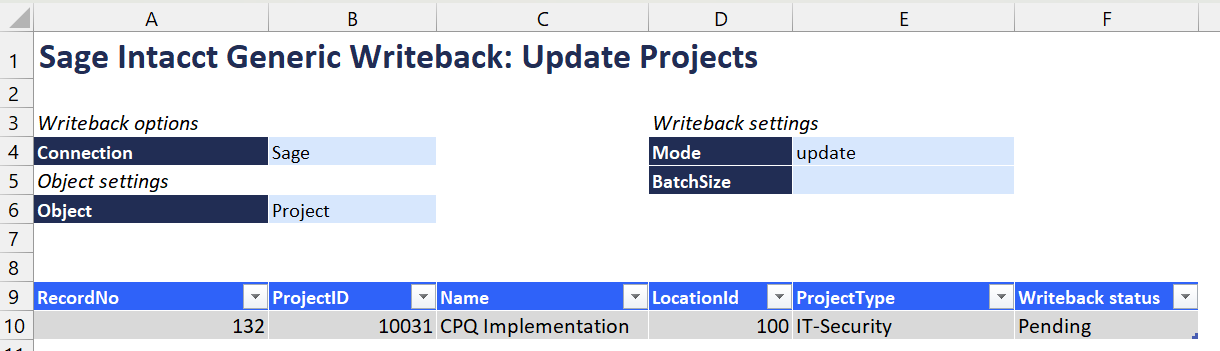
Updating records requires specifying the RecordNo of the record to update. The SI.QUERY function can be used to query the same object to retrieve the RecordNo of the specific item you wish to update.
Example 3 - Creating a record in a Private object (Cost Code Observed Percent Completed Entry scenario)
=SI.WRITEBACK(
    $K$4,
    $K$6,
    $O$4:$P$6,
    ,
    Table137[[#Headers],[TYPE]:[NOTE]],
    ,
    ,
    $P$7,
    P10,
    Table137[@[TYPE]:[NOTE]]
)
In this example, the WritebackLocation Setting is used in the 2-column Array: $O$4:$P$6, as the OBSPCTCOMPLETED object is a private object (meaning its records are "private" to a specific entity), and a specific Locationid must be referenced.
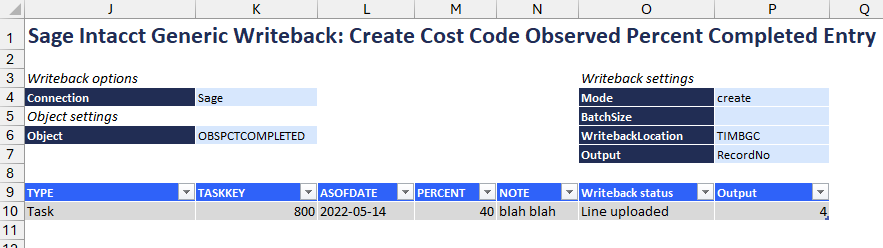
Due to a limitation within Sage Intacct, Velixo is unable to provide a specific error message to inform that the WritebackLocation argument needs to be used.
Instead, the following error message may be displayed:
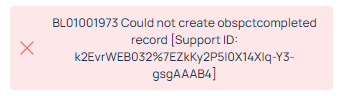
Except from the message: BL01001973 Could not create obspctcompleted record
Example 4 - Update the detail data of an object without updating the header data
(using the APBILL and APBILLITEM objects)
There is a documented example of creating both header and detail information for an object. Let's look at updating only the detail portion.
Here we have both header data (from the APBILL object) and detail data (from the APBILLITEM object):
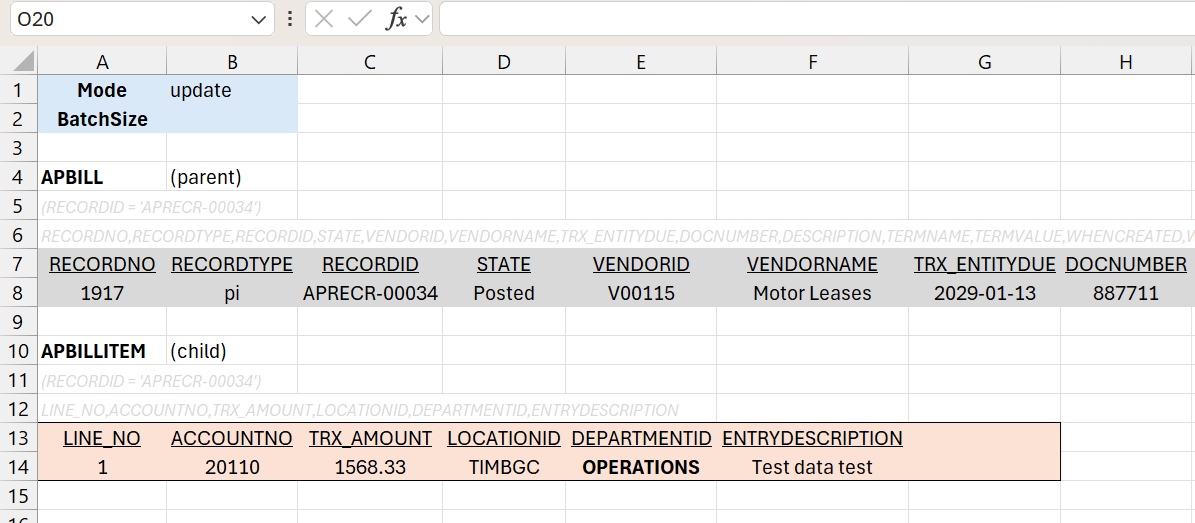
In this example, we want to change the DEPARTMENTID field at the detail-level from OPERATIONS to FINANCE.
Although we do not want to change the header data, we do need a reference to that header. So, the first thing we are going to is create a header writeback (cell I13) that does nothing except ensure that we have that reference:
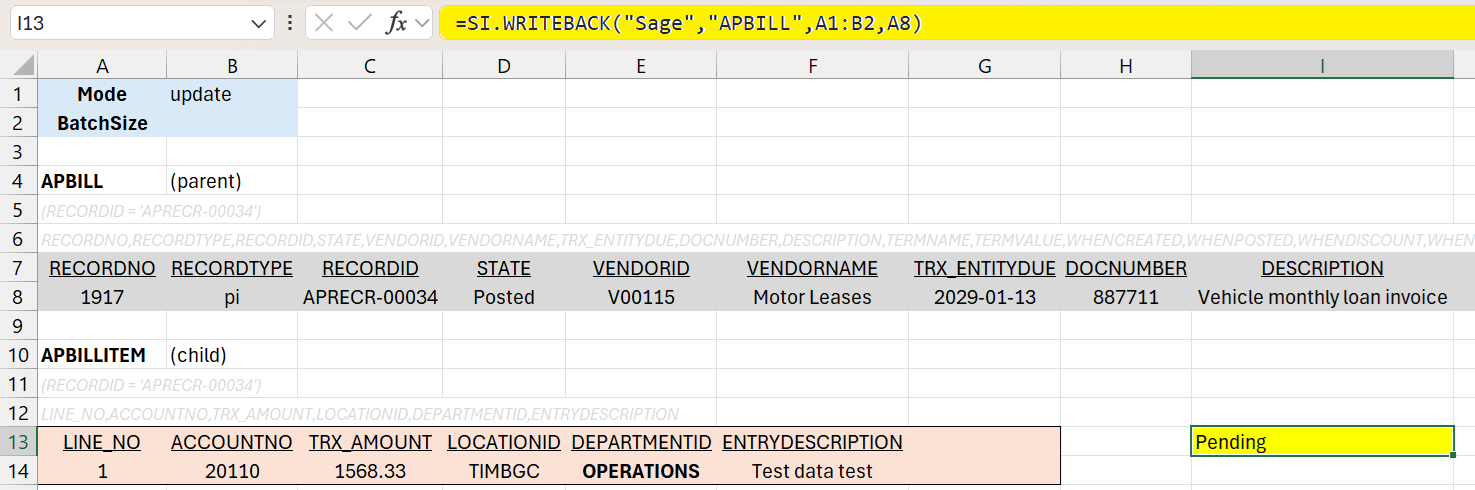
All that function does is update the header with the same RECORDNO field that we already retrieved (cell A8) using the SI.QUERY function.
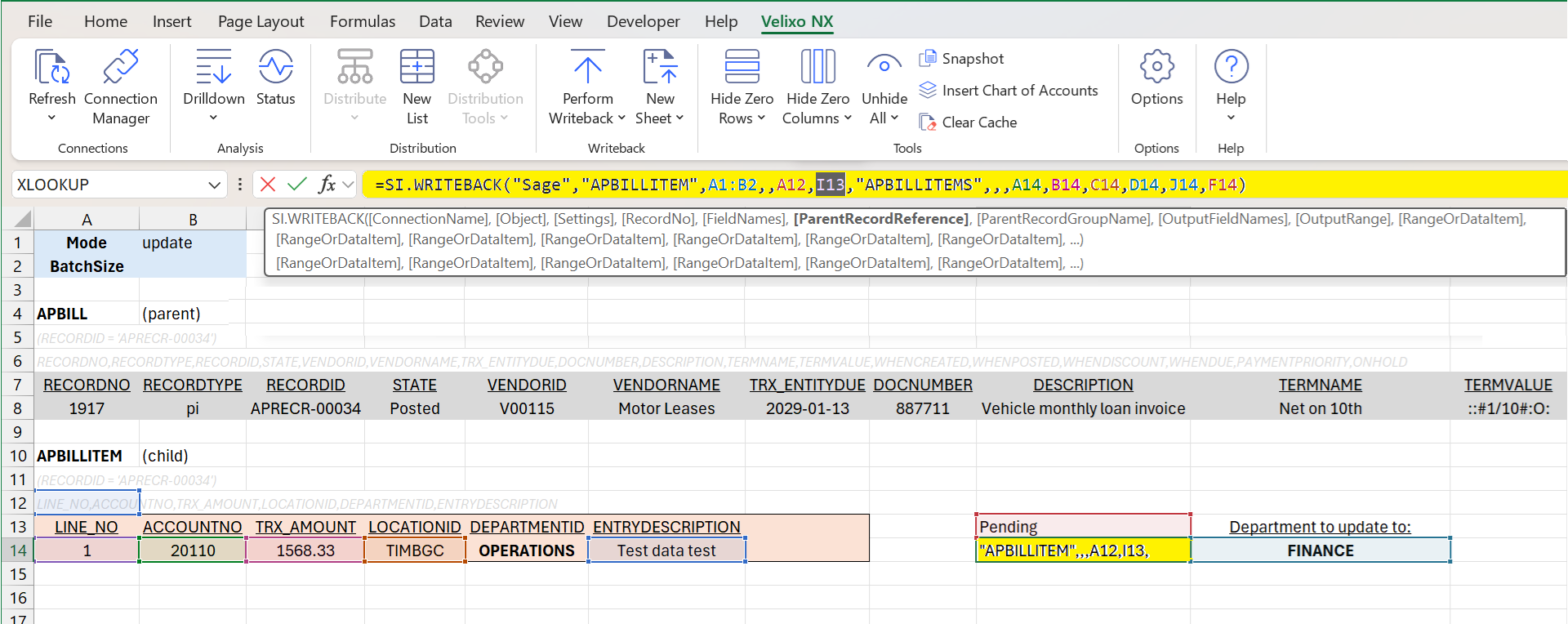
Now, we can create a WRITEBACK function (cell I14) that references the results of the first function (in the ParentRecordReference argument) and uses Update mode to replace the DEPARTMENTID field with the new value (cell J14) while maintaining the existing other field values (cells A14, B14, C14, D14, and F14):
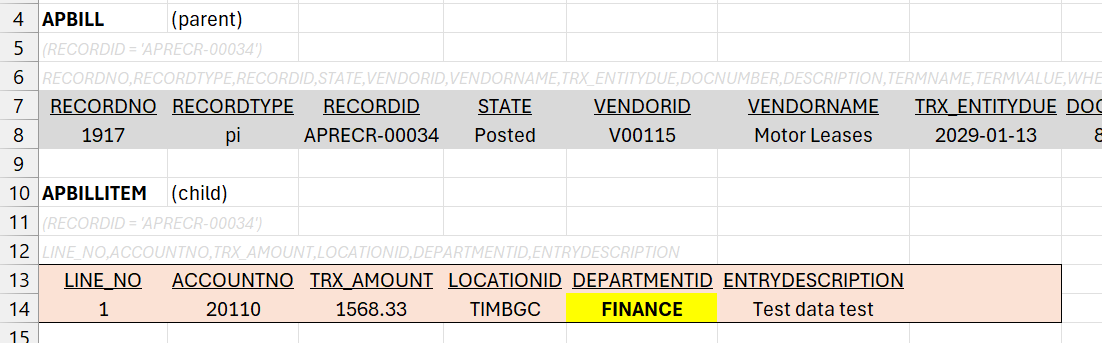
After performing a Full Refresh (to clear any cached SI.QUERY data in our report), we see the updated detail data with no changes to the header:
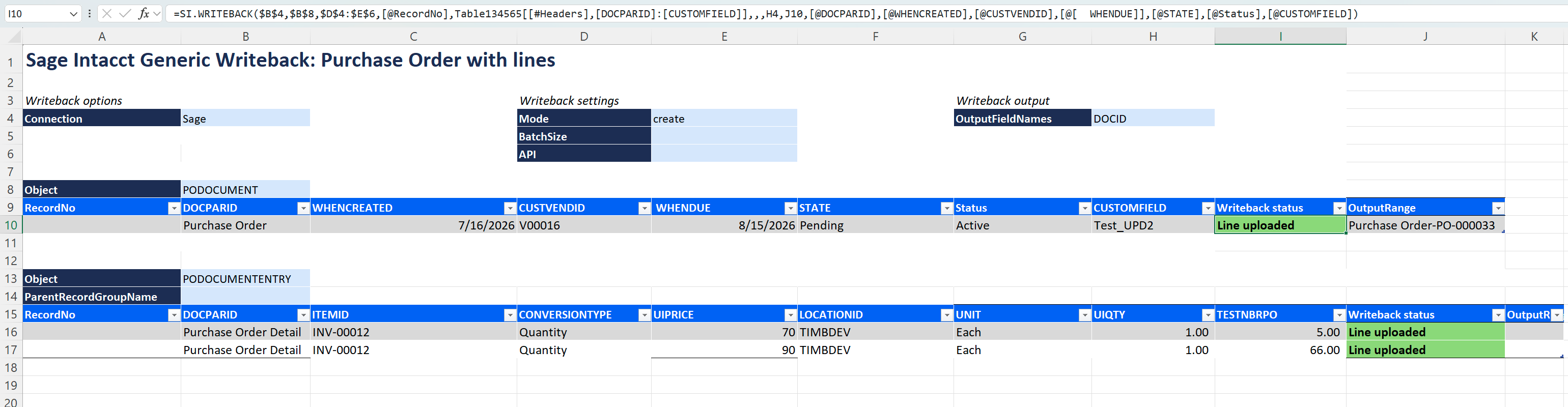
Example 5 - creating a Purchase Order with lines
The header formula writes to PODOCUMENT, with DOCPARID set to Purchase Order as the first field. The Settings range ($D$4:$E$6) sets the mode to create, and OutputFieldNames (H4, containing DOCID) returns the created document ID to cell J10:
=SI.WRITEBACK(
    $B$4,
    $B$8,
    $D$4:$E$6,
    [@RecordNo],
    Table134565[[#Headers],[DOCPARID]:[CUSTOMFIELD]],
    ,
    ,
    H4,
    J10,
    [@DOCPARID],
    [@WHENCREATED],
    [@CUSTVENDID],
    [@WHENDUE],
    [@STATE],
    [@Status],
    [@CUSTOMFIELD]
)
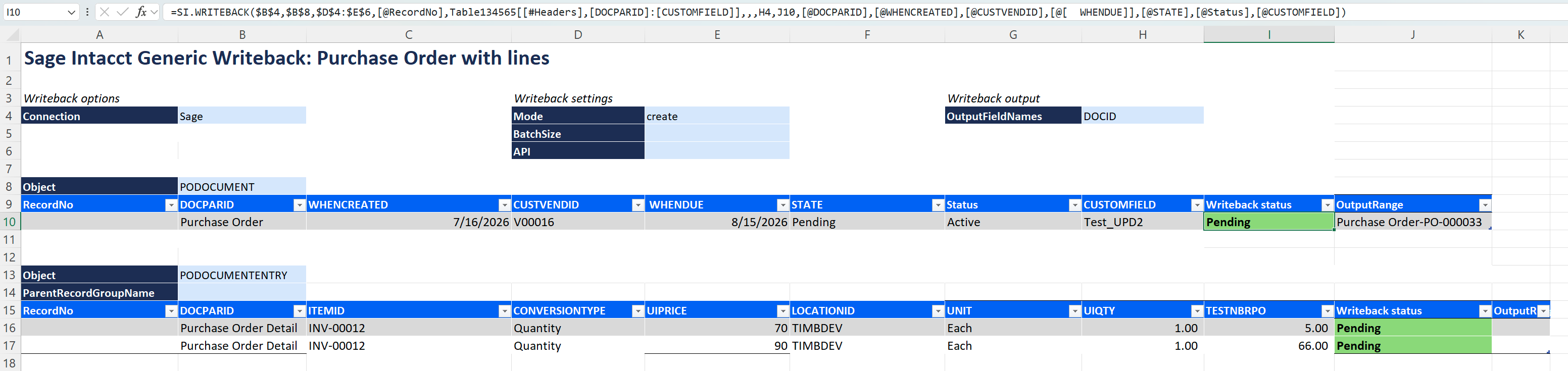
Description: $B$8 contains PODOCUMENT. The FieldNames range starts with DOCPARID and continues through the header fields, including the document type-specific custom field CUSTOMFIELD. In create mode, the RecordNo cell is left empty.
The line formula writes to PODOCUMENTENTRY with DOCPARID = Purchase Order Detail on each row, and links to the header through ParentRecordReference:
=SI.WRITEBACK(
    $B$4,
    $B$13,
    $D$4:$E$6,
    [@RecordNo],
    Table1345676[[#Headers],[DOCPARID]:[TESTNBRPO]],
    Table134565[Writeback status],
    $B$14,
    ,
    ,
    [@DOCPARID],
    [@ITEMID],
    [@CONVERSIONTYPE],
    [@UIPRICE],
    [@LOCATIONID],
    [@UNIT],
    [@UIQTY],
    [@TESTNBRPO]
)
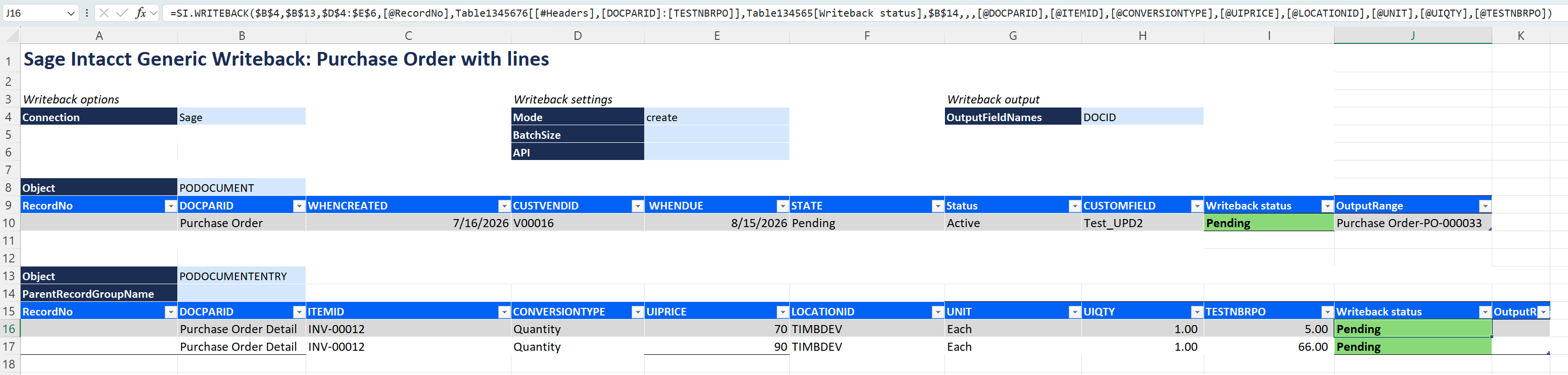
Description: $B$13 contains PODOCUMENTENTRY. ParentRecordReference points to the header writeback cell, so the lines are created under the header document. ParentRecordGroupName ($B$14) is left empty – Velixo applies the default group name for the PODOCUMENT/PODOCUMENTENTRY pair. The line fields include the document type-specific custom field TESTNBRPO.
Result: