
Overview
This feature allows users to retrieve and combine data from multiple connections directly within supported Velixo functions. You can use a Velixo filtering expression (for instance, * for all available connections) or specify a 2D array for the ConnectionName argument to aggregate results using one of the following modes:
-
sum- for retrieving totals for multiple connections -
average- for retrieving averages for multiple connections -
min/max- e.g., for performance comparison -
concat -
stack-horizontally- e.g., for data reconciliation/comparison -
stack-vertically- e.g., for retrieving exhaustive lists of objects (can be combined withSORT(UNIQUE(...))) -
first- returns the first result for any of the connections that does not trigger an error -
ensure-identical- returns a value only if it’s identical across all queried connections; otherwise, returns an error -
set- combines the results from queried connections, removes duplicates, and sorts the results.
This functionality supports a range of scenarios, including consolidating financial data across companies, merging lists, or combining data from multiple environments. For instance, you can get the turnover by specific account for all connections in the workbook, or get all projects for connections whose names start with “Construction”.
Query Builder formulas, Writeback-based functions, and functions that leverage Table Mirroring do not support this feature.
Use the VX.SETTINGS function to build the ConnectionName argument whenever any part of it comes from a cell or a formula, such as a connection name typed in a cell or assembled with &.
Excel array constants (values in curly braces, such as {"Connection","*";"AggregationMode","sum"}) accept only literal values. They cannot contain cell references, formulas, or functions. VX.SETTINGS accepts any value, so you can combine a dynamic connection name with settings such as IncludeConnectionName.
See Building the Connection argument below.
Parameters
|
Parameter |
Required / Optional |
Description |
|---|---|---|
|
|
Required |
Velixo range expression containing connection names. |
|
|
Optional |
Aggregation mode selection. Valid values: Default value: See the Default aggregation mode section |
|
|
Optional |
If Example: You run three connection-scoped functions, each returning 100 values. If you specify Default value: |
|
|
Optional |
Specifies whether to compare normalized (lowercase) or original strings in Default value: |
|
|
Optional |
Specifies whether whitespace surrounding the strings should be ignored in comparison in Default value: |
|
|
Optional |
Defines a separator character for the By default, the separator defined in the Options menu is used. |
|
|
Optional |
If 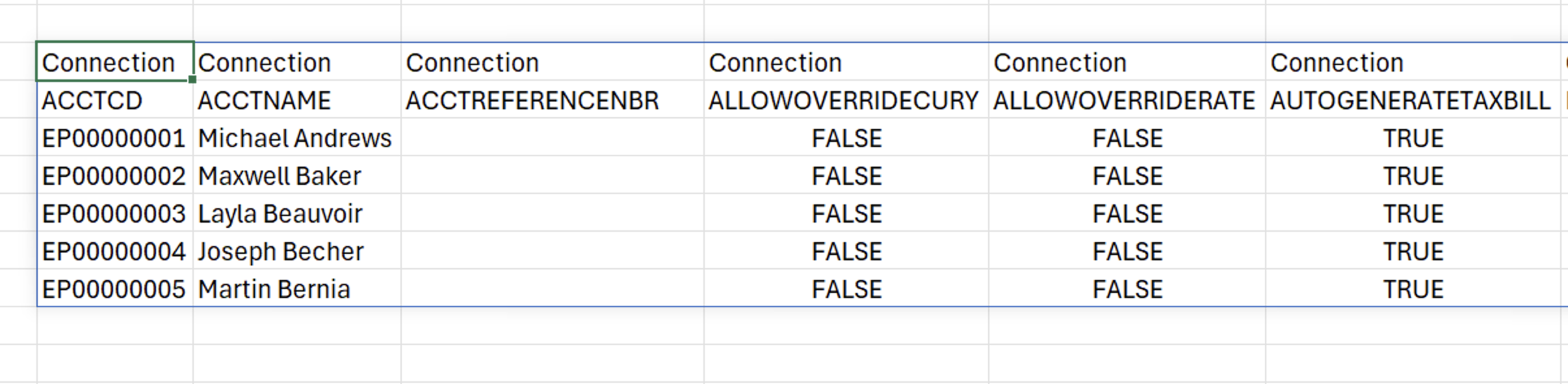
When the argument is omitted, the column appears when the query spans more than one connection or company, and is hidden for a single connection. Accepted values:
|
|
|
Optional |
If set to
If set to Default value: This parameter can be useful in scenarios where one or more of the connections return an error for a particular formula.
|
|
|
Optional |
If set to If set to Default values:
|
Building the ‘ConnectionName’ argument
The ConnectionName argument accepts a two-column array: setting names in the first column and their values in the second. You can provide this array in three ways.
Method 1 – VX.SETTINGS function (recommended)
Pass setting names and values as alternating arguments of VX.SETTINGS. Unlike an array constant, each value can be a literal, a cell reference, or a formula.
The following array constant fails because it contains a cell reference. Excel rejects the formula when you try to enter it:
{"Connection",B1;"IncludeConnectionName",FALSE}
The VX.SETTINGS formula, however, enables such a scenario:
VX.SETTINGS("Connection",B1,"IncludeConnectionName",FALSE)
For example:
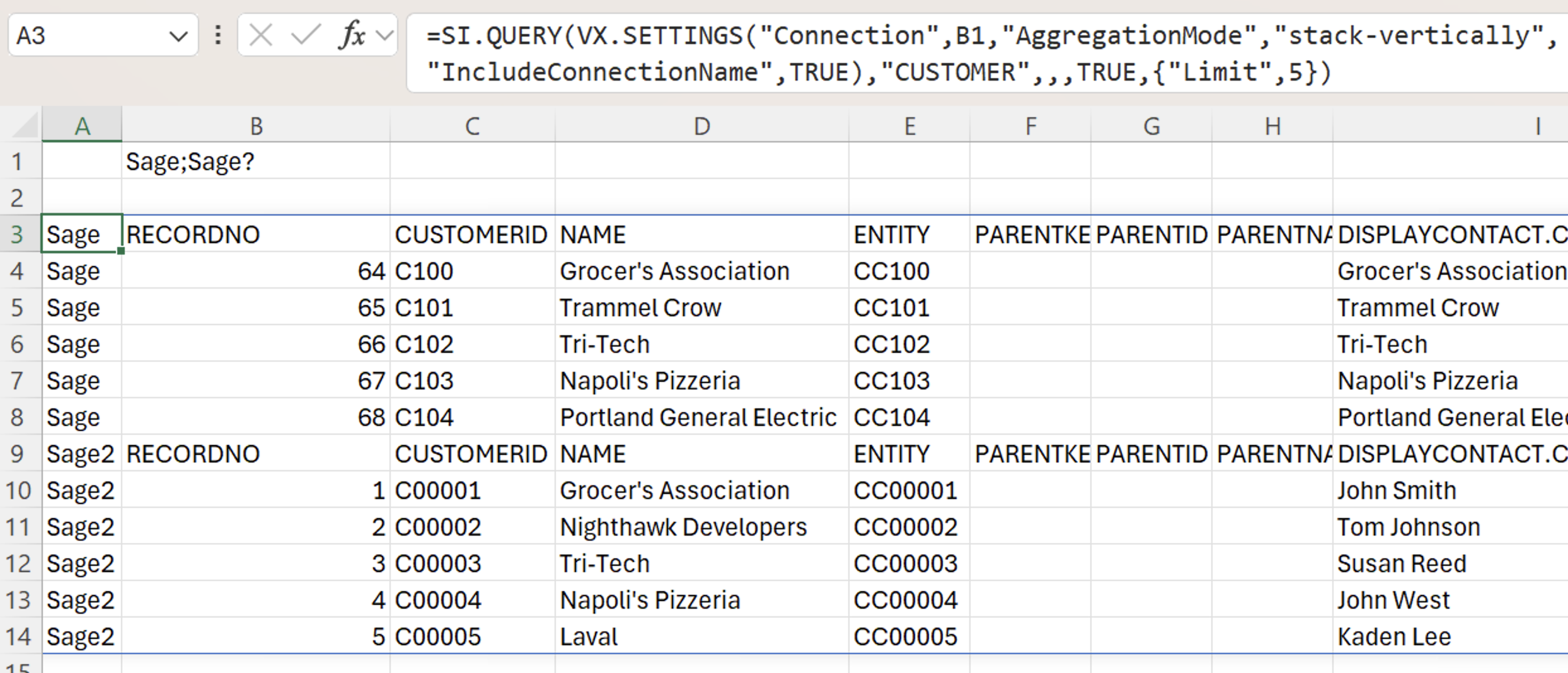
=SI.QUERY(VX.SETTINGS("Connection",B1,"AggregationMode","stack-vertically","IncludeConnectionName",TRUE),"CUSTOMER",,,TRUE,{"Limit",5})
Description: Queries the connections named in cell B1, stacks the results vertically, and adds a connection name column. B1 can contain a single connection name or a Velixo range expression, such as a semicolon-separated list of names.
Method 2 – Two-column cell range
To keep the settings visible on the worksheet, enter setting names in one column and their values in the adjacent column. Then provide the range (for example, A1:B8) as the ConnectionName argument. Value cells can contain formulas, for example, a formula that builds the connection name from another cell. You can list every setting and leave a value cell empty to use that setting's default. You can also name the range; the first example in this article uses a range named Connection.
Method 3 – Array constant
Type the settings directly in curly braces, with commas between a name and its value and semicolons between rows: {"Connection","*";"AggregationMode","sum"}. Use this method only when every name and value is a literal.
Default aggregation mode
The default value of the AggregationMode parameter depends on the type of output of the function used. Below, see a table listing supported functions and their corresponding default aggregation modes.
|
Velixo function |
Default aggregation mode |
|---|---|
|
|
|
|
|
Unsupported scenarios
Unsupported functions
The following functions do not support the multiple connection functionality:
Query function limitations
The SI.QUERY and SI.XQUERY functions do not support multiple connections in the following scenarios:
-
The function uses Table Mirroring; the
TableOutputCellargument is provided in the function's formula. -
sumoraverageis selected as theAggregationModeparameter value in theConnectionNameargument of the function’s formula.
Drilldown limitations
The following Drilldown-related scenarios are currently not supported or limited:
-
Drilling into the Excel sum of results stacked horizontally or vertically
-
Drilling into results stacked horizontally or vertically in case of multi-column and/or multi-row results
-
Drilling into the sum of results with the
GlobalAggregationparameter set toTRUEin case of multi-column and/or multi-row results.
Examples
All connections in the workbook, sum aggregation mode
The function in this example uses a range named “Connection" as the function’s ConnectionName argument.
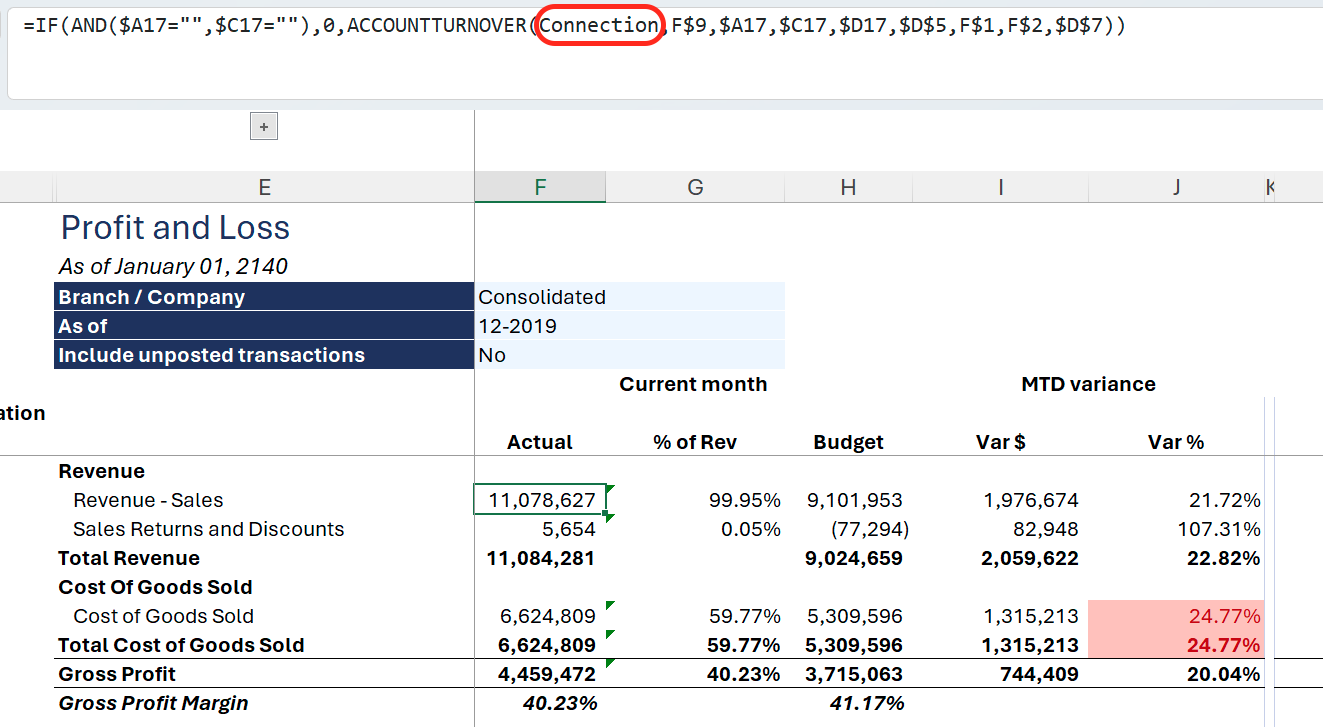
The ConnectionName argument in the connection name is set to * - a Velixo filtering expression that returns all possible values, in this case, connection names.
The AggregationMode is set to sum.
The resulting ConnectionName argument is equivalent to the following 2D array:
{"Connection", "*"; "AggregationMode", "sum"}
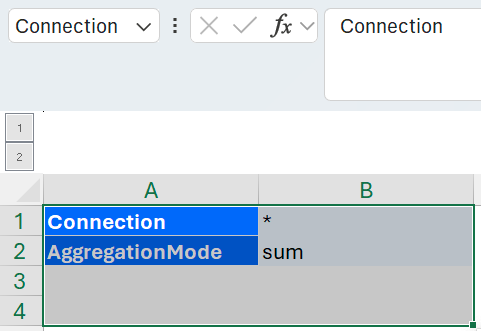
As a result, the function returns a summary of values for all connections active in the workbook.