
Overview
The SI.BUDGETABLEPERIODBYDATE function returns the name of a budgetable period that contains the specified date
Syntax
=SI.BUDGETABLEPERIODBYDATE(
    ConnectionName,
    Date
)
Arguments
The SI. BUDGETABLEPERIODBYDATE function uses the following arguments:
|
Argument |
Required/ Optional |
Description |
|
|
Optional |
Provide one of the following values:
OR Omit the argument to return results for all compatible connections with default aggregation settings. |
|
|
Required |
The date for which the corresponding budgetable period is to be retrieved (in YYYY-MM-DD format or a cell reference to a date in a valid Excel format) |
Examples
Example 1 - referencing a date in the function
=SI.BUDGETABLEPERIODBYDATE(
    "Sage",
    "2020-02-01"
)
Description
Returns the budgetable period which contains the date February 1, 2020
Results
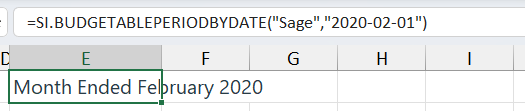
Using this method requires the date to be in YYYY-MM-DD format
Example 2 - referencing a date in a cell
=SI.BUDGETABLEPERIODBYDATE(
    "Sage",
    F3
)
Description
Returns the budgetable period which contains the date displayed in cell F3
Results
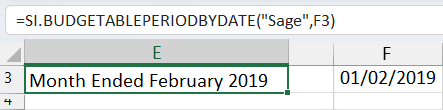
The cell containing the date can be in a valid Excel date format
Example with an Error
Description
If you attempt to access a budgetable period that does not exist within Sage Intacct, a message will appear in the Velixo NX side panel...
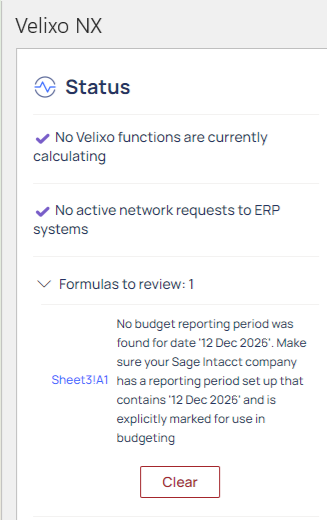
... and also be accessible within the cell:
