
Overview
The SI.WRITEBACKJOURNAL function defines a single journal transaction line to be uploaded to Sage Intacct.
For a short overview of the Journal Writeback process see: Journal Writeback (Sage Intacct).
Performing writeback (i.e., Creating entities through the Sage Intacct application programming interface) requires the access rights associated with a Full User.
Employee-type users in Sage Intacct would not be able to successfully perform a writeback.
The SI.WRITEBACKJOURNAL function is used to *create* journal transactions. It cannot be used to modify/update existing transactions.
Using Selected Cells with this function
SI.WRITEBACKJOURNAL is a dynamic function that can output a spill range. When performing Selected Cells writeback on cells belonging to this function:
-
You can select any cell or group of cells within the spill range — it is not necessary to select the spill parent cell.
-
Because the spill range cannot be recalculated cell by cell, the entire spill range recalculates when writeback is performed. The writeback status updates for all cells in that range, regardless of which cells were selected.
-
When multiple non-contiguous areas are selected, each area is processed as a separate write request.
In order to separate multiple Writeback functions into groups and execute them in batches, you can use the WRITEBACKCOMMIT function.
Related articles
-
Getting started with Writeback - A general article on setting up and using writeback functions.
Syntax
=SI.WRITEBACKJOURNAL(
    ConnectionName,
    Journal,
    PostingDate,
    ReverseDate,
    JournalDescription,
    ReferenceNumber,
    ShouldPost,
    AdditionalBatchSettings,
    Account,
    Debit,
    Credit,
    LineCurrencySettings,
    Memo,
    Location,
    LineAllocationSettings,
    Dimensions,
    UserDefinedDimensions,
    Billable,
    TaxEntry,
    BatchNumberOutput,
    ShouldOpenAfterUpload,
    HeaderCustomFields,
    LineCustomFields
  )
Arguments
The SI. WRITEBACKJOURNAL function uses the following Header and Line arguments:
Header Info
|
Argument |
Required/Optional |
Description |
|
|
Required |
The name of the connection as configured in the Connection Manager |
|
|
Required |
GL journal symbol. This determines the type of journal entry as visible in the UI, for example, Regular, Adjustment, User-defined, Statistical, GAAP, Tax, and so forth |
|
|
Required |
The transaction date in format mm/dd/yyy |
|
|
Optional |
Reverse date in format mm/dd/yyyy. Must be greater than PostingDate |
|
|
Required |
Journal description for the transaction |
|
|
Optional |
Reference number of the transaction |
|
|
Required |
Controls whether the journal is posted after it's created. Accepted values: Default value:
|
|
|
Optional |
A two-column array of key and value pairs for defining the settings The
|
Line Info
This function is spill-aware. When you provide an array for line data arguments, the function outputs a spill range with one status cell per line. The spill direction follows the shape of the input: column arrays produce a column spill, row arrays produce a row spill, and a matrix produces a 2D spill. All array arguments must be consistent in size and orientation; mismatched arrays return a #VALUE! error.
The formula recalculates automatically when source data changes.
|
|
Required |
The GL account number for the transaction |
|
|
Optional (must be left blank if Credit amount is specified) |
The Debit amount to be sent to the GL Account |
|
|
Optional (must be left blank if Debit amount is specified) |
The Credit amount to be sent to the GL Account |
|
|
Optional |
The currency code to be used for the transaction |
|
|
Optional |
A memo to be included in the transaction |
|
|
Optional (Required if muti-entity is enabled) |
ID code for the Sage Intacct location to be used for the transaction
|
|
|
Optional |
Allocation ID The
|
|
|
Optional |
A two-column (or two-row) Excel range, where the first column/row contains the name of a predefined analytical dimension (e.g. department, customer, project etc.), and the second column/row contains the semicolon-separated list of values or that dimension. For more in-depth information about using Sage Intacct dimensions in Velixo NX, see Using Dimensions. For user-defined dimensions, use the The |
|
|
Optional |
A two-column (or two-row) Excel range, where the first column/row contains the name of a user-defined analytical dimension, and the second column/row contains the respective value (or a semicolon-separated list of values) for that dimension. For more in-depth information about using Sage Intacct dimensions in Velixo NX, see Using Dimensions. For predefined analytical dimensions like customer, project etc., use the The |
|
|
Optional |
|
|
|
Required for AU, GB, ZA only |
A two-column Excel range, where the first column contains text specifying the tax rate (as specified via the unique ID of a tax detail) and the second column contains a currency value denoting the value of the tax. |
|
|
Optional |
The Excel cell to receive the batch code number of the batch that is created |
|
|
Optional |
Indicates whether or not to open the created batch in Sage Intacct after creation |
|
|
Optional |
A two-column Excel range where the first column contains a custom field’s integration name, and the second column contains the respective value for that field. Use this parameter only for header-level custom fields. Any field not recognized as a predefined field is treated as a custom field name. Example: 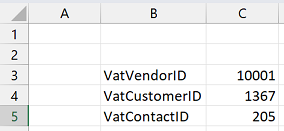
(this example sets values for Note that the SI.WRITEBACK function has its own, separate |
|
|
Optional |
A two-column Excel range where the first column contains a custom field’s integration name, and the second column contains the respective value for that field. Use this parameter only for line-level custom fields. |
Examples
Simple journal transaction
=SI.WRITEBACKJOURNAL(
    "Sage",
    "GJ",
    "12/31/2019",
    ,
    "Liability Insurance Accrual for December 2019",
    ,
    FALSE,
    ,
    "60330",
    ,
    "1322.41",
    "USD",
    ,
    "100",
    ,
    ,
    ,
    ,
    ,
    I9,
    TRUE
)
Description
Creates a transaction in the "GJ" journal. The transaction:
-
will be dated "12/31/2019"
-
does not have a reversal date
-
has the description of "Liability Insurance Accrual for December 2019"
-
should not be automatically posted
-
will be created for GL account #60330
-
will have the credit amount of 1,322.41 US dollars
-
will be created in location 100
In addition:
-
the number for the created batch number will be recorded in cell I9
-
Sage Intacct will automatically be opened to the batch immediately after it is created
using cell references:
=SI.WRITEBACKJOURNAL(
    $E$2,
    "GJ",
    $E$5,
    $I$11,
    $E$6,
    ,
    IF($I$10="Yes", TRUE, FALSE),
    ,
    $E$12,
    ,
    J17,
    $I$4,
    ,
    $B17,
    ,
    ,
    ,
    ,
    ,
    I9,
    TRUE
)
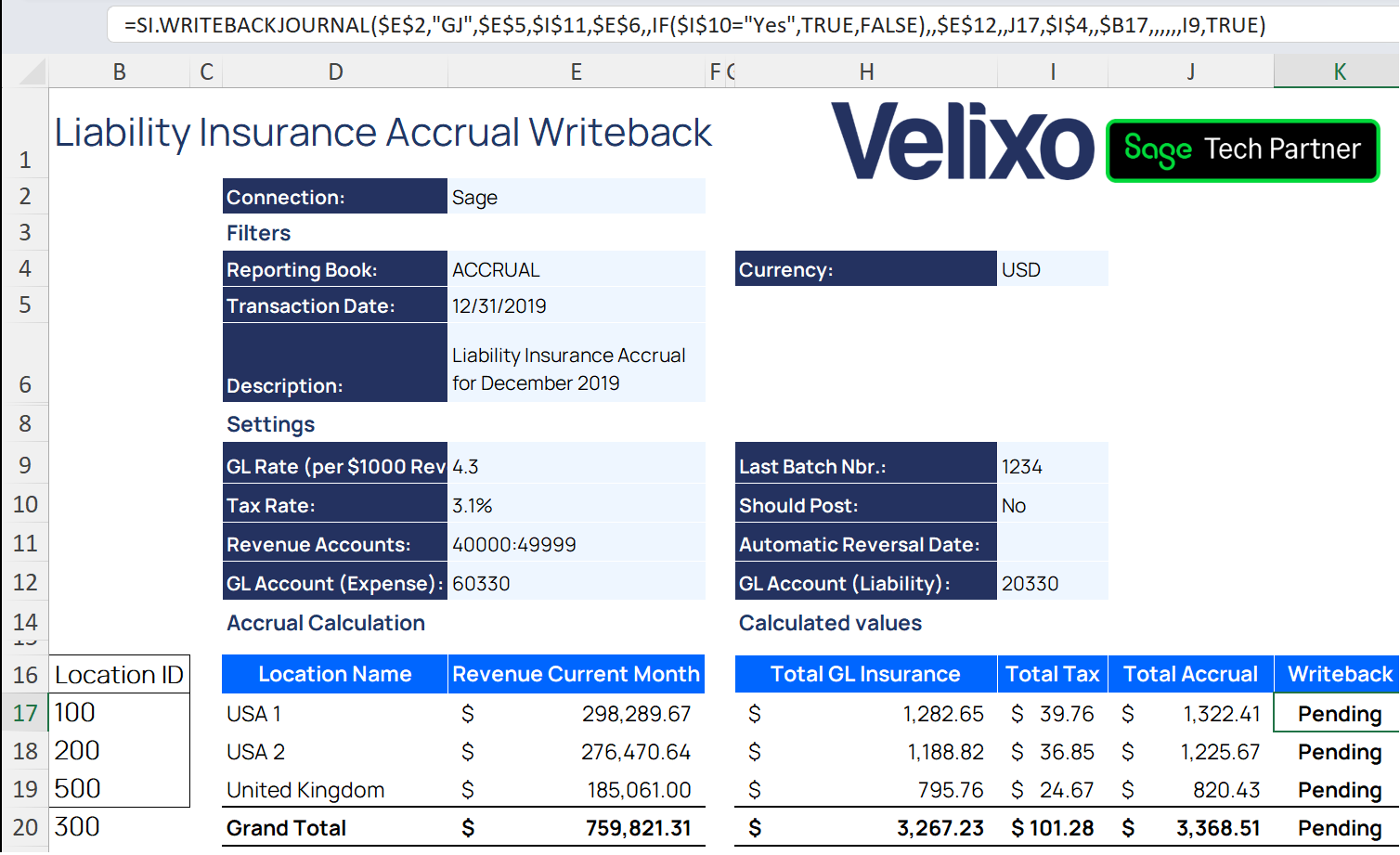
Here you can see an example where the cells contain the data for the function in cell K16:
Using the TaxEntry and AdditionalBatchSettings arguments
For Credit transactions:
=SI.WRITEBACKJOURNAL(
    "Sage",
    "GJ",
    "12/31/2019",
    ,
    "Liability Insurance Accrual for November 2019",
    ,
    FALSE,
    {
        "TaxImplications", "Outbound";
        "TaxSolutionID", "United Kingdom - VAT";
        "VatCustomerID", "10052"
    },
    "60330",
    ,
    467.75,
    "USD",
    ,
    "500",
    ,
    ,
    ,
    ,
    ,
    I9,
    TRUE
)
For Debit transactions:
=SI.WRITEBACKJOURNAL(
    "Sage",
    "GJ",
    "12/31/2019",
    ,
    "Liability Insurance Accrual for November 2019",
    ,
    FALSE,
    {
        "TaxImplications", "Outbound";
        "TaxSolutionID", "United Kingdom - VAT";
        "VatCustomerID", "10052"
    },
    "20330",
    1403.25,
    ,
    "USD",
    ,
    "500",
    ,
    ,
    ,
    ,
    {"UK Sale Goods Reduced Rate", "89.2"},
    I9,
    TRUE
)
Description
Creates a transaction in the "GJ" journal. The transaction:
-
will be dated "12/31/2019"
-
does not have a reversal date
-
has the description of "Liability Insurance Accrual for December 2019"
-
should not be automatically posted
-
with Tax implications = Outbound taxes for sales, Customer = 10052, Tax solution = United Kingdom - VAT.
-
60330 GL account will be credited with the amount of 467.75 USD
-
20330 GL account will be debited with the amount of 1,403.25 USD, including tax entry with "UK Sale Goods Reduced Rate" description and 89.20 USD amount
-
will be created in location 500
In addition:
-
The number for the created batch number will be recorded in cell I9
-
Sage Intacct will automatically be opened to the batch immediately after it is created
Here is the created journal entry in Sage Intacct:
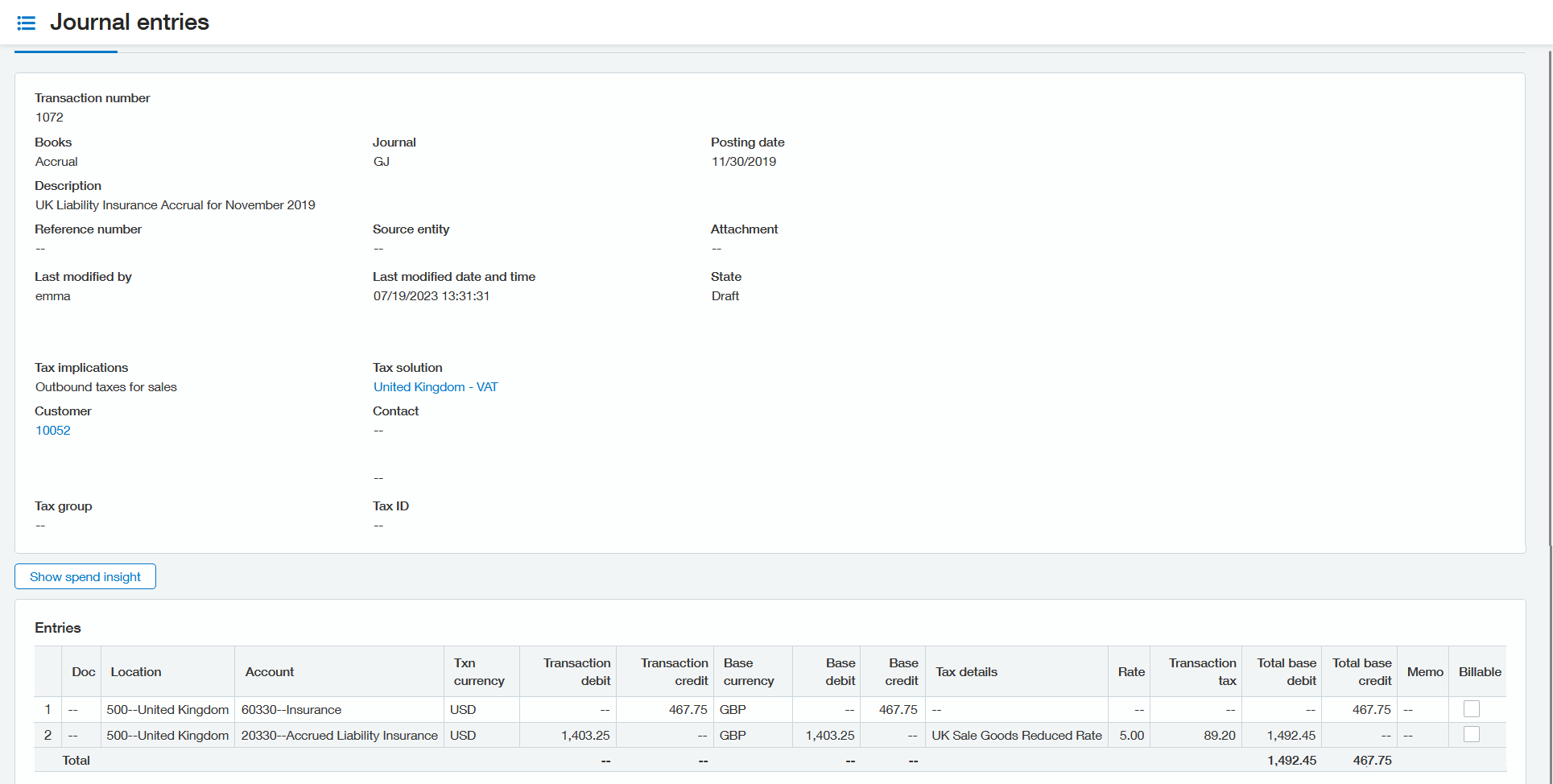
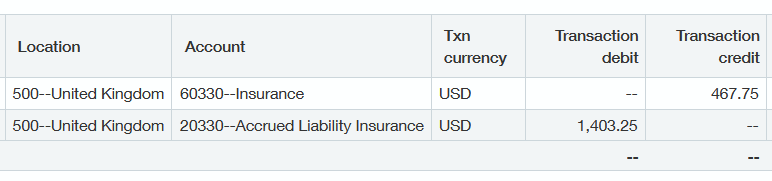
In Excel, the transaction number from the journal entry has been recorded in cell I9 and the line status has been updated to Line uploaded.
Using the LineAllocationSettings argument to provide an Allocation ID
For Debit transactions:
=SI.WRITEBACKJOURNAL(
    "Sage",
    "GJ",
    "06/06/2025",
    ,
    "Sample transaction 3",
    ,
    FALSE,
    ,
    "10000",
    2000,
    ,
    "USD",
    ,
    ,
    LOC_STD_SPLIT,
    ,
    ,
    ,
    ,
    ,
    TRUE
)
=SI.WRITEBACKJOURNAL(
    "Sage",
    "GJ",
    "12/31/2019",
    ,
    "Sample transaction 3",
    ,
    FALSE,
    ,
    "10000",
    1000,
    ,
    "USD",
    ,
    ,
    LOC_STD_SPLIT,
    ,
    ,
    ,
    ,
    H9,
    TRUE
)
For Credit transactions:
=SI.WRITEBACKJOURNAL(
    "Sage",
    "GJ",
    "06/06/2025",
    ,
    "Sample transaction 3",
    ,
    FALSE,
    ,
    "10000",
    ,
    1200,
    "USD",
    ,
    ,
    LOC_STD_SPLIT,
    ,
    ,
    ,
    ,
    ,
    TRUE
)
=SI.WRITEBACKJOURNAL(
    "Sage",
    "GJ",
    "12/31/2019",
    ,
    "Sample transaction 3",
    ,
    FALSE,
    ,
    "10000",
    ,
    2000,
    "USD",
    ,
    ,
    LOC_STD_SPLIT,
    ,
    ,
    ,
    ,
    H9,
    TRUE
)
Description
Creates a transaction in the "GJ" journal. The transaction:
-
will be dated "06/06/2025"
-
does not have a reversal date
-
has the description of "Sample transaction 3"
-
should not be automatically posted
-
without tax implications.
-
10000 GL account will be credited with the amount of 1000 USD
-
10000 GL account will be debited with the amount of 1200 USD
-
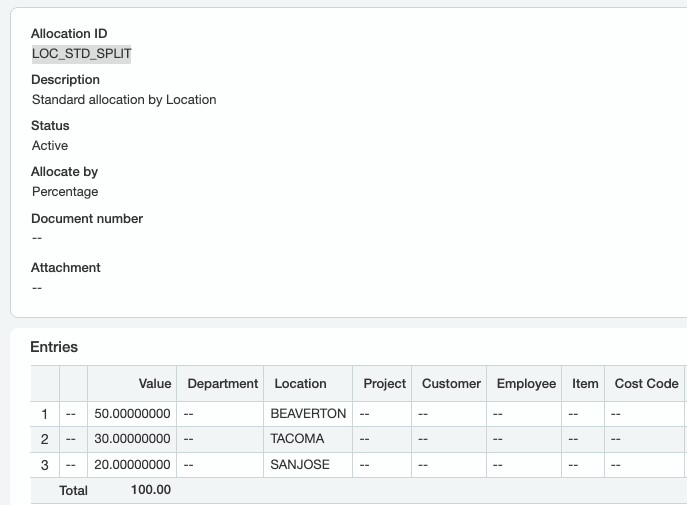
will be created according to Allocation ID LOC_STD_SPLIT, which splits the value of transactions by percentage to three locations:
In addition:
-
The number for the created batch number will be recorded in cell H9
-
Sage Intacct will automatically be opened to the batch immediately after it is created
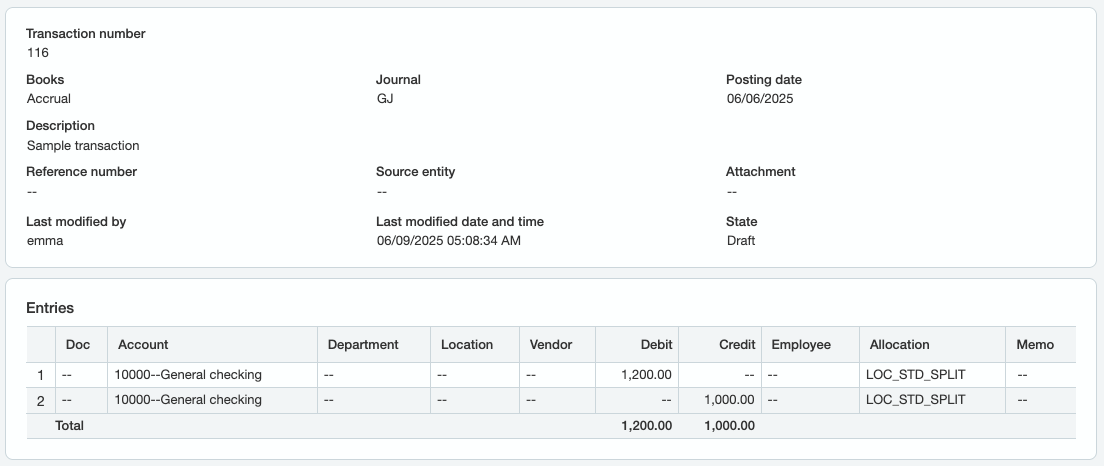
The formulas above result in the following entry in Sage Intacct:
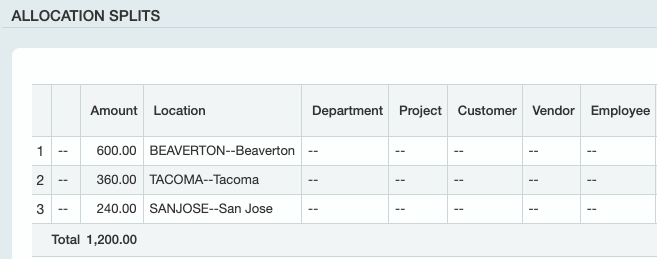
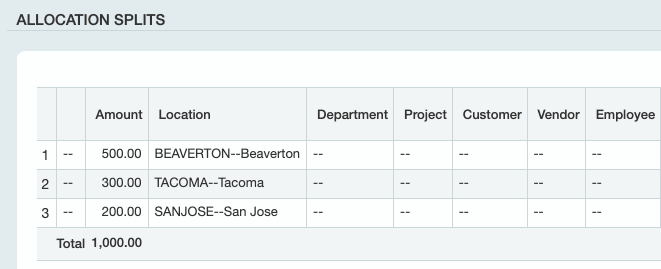
Where the amounts are split according to the selected Allocation:
Using the HeaderCustomFields argument to write header-level custom field values (on the pre-built journal writeback sheet)
Insert the sheet with Velixo NX → New Sheet → Journal Transaction. The Status column of the pre-built sheet already contains an SI.WRITEBACKJOURNAL formula that fills the first 21 arguments from the header cells and the table row.
To add a header-level custom field, expand the hidden dimension columns using the outline control above column T. Enter the custom field's integration name in cell J4 and its value in cell K4, then pass them as the 22nd argument using the VX.SETTINGS function:
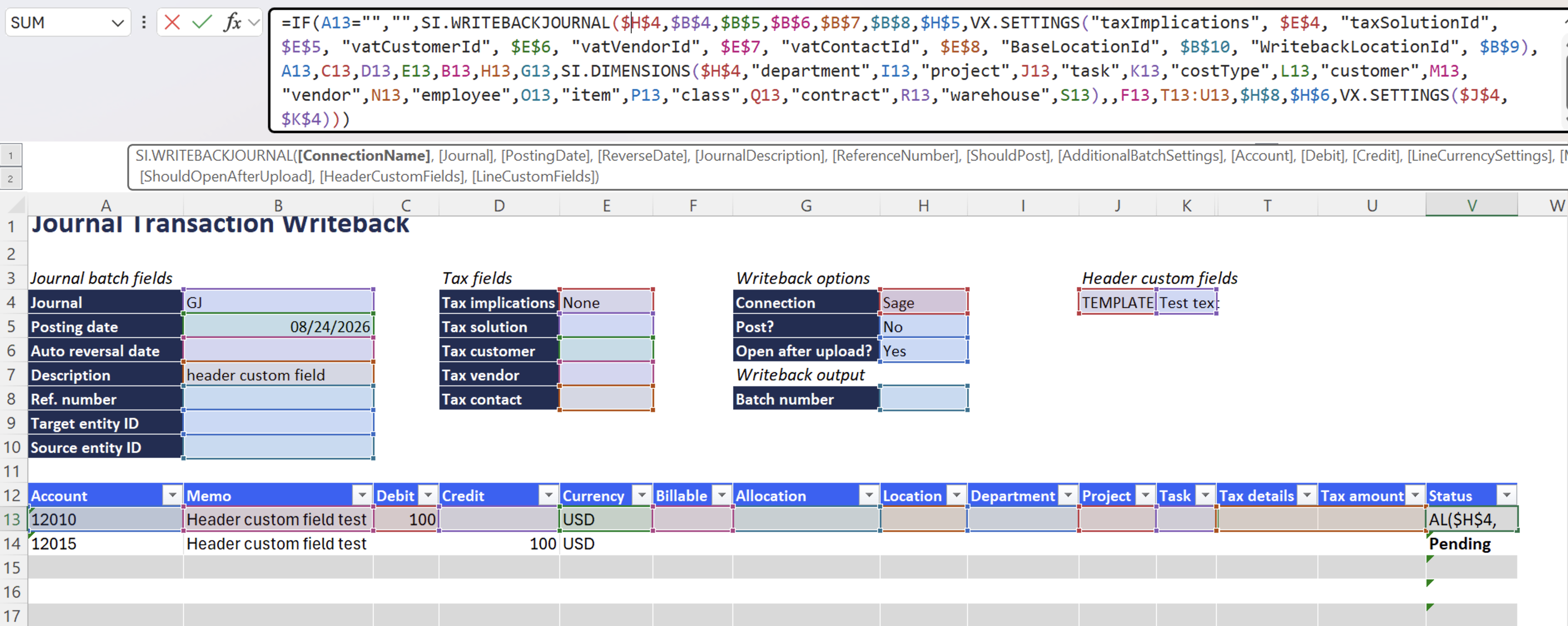
=IF(A13="", "", SI.WRITEBACKJOURNAL(
    $H$4, $B$4, $B$5, $B$6, $B$7, $B$8, $H$5,
    VX.SETTINGS("taxImplications", $E$4, "taxSolutionId", $E$5, "vatCustomerId", $E$6, "vatVendorId", $E$7, "vatContactId", $E$8, "BaseLocationId", $B$10, "WritebackLocationId", $B$9),
    A13, C13, D13, E13, B13, H13, G13,
    SI.DIMENSIONS($H$4, "department", I13, "project", J13, "task", K13, "costType", L13, "customer", M13, "vendor", N13, "employee", O13, "item", P13, "class", Q13, "contract", R13, "warehouse", S13),
    ,
    F13, T13:U13, $H$8, $H$6,
    VX.SETTINGS($J$4, $K$4)
))
Description: The formula is the pre-built sheet formula with a 22nd argument added. VX.SETTINGS builds the two-column range from cells J4 and K4, and the value is written as a header-level custom field on the journal transaction.
To pass more than one custom field, add further name-value pairs to the same call, for example VX.SETTINGS($J$4, $K$4, $J$5, $K$5).