
Overview
The SI.EXPANDACCOUNTRANGE function returns all general ledger account numbers within the specified range.
Syntax
=SI.EXPANDACCOUNTRANGE(
    ConnectionName,
    Account,
    StatisticalAccounts,
    IncludeInactive,
    QuickStartCategory
)
Arguments
The SI.EXPANDACCOUNTRANGE function uses the following arguments:
|
Argument |
Required/Optional |
Description |
|
|
Optional |
Provide one of the following values:
OR Omit the argument to return results for all compatible connections with default aggregation settings. |
|
|
Optional |
The range of accounts to include in the results. |
|
|
Optional |
Determines whether or not statistical accounts are included in the results.
1 - Include statistical accounts (default) 2 - Exclude statistical accounts 3 - Include Only statistical account |
|
|
Optional |
Determines whether or not the results include entries with a Status field set to Inactive. |
|
|
Optional |
Filters the result set. Only those accounts belonging to the specified Quick Start account category will be displayed. |
Examples
Example #1
=SI.EXPANDACCOUNTRANGE(
    "Sage",
    "10000:11000",
    "1"
)
Description
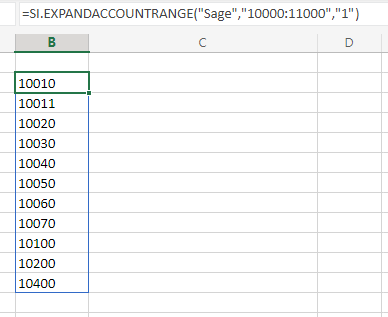
Returns all active general ledger account numbers (including statistical accounts) between account 10000 and account 11000 (inclusive).
Result
Example #2
=SI.EXPANDACCOUNTRANGE(
    "Sage",
    "10010:12600;-10400",
    "2"
)
Description
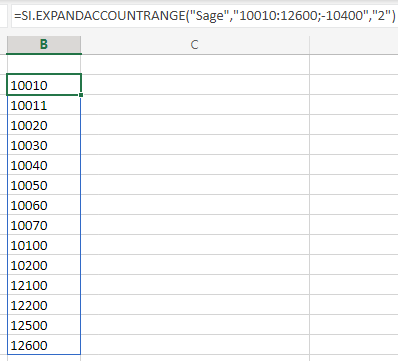
Returns all active general ledger account numbers (between 10010 and 12600) except account 10400 and statistical accounts.
Results
Example #3
=SI.EXPANDACCOUNTRANGE(
    "Sage",
    ,
    ,
    FALSE
)
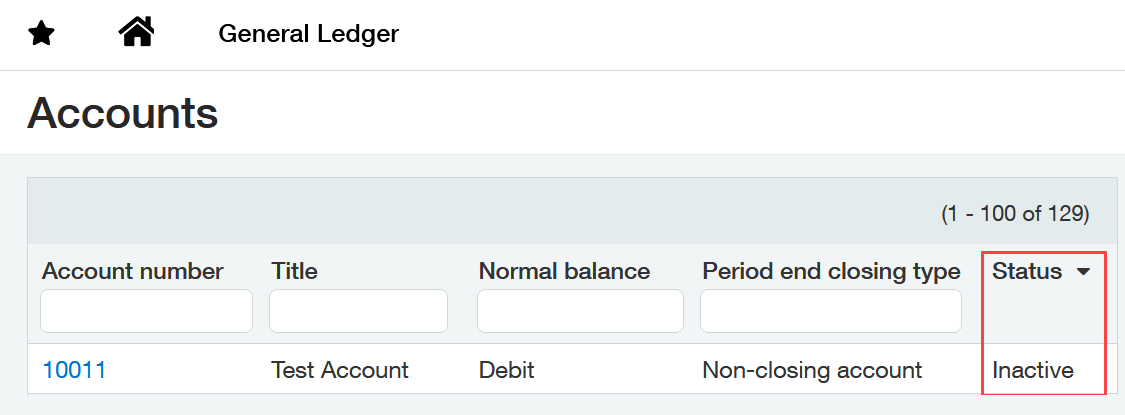
Assuming this account configuration within Sage Intacct:
Description
Returns all active general ledger account numbers defined within Sage Intacct (inactive account 10011 will be excluded).
Results
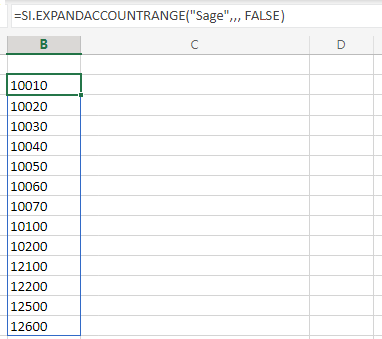
Inactive account 10011 is not included