
Overview
A Sage Intacct record can be scoped to the top level within Sage Intacct or to a specific location/entity.
When the record is at the top level, it can be used to create other records specific to a location. However, when the record is specific to a location, it cannot be used to create records in other locations (including at the top level).
Sage Intacct uses the term MegaEntity to refer to the location or entity that a record is scoped to. The mega entity of a record can be checked by looking at the MEGAENTITYID field via the Velixo SI.QUERY function.
Examples
Consider the following Sage Intacct instance configuration:
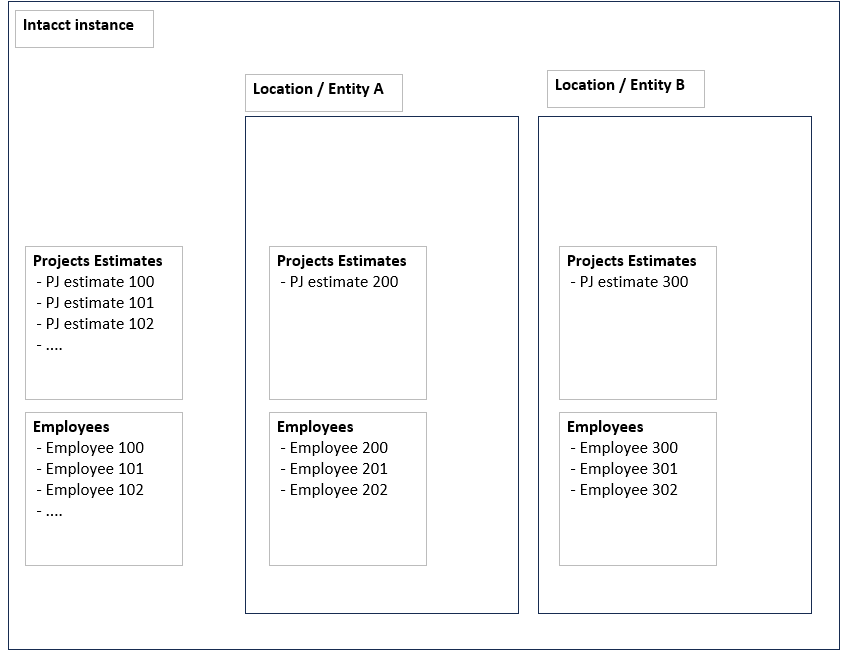
From the diagram, we can see that:
-
The 100-level project estimates and employees are at the top level.
-
The 200-level project estimates and employees are private in Entity A.
-
the 300-level project estimates and employees are private in Entity B.
Example 1 - Top-Level record update
Suppose we want to update Project Estimate 100 (at the top level) and specify an employee dimension.
If we use:
-
Employee 100, this will work, because both the project and the employee are at the top level.
-
Employee 200, this will result in an error. We cannot use a private dimension (Employee 200 is specific to Entity A) on a top-level record.
-
Employee 300, this will result in an error. We cannot use a private dimension (Employee 200 is specific to Entity B) on a top-level record.
-
Employee 200 and 300, this will result in an error because we cannot mix entities from separate private dimensions.
Example 2 - Location-level record update
Suppose we want to update Project Estimate 200 (private to Entity A) and specifying an employee dimension.
If we use:
-
Employee 100, this will work because a top-level dimension can be used in private record.
-
Employee 200, this will work. Both the project record and the employee records are specific to the same entity.
-
Employee 300, this will result in an error. Employee 300 is private to Entity B. We cannot use a private dimension from Entity B on a record which is private to Entity A
-
Employee 200 and 300, this will result in an error because we cannot mix entities from different private dimensions.
-
Employee 100 and 200, this will work because we can mix top-level and private dimensions.
Example 3 - New record
When creating a new record, there is no existing estimate ID. Thus, we don't know if we are creating a top-level record (e.g. Project Estimate 104) or an entity private record (e.g. Project Estimate 201).
So, when a new record is created, the level at which it is created will depend upon the dimension(s) associated with it.
Using the same project/employee concept as above...
If we specify:
-
Employee 100, this will work. The new project estimate will be created at the top level (since Employee 100 is defined at that level).
-
Employee 200, this will work. The new project estimate will be private in Entity A.
-
Employee 300, this will work. The new project estimate will be private in Entity B
-
Employee 100 and 200, this will work. The new project estimate will be private in Entity A (Employee 200 is defined in Entity A and we can also apply the top-level Employee 100 to a private entity).
-
Employee 200 and 300, this will result in an error because we cannot mix dimensions from different private entities.