Overview
If you want to get accounts with non-zero balances, you can use the SI.EXPANDGLHISTORY function.
You can make an even more precise query to select accounts with a non-zero balance of a specific type for particular dimensions from the specified account range. You can also specify books and balance types that should be used for the turnover calculation.
Syntax
=SI.EXPANDGLHISTORY(
    ConnectionName,
    AccountGroup,
    Account,
    FromDate,
    ToDate,
    LocationId,
    Books,
    Dimensions,
    UserDefinedDimensions,
    IncludeChildDimensionBalances,
    ExpansionOrder,
    IncludeInactive,
    BalanceTypesToLookAt,
    BudgetId
)
Arguments
|
Argument |
Required/Optional |
Description |
|---|---|---|
|
|
Optional |
Provide one of the following values:
OR Omit the argument to return results for all compatible connections with default aggregation settings. |
|
|
Optional |
The name of the account group that gathers the required accounts. |
|
|
Optional |
The account code ( |
|
|
Required |
The inclusive start date or dates in YYYY-MM-DD format or an Excel range reference. |
|
|
Required |
The inclusive end date or dates in YYYY-MM-DD format or an Excel range reference.
|
|
|
Optional
|
One or many IDs of the Sage Intacct entities or locations.
|
|
|
Optional |
You can specify a reporting or global consolidation ( If you omit the argument, |
|
|
Optional |
You can specify the dimensions and their values if you want to consider transactions with these dimensions only. There are two ways to do it:
When filtering by a dimension group, you can either use a dedicated group dimension name (e.g. You can specify dimension values using ranges, wildcards, and other techniques. For more in-depth information about using Sage Intacct dimensions in Velixo NX, see Using Dimensions.
|
|
|
Optional |
You can specify the dimensions and their values if you want to consider transactions with these dimensions only. There are two ways to do it:
You can specify dimension values using ranges, wildcards, and other techniques. For more in-depth information about using Sage Intacct dimensions in Velixo NX, see Using Dimensions.
|
|
|
Optional |
If you want to exclude combinations with inactive dimensions from your result, set this argument to |
|
|
Optional |
If you want to see in your result another set of dimensions than specified in |
|
|
Optional |
If you want to get all possible combinations of dimensions specified in |
|
|
Optional |
You can specify which balance types to include as a comma-separated string (for example, Accepted values: The Default value: all accepted values except To return both actual and budget history in a single formula, specify a |
|
|
Optional |
The ID of the budget to read balances from. Required when |
Output
The function returns a spill range with account codes and dimensions specified in the arguments LocationId, Dimensions, UserDefinedDimensions, or ExpansionOrder.
It does not return balances or turnovers for these account codes and dimensions.
The output is always sorted by account code first, then by LocationId if specified, and afterwards, each of the dimensions specified in Dimensions and UserDefinedDimensions or by ExpansionOrder.
For example, if you specify ExpansionOrder as Location, Project, the output will be sorted by Location, then by Project.
Examples
Closing balances for accounts filtered on a project
You want to get closing balances for the accounts with transactions related to the Tango project.
Primarily, you need to get all accounts with non-zero turnover for the Project dimension.
=SI.EXPANDGLHISTORY(
    "Sage",
    ,
    "*",
    "2024-01-01",
    "2024-12-31",
    ,
    {"Project", "Tango"}
)
Or this way, if you have them on the sheet:
=SI.EXPANDGLHISTORY(
    B2,
    ,
    "*",
    B5,
    B6,
    ,
    B3:B4
)
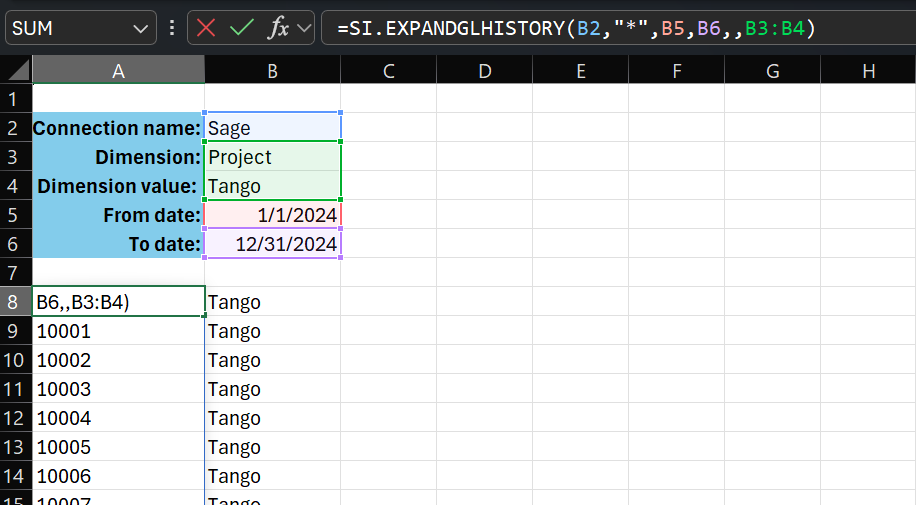
Then, you can get the closing balance for each account.
=SI.CLOSINGBALANCE(
    $B$2,
    ,
    A8,
    $B$5,
    $B$6,
    ,
    ,
    $B$3:$B$4
)
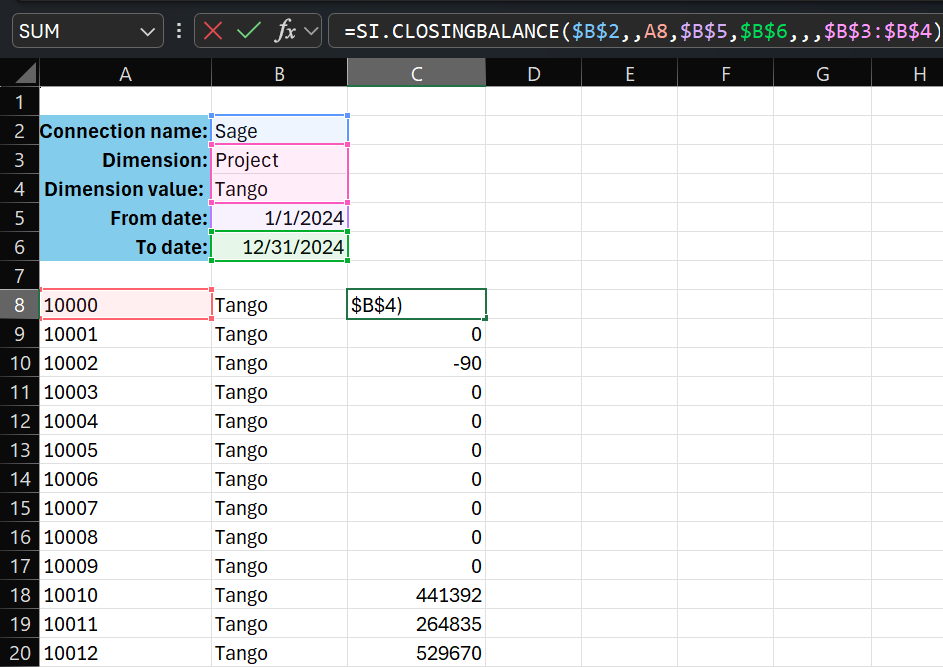
See the CLOSINGBALANCE function description for details.
Combining actual and budget history
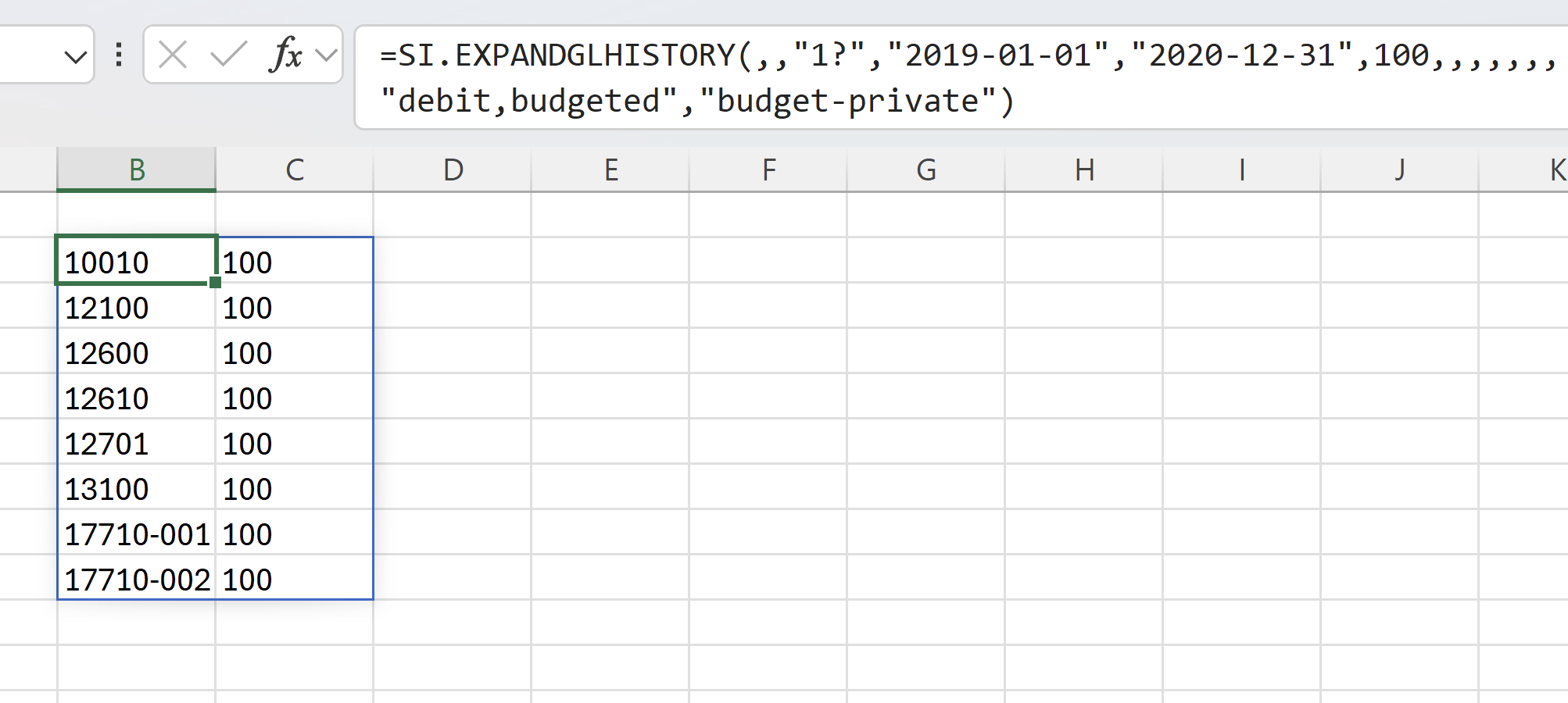
=SI.EXPANDGLHISTORY(,,"1?","2019-01-01","2020-12-31",100,,,,,,,"debit,budgeted","budget-private")
Description: This formula returns every account matching the 1? wildcard mask (a 1 followed by any single character) that has a non-zero debit balance or a budget balance in location 100, over the period from January 1, 2019 to December 31, 2020. Because BalanceTypesToLookAt pairs the non-budgeted type debit with budgeted and a BudgetId (budget-private) is supplied, the function retrieves the actual (debit) history and the budget history together and returns the combined set of accounts in a single spill. Omitting ConnectionName runs the query against all compatible connections.
Result: