
Overview
The SI.UDDVALUEID function returns the value ID for a user-defined dimension (UDD) - an argument used by the SI.QUERY or SI.WRITEBACK functions when working with UDDs.
You can find the UDD value in Sage Intacct as well, but the SI.UDDVALUEID function is much more convenient.
Syntax
=SI.UDDVALUEID(
    ConnectionName,
    DimensionName,
    DimensionValue
)
Arguments
The SI.UDDVALUEID function uses the following arguments:
|
Argument |
Required/ Optional |
Description |
|
|
Optional |
Provide one of the following values:
OR Omit the argument to return results for all compatible connections with default aggregation settings. |
|
|
Required |
The integration name of the user-defined dimension ID for which you want to retrieve IDs. 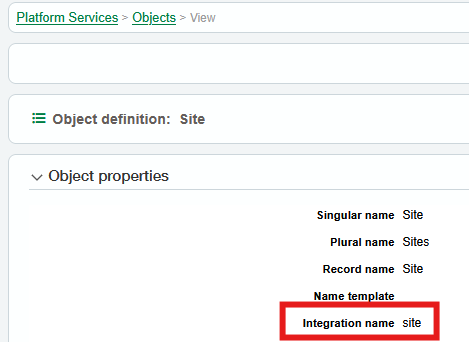
|
|
|
Required |
The UDD value or range, as you see it in the Sage Intacct interface.
|
Output
The function returns a spill range with UDD IDs, which you can use in SI.QUERY or SI.WRITEBACK functions.
Example
Say, you want to get IDs for the values of your UDD named SITE.
First, you can leverage the SI.EXPANDUDDVALUERANGE function to get all UDD values.
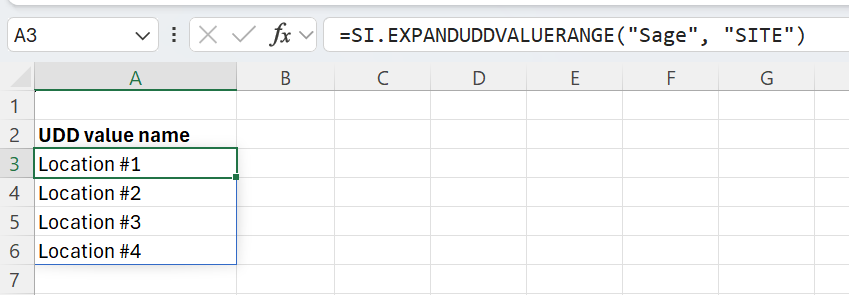
Then, get the UDD value IDs using SI.UDDVALUEID.
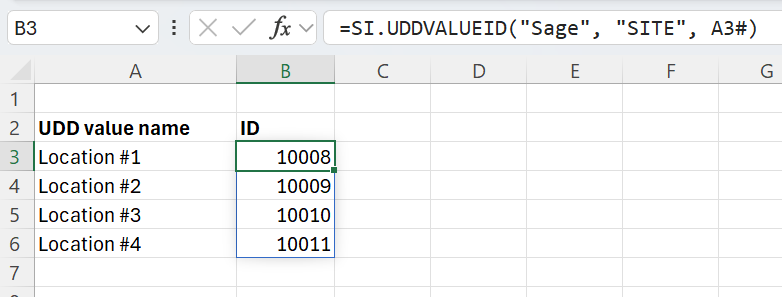
Using the “#” symbol (“A3#”) makes the function return values for cells A3 and below.