
Overview
Velixo Tools for NX exposes some of its features through Visual Basic for Applications (Excel for Windows macro language). This enables powerful automation, for instance, in report distribution. This article provides a guide for setting up and using VBA macros with Velixo NX in Excel for Windows.
Prerequisites
-
Excel Desktop for Windows is installed
-
Velixo NX is installed (see our Getting started with Velixo NX guide)
-
An Excel workbook with an established ERP connection (use Connection Manager to add a connection).
Adding the Reference
To use Velixo's VBA commands in your macros, add a reference to the Velixo_NX_Tools.VBA object. Repeat this step once for every workbook where you want to use the commands.
To do so, first, press Alt+F11 from an open Excel workbook to show the Microsoft Visual Basic for Applications window.
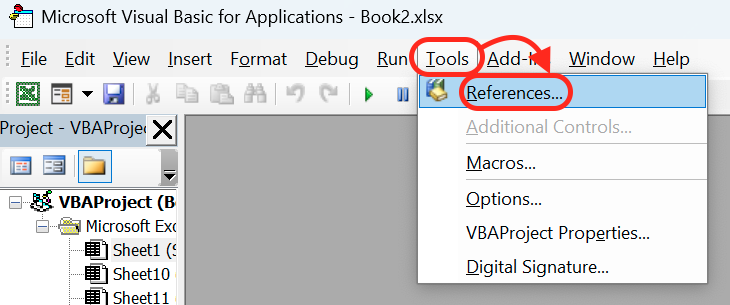
Navigate to Tools → References...
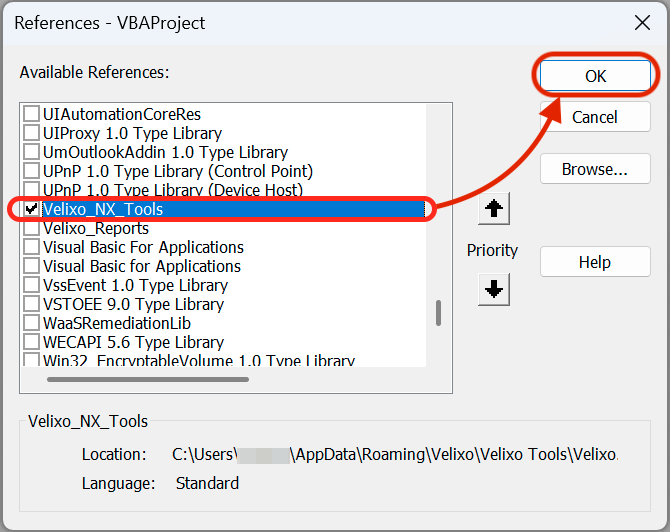
Scroll down the list and check Velixo_NX_Tools. Click OK.
How to use Velixo's VBA commands
First declare an object As Velixo_NX_Tools.VBA and use CreateObject to instantiate it.
Dim velixoObj As Velixo_NX_Tools.VBA
Set velixoObj = CreateObject("Velixo.NX.Tools.Vba")
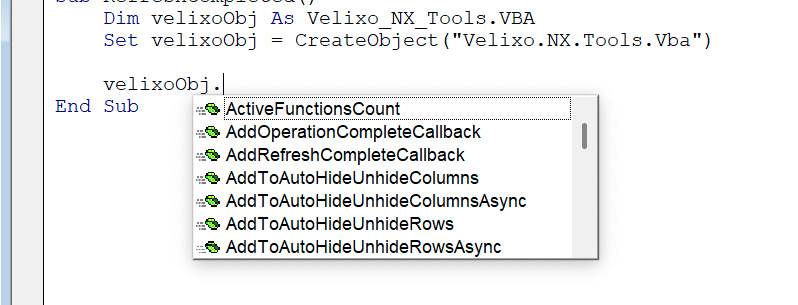
You are ready to use the VBA commands. You can see the available commands with Intellisense:
We highly recommend using asynchronous commands and callbacks for these commands in a separate VB module. Using synchronous functions may result in Excel becoming unresponsive. This happens because Velixo Tools and Velixo NX share Excel’s user interface processing thread.
See Visual Basic for Applications Functions Reference for available commands and additional details on each command.
Example
Below you can see an example of a Velixo NX-compatible VBA script using the CopyWorkbookWithoutFormulasAsynccommand preceded by an AddOperationCompleteCallback call referencing the command, followed by a separate VB module containing the callback.
Public Sub CopyWorkbookWithoutFormulas()

    Dim velixoObj As Velixo_NX_Tools.VBA
    Set velixoObj = CreateObject("Velixo.NX.Tools.Vba")

    Dim noArgs() As Variant
    velixoObj.AddOperationCompleteCallback ActiveWorkbook, VbaCommandName_CopyWorkbookWithoutFormulas, "ShowStatusCopyWithoutFormulas", noArgs

    Application.DisplayAlerts = False

    velixoObj.CopyWorkbookWithoutFormulasAsync "C:\The\Desired\Path\FileName.xlsx"

    Application.DisplayAlerts = True

End Sub
Sub ShowStatusCopyWithoutFormulas()

    MsgBox "Workbook copied without formulas"

    Dim velixoObj As Velixo_NX_Tools.VBA
    Set velixoObj = CreateObject("Velixo.NX.Tools.Vba")

    Dim noArgs() As Variant
    velixoObj.RemoveOperationCompleteCallback ActiveWorkbook, VbaCommandName_CopyWorkbookWithoutFormulas, "ShowStatusCopyWithoutFormulas", noArgs

End Sub