
Overview
The BC.WRITEBACKBUDGET function enables you to write lines to a specified GL budget in Business Central.
Writing back to General Ledger budgets is not available to users with the MS Dynamics 365 Team Members license.
Related articles
-
Getting started with Writeback - A general article on setting up and using writeback functions.
Syntax
=BC.WRITEBACKBUDGET(
  ConnectionName,
  Budget,
  BudgetDescription,
  BudgetDimensions,
  BudgetUpdateMode,
  Account,
  Amount,
  Date,
  Description,
  Dimensions,
  EntryNumber,
  EntryNumberOutput
)
Arguments
Header data
|
Argument |
Required/Optional |
Description |
|
|
Required |
The name of the connection, as specified in the Connection Manager. This function does not support the multiple connection functionality. |
|
|
Required |
The name of the GL budget targeted for Writeback. If a budget with the provided name is not present in Business Central, a new budget by that name will be created. |
|
|
Optional |
A textual description of the budget. |
|
|
Optional |
Comma-separated array of budget dimensions. This parameter affects only newly created budgets. If skipped, the new budget is created without budget dimensions. Global dimensions are not affected by this parameter. |
|
|
Optional |
One of four available values:
|
Line data
This function is spill-aware. When you provide an array for line data arguments, the function outputs a spill range with one status cell per line. The spill direction follows the shape of the input: column arrays produce a column spill, row arrays produce a row spill, and a matrix produces a 2D spill. All array arguments must be consistent in size and orientation; mismatched arrays return a #VALUE! error.
The formula recalculates automatically when source data changes.
|
Argument |
Required/Optional |
Description |
|
|
Required |
Account code for which the budget entry is created. |
|
|
Required |
Budget entry amount. |
|
|
Required |
Budget entry date. |
|
|
Optional |
A description of the budget entry. |
|
|
Optional |
A two-column Excel range, where the first column contains the name of a predefined dimension (e.g. department, customer, project etc.), and the second column contains the value for that dimension. When writing to an existing budget, make sure the dimensions you specify in this argument are part of the budget's configured dimensions. See the Using Dimensions article for more details. |
|
|
Optional |
Budget entry number. |
|
|
Optional |
Reference to a cell where the GL budget entry numbers will be returned. |
BudgetDimensions vs. Dimensions arguments
BC.WRITEBACKBUDGET uses two separate arguments for dimension-related information:
-
BudgetDimensions(4th argument) sets up a new budget's dimension structure. This is the equivalent of adding dimensions to a budget on the G/L Budgets page in Business Central. It tells BC which non-Global dimensions the budget should track. If omitted, the new budget tracks only the Global Dimensions.
The argument applies only when creating a new budget (ignored for existing budgets).
Do not include Global Dimensions inBudgetDimensions, as they are included for each budget by default. Specifying one returns an error. -
Dimensions(10th argument) assigns dimension values to each budget entry. This argument provides the actual values for each entry. Specify dimension/value pairs for all dimensions, including those listed inBudgetDimensions.
This argument uses the standard two-column format (dimension code + value code) and allows one value per dimension.
When writing to an existing budget, make sure the dimensions you specify in the line-level Dimensions argument are part of the budget's configured dimensions.
For example, you need a new budget that tracks AREA (a non-Global dimension) in addition to the Global Dimensions DEPARTMENT and SALESPERSON.
First, provide "AREA" in the BudgetDimensions argument to assign the dimension to the budget.
Then provide values for all three dimensions in the Dimensions argument:
=VX.SETTINGS(
  "AREA", "40",
  "DEPARTMENT", "SALES",
  "SALESPERSON", "MH"
)
BudgetDimensions defines what the budget can track. Dimensions defines what each entry contains.
Dynamic awareness and spill ranges
BC.WRITEBACKBUDGET is a dynamic-aware function — its dimension arguments accept dynamic arrays and spill ranges.
This makes it possible to define a set of dimension-value pairs (for example, using HSTACK or VSTACK) and pass that range as the Dimensions argument. The function's output will spill according to the orientation and size of the input data.
A single dimension array applies to all records in the writeback, regardless of how many data rows are being written.
If the spill ranges used in different arguments are of different lengths, an error will occur.
Example
Writeback to particular dimensions
Assume the following dimension range A3:B4:
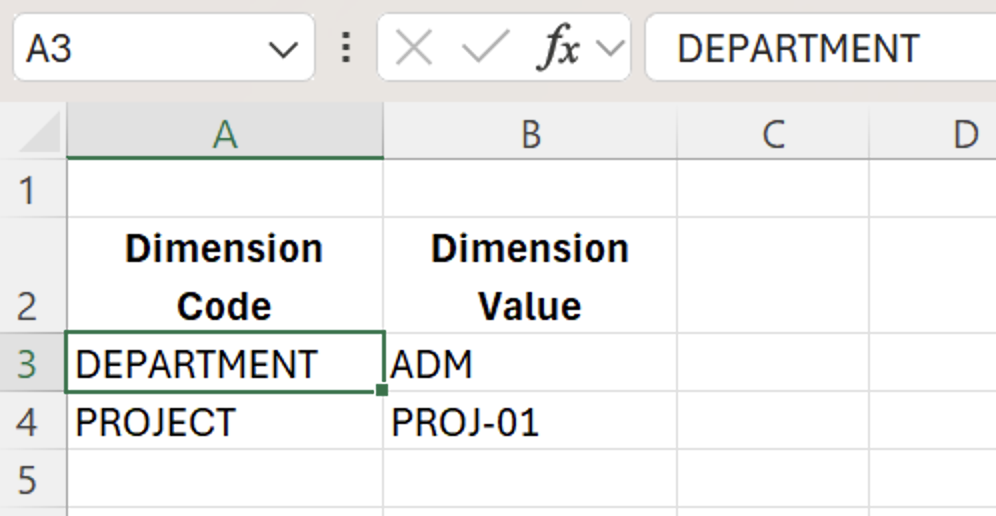
You can reference this range in your BC.WRITEBACKBUDGET formula:
=BC.WRITEBACKBUDGET(
  "BC",
  "BUDGET2025",
  "Annual Budget 2025",
  ,
  ,
  "61100",
  5000,
  "2025-01-01",
  "Q1 office budget",
  E3:F4
)
This formula writes a budget entry of 5000 to account 61100 for 1 January 2025, and assigns the dimension value codes DEPARTMENT – ADM and PROJECT – PROJ-01 in line data.