Overview
The BC.EXPANDACCOUNTSUBCATEGORYRANGE function returns general ledger account subcategory names matching the search criteria.
Syntax
=BC.EXPANDACCOUNTSUBCATEGORYRANGE(
    ConnectionName,
    AccountSubcategory,
    AccountCategory
)
Arguments
|
Argument |
Required/Optional |
Description |
|
|
Optional |
Provide one of the following values:
|
|
|
Optional |
Subcategory name filter. Supports Velixo range expressions for specifying multiple values. |
|
|
Optional |
One or more account category names, visible in the Business Central Chart of Accounts. The following values are accepted: Supports Velixo range expressions for specifying multiple values. |
Example
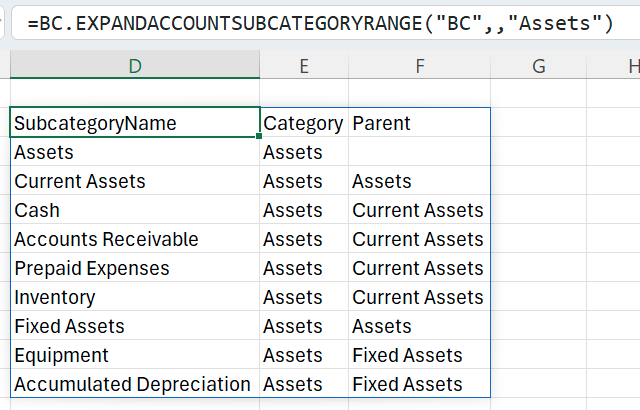
=BC.EXPANDACCOUNTSUBCATEGORYRANGE("BC",,"Assets")
Description: Returns all subcategory names in the category Assets for the connection BC.