Overview
The VXTEXTSPLIT function takes a delimited list (values separated by a common character) and separates the values in that list into an array of rows.
Examples include a list of comma-separated values: 1,2,3,4,5
Prior to version 7.0.282, the function is named TEXTSPLIT. Velixo renamed this function to VXTEXTSPLIT to avoid conflicts with the newly released Excel TEXTSPLIT function from Microsoft, which has a different set of arguments.
Syntax
=VXTEXTSPLIT(
    Text,
    Delimiter
)
Arguments
The VXTEXTSPLIT function uses the following arguments:
|
Argument |
Required/Optional |
Description |
|
|
Required |
The delimited text to be separated (may be typed into the function or be in a separate cell and referenced). |
|
|
Required |
The character that is used - in the |
Examples
Example 1
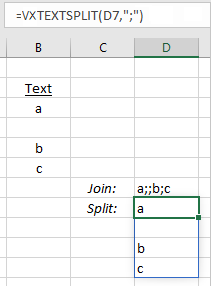
=VXTEXTSPLIT(
    D7,
    ";"
)
Description
Cell D7 contains a list separated by semicolons (and includes an empty value).
Results:
Example 2
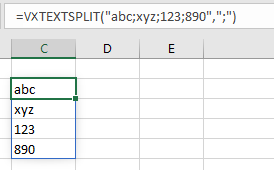
=VXTEXTSPLIT(
    "abc;xyz;123;890",
    ";"
)
Description
Returns the segments abc, xyz, 123, and 890 as elements of a dynamic array.
Result: