
Overview
The EXPANDCONNECTIONRANGE function lets you retrieve a list of all Velixo connections within the workbook.
Syntax
=EXPANDCONNECTIONRANGE(
    ConnectionName,
    ErpType,
    IncludeType
)
Arguments
|
Argument |
Required/Optional |
Description |
|
|
Optional |
Search expression for filtering connection names, supports Velixo filtering techniques. |
|
|
Optional |
Limits results to the provided ERP types. Accepts the following values:
|
|
|
Optional |
Include connection types in the results – Default value: |
Examples
List all connections and their types
=EXPANDCONNECTIONRANGE(
    ,
    ,
    "TRUE"
)
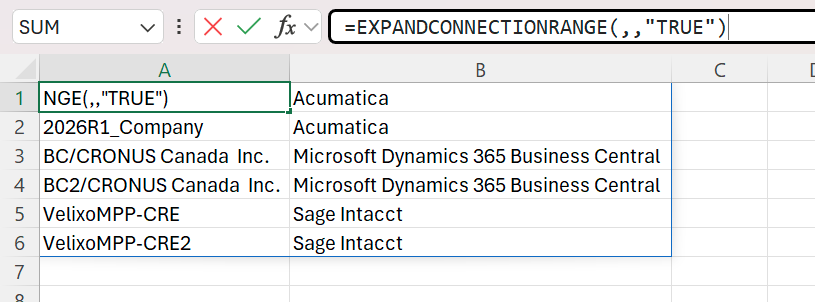
Description:
Returns all connection names for the workbook along with their ERP types.