Overview
The function creates a two-column Excel array of names and values. Use it as the ConnectionName argument described in Multiple connections per formula, as the Dimensions or Settings argument in various Velixo NX functions, or any other use case that calls for a two-column array.
Unlike an Excel array constant in curly braces, VX.SETTINGS accepts cell references and formulas as names and values, so you can build the array dynamically.
Syntax
=VX.SETTINGS(
  SettingNameOrValue,
  SettingNameOrValue,
  SettingNameOrValue,
  SettingNameOrValue,
  ...
)
Arguments
|
Argument |
Required /
|
Description |
|---|---|---|
|
|
Required |
First key name (setting/dimension/parameter). |
|
|
Required |
A value corresponding to the key. |
|
… |
|
|
|
|
Optional |
Final key name(setting/dimension/parameter). |
|
|
Optional |
An additional value corresponding to the final key. If the N-th parameter name is provided, the N-th value is required. |
In cases where empty arguments are provided, the VX.SETTINGS function:
-
excludes a key-value pair from the spilled output when both the key and the value are empty,
-
does not exclude a pair when the key is present but the value is empty,
-
returns an error when the key is empty, but the value is present in a pair.
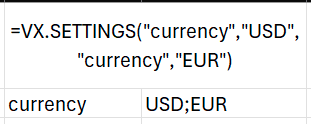
In cases where duplicate keys are provided, Velixo will deduplicate keys and join the values in a single range using the delimiter character.
Examples
Literal values
=VX.SETTINGS("Connection","Connection1, Connection2","AggregationMode","sum","GlobalAggregation","TRUE")
Description: The result is an array that is ready to use as the multi-connection ConnectionName argument in numerous Velixo functions.

Dynamic filter
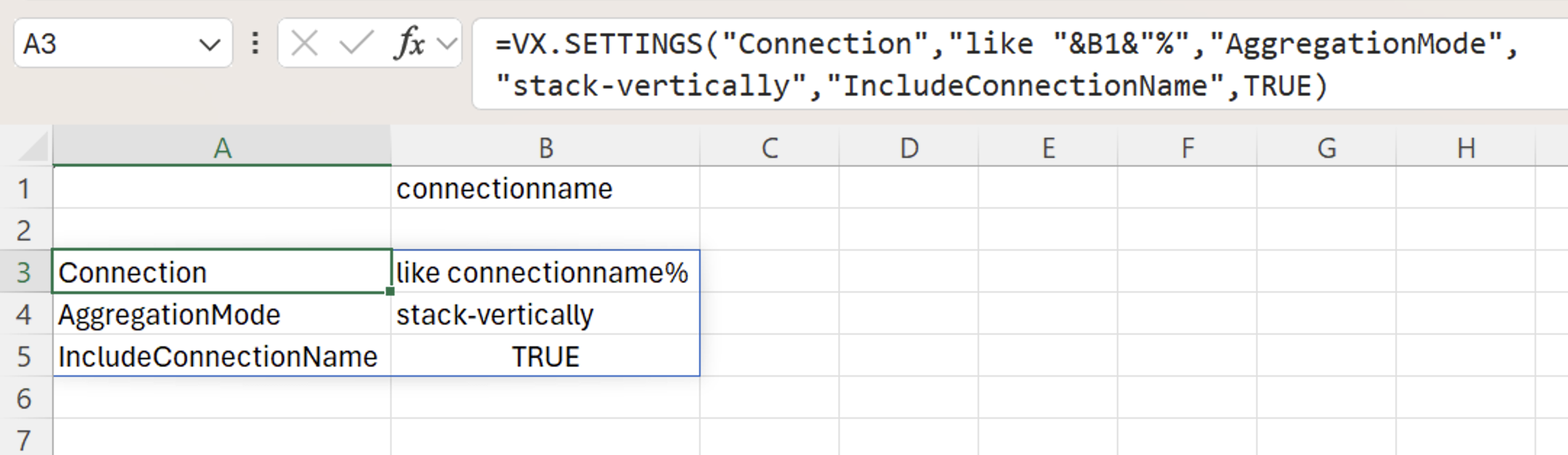
=VX.SETTINGS("Connection","like "&B1&"%","AggregationMode","stack-vertically","IncludeConnectionName",TRUE)
Description: Returns three setting name and value pairs. Used as the ConnectionName argument, it queries every connection whose name starts with the text in cell B1, stacks the results vertically, and adds a connection name column. For the like syntax, see Filtering using Velixo range expressions.