Overview
Use the BC.TABLEDEFINITION function to retrieve column names and their respective data types, valid values, related tables, and related field names for a specified table available in Business Central. You can use the retrieved column names as input for the Column argument in the BC.QUERYTABLE and BC.QUERYTABLEFILTER functions.
Syntax
=BC.TABLEDEFINITION(
  ConnectionName,
  Table
)
Arguments
|
Argument |
Required / Optional |
Description |
|---|---|---|
|
|
Optional |
The name of the connection, as specified in the Connection Manager. |
|
|
Required |
Table name. Use the BC.EXPANDTABLERANGE function to retrieve a list of tables available for querying. |
Example
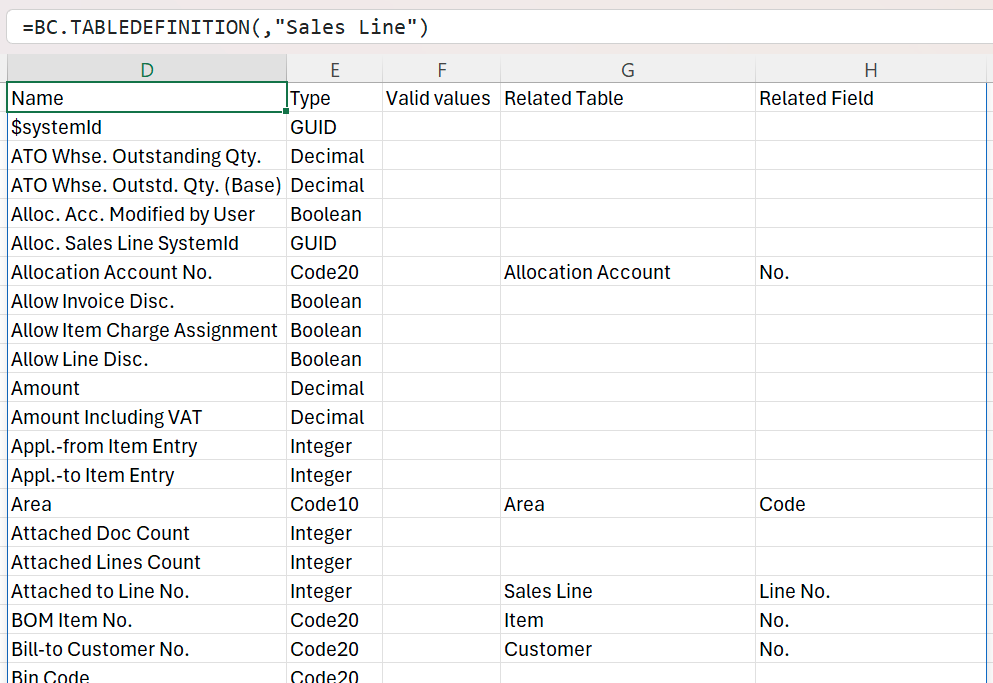
=BC.TABLEDEFINITION(,"Sales Line")
Description: This formula returns a table containing all column names, respective data types, valid values, related tables, and related field names for the table named Sales Lines.