
Overview
The BC.WRITEBACK function sends one or more lines of values to the ERP. The function uses the fields specified in an Object defined in the ERP.
Syntax
=BC.WRITEBACK(
    ConnectionName,
    Object,
    Settings,
    FieldNames,
    ParentObject,
    ParentRecordId,
    OutputFieldNames,
    OutputRange,
    RangeOrDataItem,
    ...
)
Arguments
The BC.WRITEBACK function uses the following arguments:
|
Argument |
Required/Optional |
Description |
|
|
Required |
The name of the connection as configured in the Connection Manager. This function does not support the multiple connection functionality. |
|
|
Required |
The name of the Business Central object (case insensitive). Use the BC.EXPANDOBJECTRANGE function to retrieve available values. |
|
|
Optional |
A two-column array of
Example: |
|
|
Required |
A comma-separated string
|
|
|
Optional
|
A parent object name (for example, Use the BC.EXPANDOBJECTRANGE function to retrieve available values. |
|
|
Optional (Required if |
The ID of a parent record with which the child record will be associated.
Use the BC.OBJECTDEFINITION function to retrieve information about key fields. 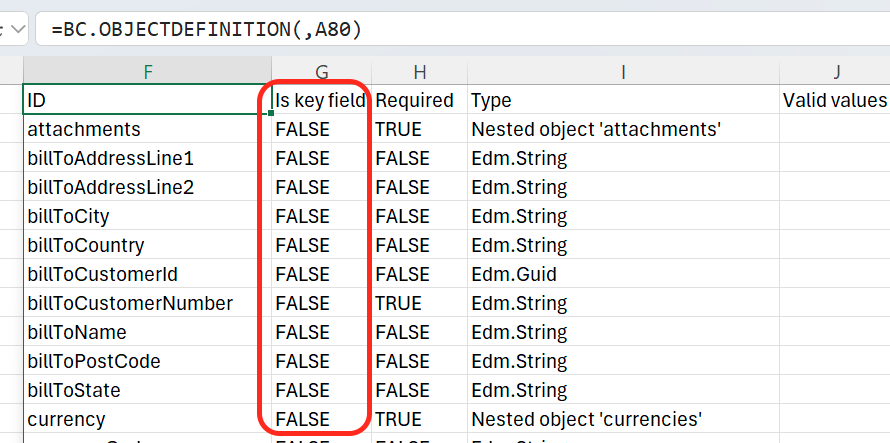
|
|
|
Optional |
An Excel cell range (or a comma-separated string) containing the field names to retrieve from the resulting object. Returns all fields when omitted.
This argument is ignored when in "delete" mode |
|
|
Optional
|
A reference to an Excel range where the output fields will be returned. This argument is ignored when in "delete" mode |
|
|
Required |
An Excel range with the data items or a value to be written to the first field specified in |
|
|
Optional
|
An Excel range with the data items or a value to be written to the second field specified in |
|
... |
|
|
How to build writeback data lines
This section explores different ways of composing data for the BC.WRITEBACK function.
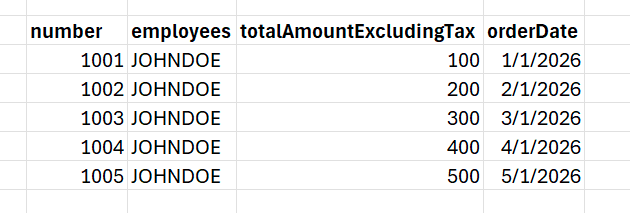
We will be using an example where you write back data lines containing an order number, employee, a monetary amount, and a date.
As separate lines - multiple BC.WRITEBACK functions
The first way to write back such a block of data is to specify each data line as a separate RangeOrDataItem argument:
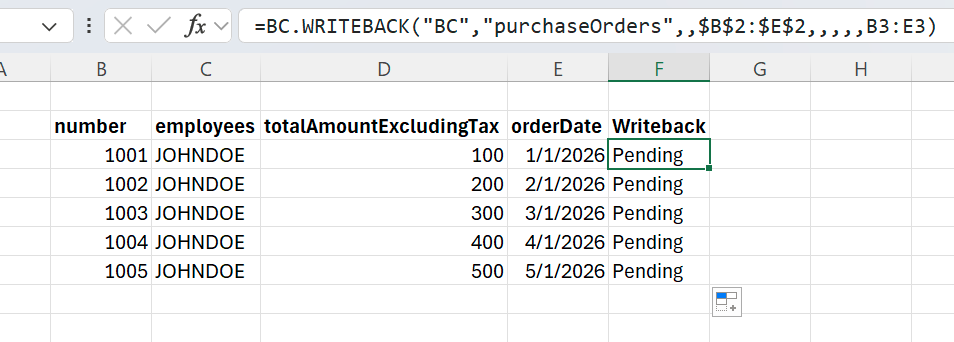
This works great when the number of lines doesn't change over time, or changes relatively infrequently.
As separate lines - single BC.WRITEBACK function
You can also use just one BC.WRITEBACK function and display the status just once on your worksheet. To specify data items as separate lines in such a case, you can use multiple RangeOrDataItem arguments representing writeback lines:
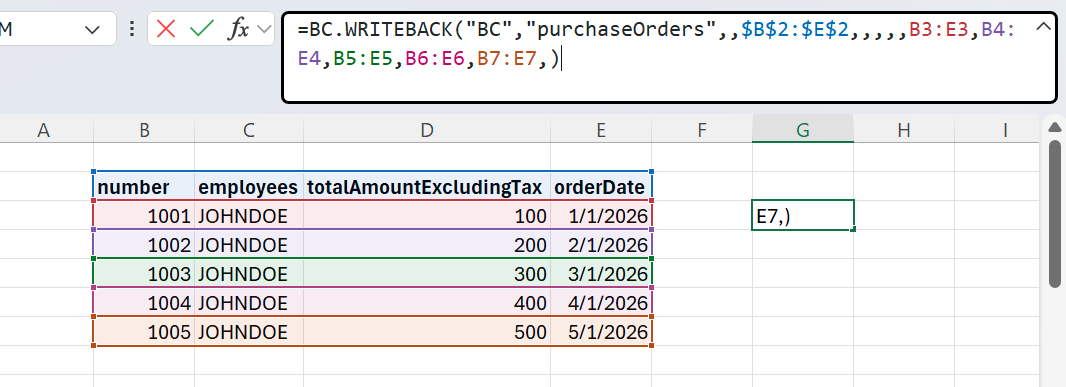
The downside here, again, is when the number of items changes over time, you will need to manually modify your formula.
As a block of data - single WRITEBACK function
Alternatively, you can use an Excel range as the first RangeOrDataItem argument of the BC.WRITEBACK function:
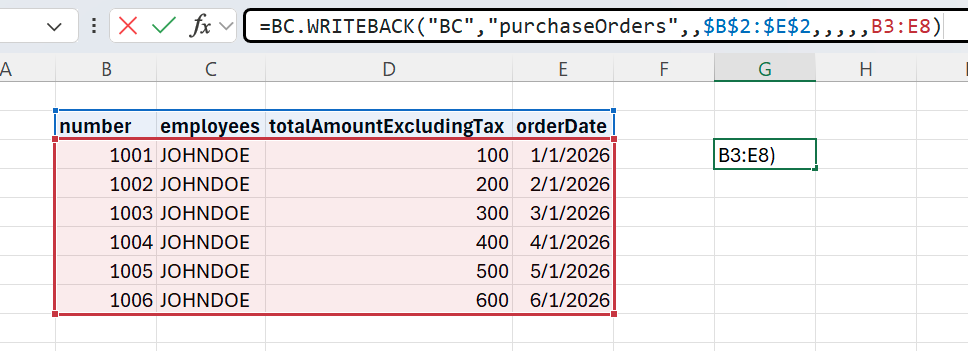
Hard-coded range references may be a good choice when the shape of data and the number of lines stay the same over time. If the shape of data changes, however, there is a risk of forgetting to modify the formula to include the additional data lines.
This approach works great with spill ranges:
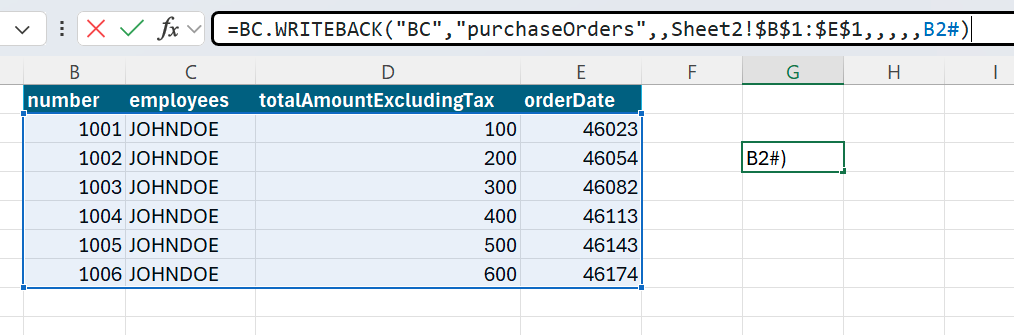
You can use such functions as COLLATE, HSTACK and VSTACK to compose such a dynamic block.
From separate columns of data - single WRITEBACK function
Suppose the employee's name in our example stays the same, no matter what, and the date is the same for every line.
Also, let's suppose that the number and amount are Excel spill ranges coming from two different functions or data sources.
Then, you can compose your writeback data in a more dynamic way without using HSTACK / COLLATE, and also avoid repeating JOHNDOE in each line.
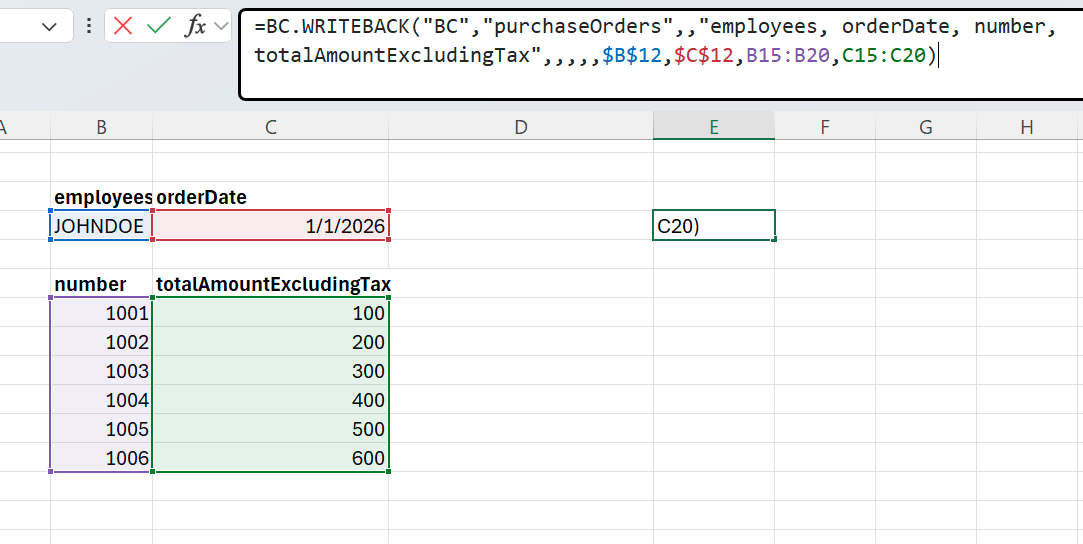
Note how we reference the Account / Amount using the spilling range syntax with "#", and also specify employees and orderDate as a single-cell references.
This layout is equivalent to the following rows:
JOHNDOE, 1001, 100, 01/01/2026,
JOHNDOE, 1002, 200, 01/01/2026,
JOHNDOE, 1003, 300, 01/01/2026 etc.
This saves space on the worksheet, removing unnecessary duplication, and is also completely robust when using spilling ranges of accounts/amounts resized in the future.
Example
New sales order
=BC.WRITEBACK(
A9,
B9,
C9:D10,
E9,
F9,
G9,
H9,
I9,
J9:M9)

Description:
This BC.WRITEBACK formula updates the fields orderDate, customerNumber, currencyCode, and shipToCity in the salesOrders object for the connection BC.
In the Settings argument, the API is set to common, and the Writeback mode is set to create-or-update.
The output fields are set in the OutputRange argument to be returned in the Excel range called id.
The range J9:M9 provided in the RangeorDataItem argument contains values to be written to the ERP (in the same order as in the FieldNames argument).
With references substituted by literal values, the formula translates to:
=BC.WRITEBACK(
BC,
"salesOrders",
{"api","common";"mode","create-or-update"},
"orderDate,customerNumber,currencyCode,shipToCity",
"id",
"2026-03-09,5000,GBP,London")