Overview
The BC.BUDGETTURNOVER function lets you retrieve the turnover for a specified GL budget between two dates.
Syntax
=BC.BUDGETTURNOVER(
    ConnectionName,
    Account,
    AccountCategory,
    AccountSubcategory,
    Budget,
    FromDate,
    ToDate,
    Dimensions,
    UseReportingCurrency
)
Arguments
|
Argument |
Required/Optional |
Description |
|
|
Optional |
Provide one of the following values:
OR Omit the argument to return results for all compatible connections with default aggregation settings. |
|
|
Optional if |
The code of the general ledger account, a spill range, or a cell range containing account codes. For example, |
|
|
Optional if |
One or more account category names, visible in the Business Central Chart of Accounts. The following values are accepted: |
|
|
Optional if |
One or more account subcategory names.
|
|
|
Required |
GL budget name or a range containing multiple budget names. |
|
|
Required |
The inclusive start date in YYYY-MM-DD format (or a reference to a cell in a valid Excel date format) |
|
|
Required |
The inclusive end date in YYYY-MM-DD format (or a reference to a cell in a valid Excel data format) |
|
|
Optional |
A two-column Excel range where the first column contains the name of a dimension and the second column contains a semicolon-separated list of values for that dimension You can specify dimension values using ranges, wildcards, and other techniques. See the Using Dimensions article for more details. |
|
|
Optional |
When a reporting currency is configured for your organization, set this argument to Accepted values: Default value: |
Example
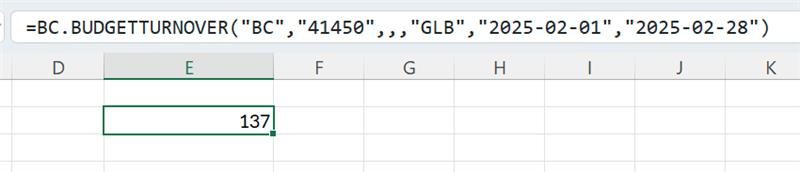
=BC.BUDGETTURNOVER(
    "BC",
    "41450",
    ,
    ,
    "GLB",
    "2025-02-01",
    "2025-02-28"
)
Description:
Returns the turnover for the budget GLB in the account 41450 in February 2025, within the connection named BC.