Overview
The EXPANDACCOUNTGROUPRANGE function returns all general ledger account group codes within the specified range.
Velixo recommends the use of Microsoft 365 for this feature. Experimentally, Excel 2010 or higher may be used. See the Prerequisites for additional information.
Syntax
=EXPANDACCOUNTGROUPRANGE(
    ConnectionName,
    Range,
    IncludeInactive,
    AccountGroupType
)
Arguments
The EXPANDACCOUNTGROUPRANGE function uses the following arguments (see our article on Filtering Velixo functions):
|
Argument |
Required/Optional |
Description |
|
|
Optional |
Provide one of the following values:
OR Omit the argument to return results for all compatible connections with default aggregation settings. |
|
|
Optional |
The range of account groups to include in the results. Supports Velixo filtering expressions. If you omit the argument, all account groups are returned. |
|
|
Optional |
Specifies whether to include inactive account groups in the results.
|
|
|
Optional |
Filters the results by account group type, as defined in Acumatica. Enter one or more of the following letters, in any order:
|
Examples
All account groups
=EXPANDACCOUNTGROUPRANGE(
    "Demo",
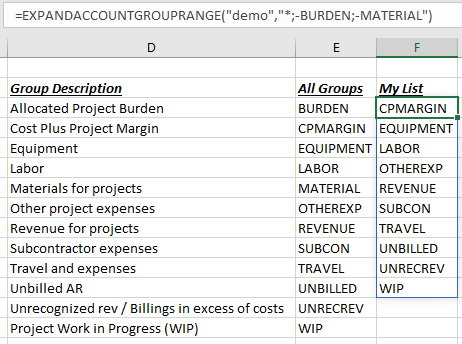
    "*;-BURDEN;-MATERIAL"
)
Description: Returns all Active general ledger account group codes EXCEPT BURDEN and MATERIAL, including inactive account groups.
Result:
Selected account group types
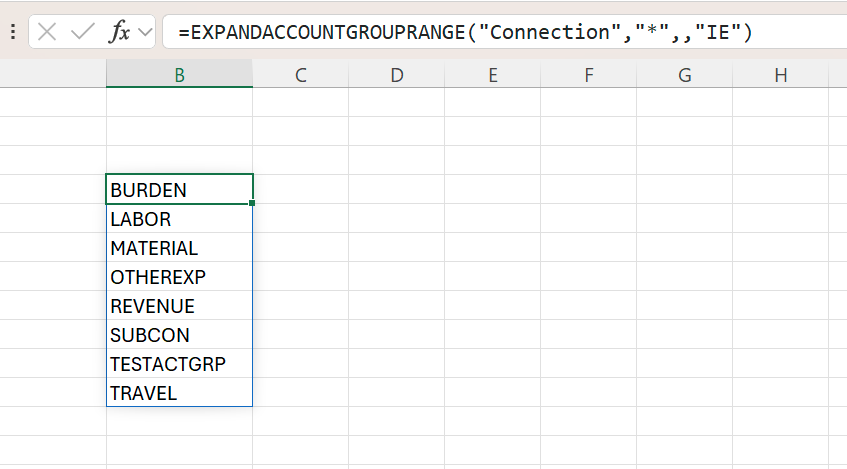
=EXPANDACCOUNTGROUPRANGE("Connection","*",,"IE")
Description: Returns the codes of all Income and Expense account groups, including inactive ones.
Result: