Overview
The ACCOUNTCLASSLIST function returns the list of GL account codes that are assigned to the specified account class.
Syntax
=ACCOUNTCLASSLIST(
    ConnectionName,
    AccountClass
)
Arguments
This function uses the following arguments (see our articles on Filtering Velixo Functions and using Excel arrays or cell ranges are arguments):
|
Argument |
Required /Optional |
Description |
|
|
Optional |
Provide one of the following values:
OR Omit the argument to return results for all compatible connections with default aggregation settings. |
|
|
Required |
The account class(es) for which the component accounts are to be displayed. |
Example
=ACCOUNTCLASSLIST(
    "Demo",
    "Sales"
)
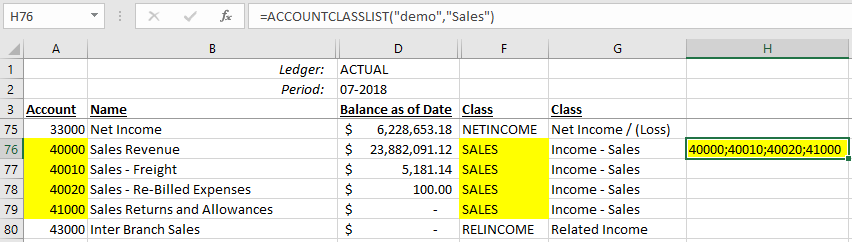
Description: Returns the list of accounts with an Account Class of Sales
Result: 40000;40010;40020;41000