
Overview
Acumatica allows a transaction from a specific date to be posted to a different financial period.
This is particularly useful when creating year-to-date (YTD), month-to-date (MTD), or quarter-to-date (QTD) reports.
When calculating account balances using dates instead of financial periods, Velixo does NOT include those transactions which are within the date range but have been posted to a different period.
Example
Let's assume the following three transactions have been posted to account 11000:
|
Date |
Amount |
Period |
|
May 5, 2021 |
75.00 |
04-2021 |
|
May 6, 2021 |
100.00 |
05-2021 |
|
May 7, 2021 |
150.00 |
06-2021 |
If we were to use the ACCOUNTTURNOVER function to report the account turnover for May 5, 2021 through May 7, 2021...
=ACCOUNTTURNOVER("Connection","Actual",,"11000",,,$C$3,$C$4,1)
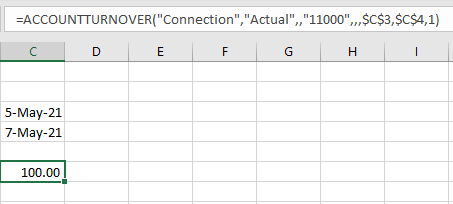
The results would be $100.00 (the amount of the transaction from May 6, which was posted to period 05-2021).
In this way, the transactions from May 5 and May 7 affect the balances in ONLY the financial periods to which they were posted (04-2021 and 06-2021, respectively).