
Excel add-in
Release date: 3 June 2026
🚀 New
-
The Velixo Intelligence agent can now:
-
Query related objects via BC.QUERYTABLE. (RD-10663)
-
Perform operations such as worksheet rename/hide, sort/filter, conditional formatting, and freeze/group. (RD-9966)
-
Create charts. (RD-9358)
-
Set appropriate column widths. (RD-9675)
-
-
Each error in the Formulas to Review panel now has a Troubleshoot button that hands the error and its context to Velixo Intelligence for diagnosis. (RD-10511)
The Velixo Intelligence feature is in private preview. To enable it, please reach out to your Customer Success Manager.
-
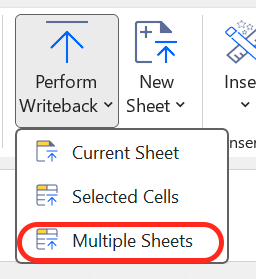
You can now write back to multiple worksheets at a time using the new Multiple Sheets mode in the Perform Writeback dropdown. You can tick the worksheets you want to write back in the side panel; they are then processed one by one in a single operation. (RD-10140)
-
BC.QUERYTABLE now supports the
unpivotoperator in theSelectargument. When the queried table has a nested object, you can pick a key attribute and a value attribute. Distinct values of the key become columns, and the value attribute fills the corresponding cells. (RD-10660) (Business Central) -
BC.OBJECTDEFINITION now supports navigation property names in addition to API endpoint names so that you can retrieve field definitions for nested objects directly. (RD-7016) (Business Central)
✨ Improved
-
The VX.ANALYSIS function is now VX.ASK. (RD-10913)
This is a breaking change! Please migrate all your VX.ANALYSIS formulas to VX.ASK.
-
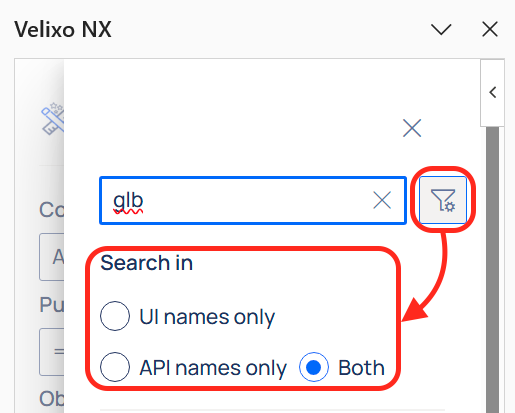
Query Builder now lets you choose whether the object/field search matches against UI names, API names, or both. (RD-8866)
-
We made Velixo NX look and feel crisper with a new font. (RD-10954)
-
Query Builder now shows valid values from a prepopulated list when building BC.QUERYTABLE formulas, making it easier to pick the right filter values without consulting documentation. BC.TABLEDEFINITION also displays a new column with valid values. (RD-10105) (Business Central)
-
The connection editor now includes a Select All / Unselect All checkbox when configuring a Business Central connection with multiple companies. (RD-10079) (Business Central)
-
Significantly improved refresh performance in large workbooks when using functions that output spill ranges (e.g., leveraging BC.DIMENSIONS). (RD-10962) (Business Central, Sage Intacct)
🔨 Fixed
-
Fixed an issue where the Distribute button on the Velixo NX ribbon could remain disabled when switching back to a distribution list worksheet, requiring a taskpane reload as a workaround. (RD-10301)
-
Fixed an issue where the connection editor did not clear fields (such as username, password, and tenant) when the ERP type was changed, which could carry incorrect credentials over to the next connection attempt. (RD-8346)
-
Fixed a bug causing Velixo to require signing-in each time a user opened a file with established connections. (RD-9436)
-
Fixed an issue causing the
*?range expression not to include records without a dimension set. (RD-7689)
Velixo Portal
🚀 New
-
Every organization now has a designated Owner — a special form of organization admin whose role cannot be revoked by any other admin. (RD-10344)
-
The Tenant terminology in Portal is now deprecated. All users are now scoped to an Organization. (RD-10046)
-
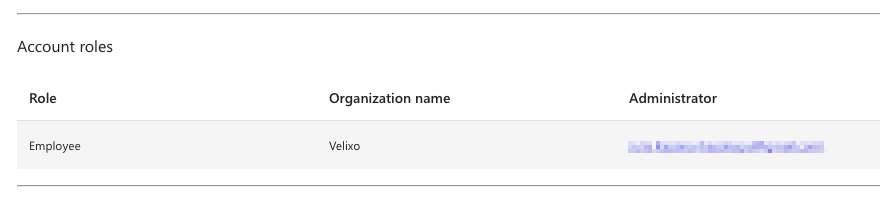
Every user can now see who the administrator of their organization is. (RD-9377)
-
The Account Roles grid on the Account Details page now shows an Administrator column with the organization admin(s) above the current user in the hierarchy. The column is hidden when it would be empty across all rows. (RD-9376)