
Overview
Velixo NX is an MS Office add-in that Velixo hosts and updates for you. You do not download or install new versions manually – Velixo delivers them automatically through a gradual rollout.
If you want to control who can install Velixo NX or deploy it centrally, see Controlling Velixo NX installation in your organization.
How Velixo NX delivers updates
Velixo checks for available versions on startup and when an update is available, it delivers the updated add-in to users automatically – there is no installer to run and no action required from the individual user.
Because Velixo delivers updates centrally, it controls how quickly a new version reaches users through a gradual (staged) rollout.
When to expect a new version
Velixo NX follows a monthly release cycle. Each month has a main Velixo NX release, typically near the beginning of the month, and an additional Velixo Intelligence release mid-month.
After each release, the new version rolls out gradually, so it reaches all organizations over the following week rather than immediately. Velixo does not commit to exact per-organization delivery dates in advance because it adjusts rollout timing based on how a release performs in production.
What a gradual rollout means
Velixo does not release a new version to every user at the same moment. Velixo starts each release with a limited group of users and steadily increases coverage to all users over the following days. This lets Velixo monitor a release in production and react quickly if an issue appears, before it reaches everyone.
Velixo spreads the early stages across the user base rather than targeting specific organizations. Which organizations go first does not depend on region or on any setting you control.
Velixo VAR Partners always receive updates in the first stage. To enable first-stage updates for your customers, contact Velixo Support. Mind that the earliest releases may contain issues that are very unlikely to reach later update recipients.
Check your version and learn about new features
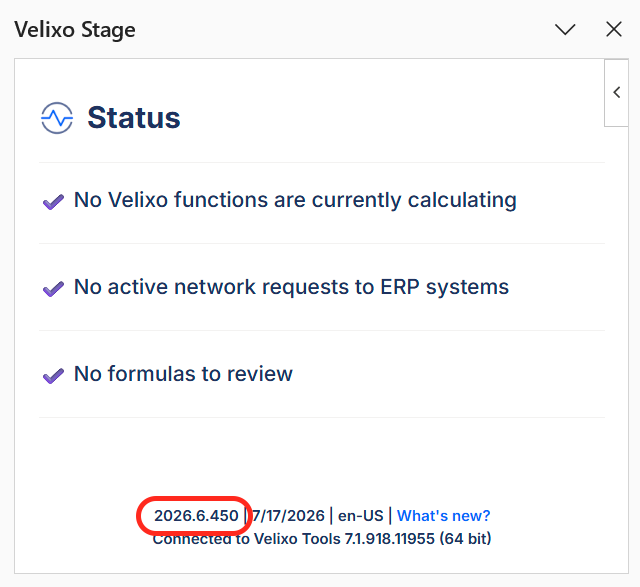
You can see which version you currently have from the Velixo side panel in Excel.
The version number appears in the footer at the bottom of the Velixo task pane. The footer also shows the release date and the version of Velixo Tools you are connected to.
See what's new
To read what a release includes, open its release notes. There are two ways to do that:
-
Click What's new? in the Velixo side panel footer.
-
Open the Velixo NX Releases page and head to the most recent release notes.
What administrators need to do
For the Velixo NX add-in itself, no action is required – it updates automatically for every user through the rollout mechanism described above.
Velixo Tools
Velixo NX requires Velixo Tools for report distribution (available only in Excel for Windows). Velixo Tools updates are less frequent than Velixo NX, but need to be installed manually.
Velixo NX will prompt you to update Velixo tools when you attempt to use a feature not enabled by your current version.
Acumatica customization package
Separately, Velixo relies on an Acumatica-side customization package. This component is not tied to the Velixo NX release cycle and changes only occasionally, when a Velixo feature requires a change inside the ERP.
The package version tracks your Acumatica major version, not the Velixo NX version. An administrator needs to publish an updated package only after upgrading Acumatica or when a release note states that a feature requires a customization package update.
To update the package, see Updating the Customization Package. To download the current package for your Acumatica version, see Installing the Customization Package for Acumatica-based ERPs.