
Overview
Sage Intacct offers two different Fixed Assets applications, and each one is exposed through a different Sage API. The application your company uses determines whether Velixo can read your asset data, and which function you use to read it.
This article covers:
-
The difference between the two applications
-
How to check which application your company uses
-
How to check whether your Velixo connection can read Fixed Assets data
-
What to do when the objects are not available
The two Fixed Assets applications
Fixed Assets Management data is available through the Sage REST API, so you read it with SI.XQUERY. SIG Fixed Assets data is not available through the REST API, so SI.XQUERY can't read it.
Checking which application you have
-
Sign in to Sage Intacct.
-
Open the Applications menu.
-
Check which entry you see:
-
Fixed Assets Management — your company uses Sage Fixed Assets Management (SFAM).
-
Fixed Assets — your company uses SIG Fixed Assets.
-
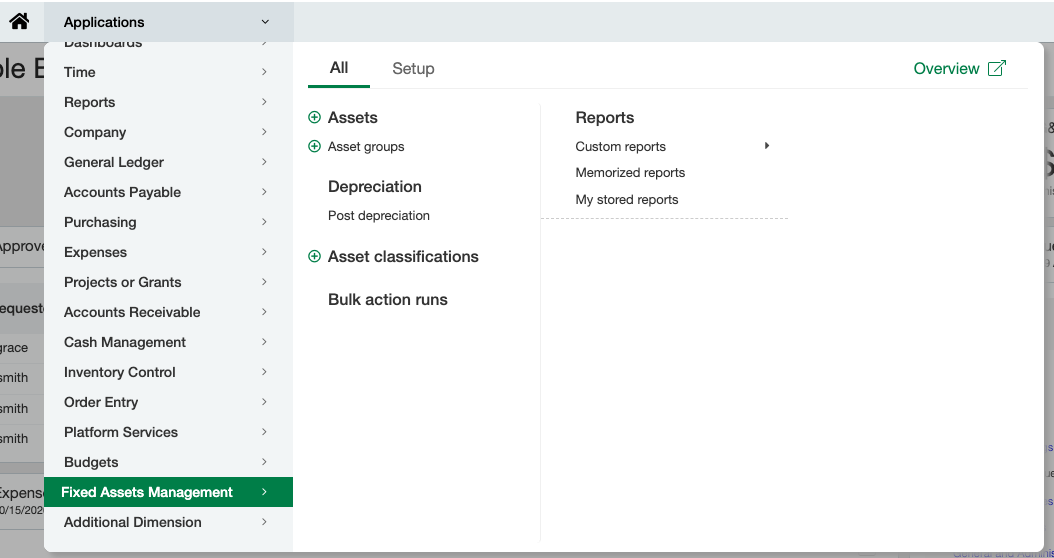
For Sage's own description of the two applications, see Sage Fixed Assets Management vs SIG Fixed Assets in the Sage Intacct Help Center.
Checking whether your connection can read Fixed Assets data
-
In a worksheet, query a Fixed Assets Management object (adjust the ConnectionName argument to match your workbook):
=SI.XQUERY("Sage", "fixed-assets/asset")
-
Compare the result with the following table.
|
Result |
What it means |
|---|---|
|
Rows of asset data |
Your connection can read Fixed Assets Management data. |
|
|
Your connection can read the object, but no records match the query. |
|
|
The Sage Intacct user in your connection can't read the object. Either your company doesn't have Fixed Assets Management, or the user's role doesn't include access to it. See the section below on what to do when the Fixed Assets objects are not available. |
If you enter a Fixed Assets Management object name in the SI.QUERY function, Velixo returns #VALUE! with the message Unknown object 'FIXED-ASSETS/ASSET'. Did you mean to use SI.XQUERY? Use SI.XQUERY for these objects.
To see the other objects Sage Intacct reports for your connection, use SI.XEXPANDOBJECTRANGE and look for names that begin with fixed-assets/.
=SI.XEXPANDOBJECTRANGE("Sage")
To see the fields of an object, use SI.XOBJECTDEFINITION:
=SI.XOBJECTDEFINITION("Sage", "fixed-assets/asset")
Sage Intacct lists these objects and returns their fields even when your connection can't read the data. Use SI.XQUERY to confirm that you can read it.
Velixo keeps object lists, object definitions and failed lookups for the rest of your session. After Fixed Assets Management is enabled for your company, refresh the workbook or clear the Velixo cache before you check again.
When the Fixed Assets objects are not available
If SI.XQUERY returns the REST-3007 error or another error from Sage Intacct, check the Applications menu in Sage Intacct:
-
If the Applications menu shows Fixed Assets, your company uses SIG Fixed Assets. The
fixed-assets/REST objects do not apply to your company. Contact your Sage Intacct implementation partner to discuss moving to Sage Fixed Assets Management. -
If the Applications menu shows neither Fixed Assets Management nor Fixed Assets, your company doesn't have a Fixed Assets application. Contact your Sage Intacct implementation partner to discuss adding Sage Fixed Assets Management.
-
If the Applications menu shows Fixed Assets Management and SI.XQUERY still returns REST-3007, check that the Sage Intacct user in your Velixo connection has access to Fixed Assets Management. Velixo reads data as that user. If the access looks correct, contact your Sage Intacct implementation partner or Sage Support.