
Overview
Velixo Intelligence is a preview feature. The assistant can draft formulas, reports, and analysis for you to review. This article explains what to expect from it, what limits apply, and what to do when something goes wrong.
Velixo Intelligence produces drafts rather than finished work. Treat everything it returns as a starting point that you check.
Velixo does not take responsibility for the results of financial analysis, or for the design of reports, produced by Velixo Intelligence. A qualified specialist needs to verify both. Velixo Intelligence shortens the time it takes to reach a first draft. It does not replace professional judgment.
Answers can be incorrect or invented. This is a property of AI language models in general, not specific to Velixo Intelligence.
Velixo Intelligence responses are not deterministic. The same question can produce a different answer on a later attempt, so an answer you liked is not guaranteed to come back the same way.
What Velixo Intelligence can help with
-
Velixo formulas. Composing them, and explaining why one fails - a missing comma, an argument of the wrong type, and similar mistakes. See Troubleshooting formulas with Velixo Intelligence.
-
Excel itself. Velixo Intelligence answers from documentation, so its help is not limited to Velixo functions. You can ask about Excel behavior that has nothing to do with Velixo.
-
Financial data. Reading a range and commenting on trends, variances, and anomalies. See Analyzing data with Velixo Intelligence.
-
Reports. Building complete worksheets on request. See Creating reports with Velixo Intelligence.
Where your conversations are stored
Your conversations are stored on the computer you are working on, for your user account. They are not saved inside the workbook. As a result:
-
If you send the workbook to a colleague, your conversations do not travel with it.
-
If you open the same workbook on another computer, your earlier conversations are not there.
Keep anything you want to preserve in the worksheet, not in the chat.
Credits
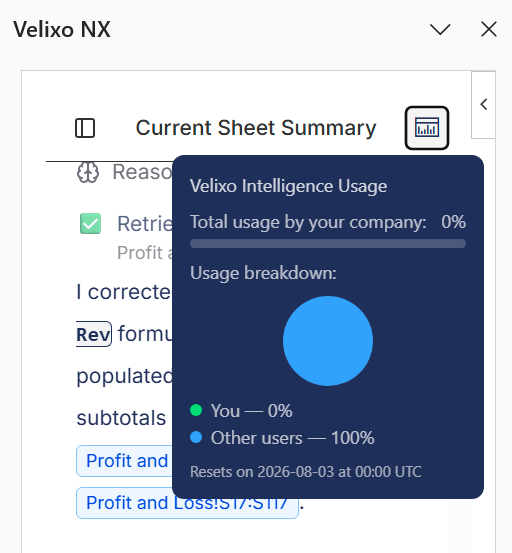
Your use of Velixo Intelligence as a feature preview is limited by a weekly credit allowance, which renews every Monday.
-
To see how much of your allowance is left, click the usage icon in the top-right corner of the Velixo Intelligence panel.
-
A dismissible banner above the message box warns you when you are near or over your allowance.
-
When the allowance is used up, Velixo Intelligence keeps answering questions from the Velixo help articles, but it can no longer read or change your workbook or your ERP data.
-
To increase your allowance, contact your Velixo representative.
Operations that use the most credits
Building a report is the most credit-intensive thing you can ask for. If your allowance runs out partway through a build, the rest of the conversation is answered from the help articles only, and you are left with an unfinished report on the worksheet. Check your remaining credits before you ask for a large report.
The VX.ASK function also uses credits every time it recalculates, not only when you first enter it. Each recalculation sends a new request and can return a different answer, which means text you have already reviewed can change. Use VX.ASK sparingly and over small ranges.
Getting better results
-
One request, one conversation – start a new conversation for each task. Mixing several unrelated requests into one conversation loses context and blurs your intent.
-
Be specific – for a report, the more precisely you describe where the data comes from, where to put it, and how to format it, the better the result.
-
Stick to facts and instructions – evaluative wording such as “the best report”, “a convincing analysis”, or “something my manager will like” gives the agent nothing to act on.
-
Use the common name of a report – if a report is widely known by a particular name, use it - Velixo Intelligence is then more likely to match an existing template. See Creating reports with Velixo Intelligence.
-
Expect what a person could do – Velixo Intelligence works from the information you give it and the documentation available to it.
Reporting a problem with Velixo Intelligence
To help us improve Velixo Intelligence during the preview, we kindly ask you to report the following:
-
The chat stops responding, or a reply stops partway through.
-
The Velixo Intelligence panel fails to load, or its interface is broken.
-
No reply arrives at all.
-
You receive an error message from the service.
An answer you disagree with or a formula that needs correcting is not a defect – those are covered by Troubleshooting formulas with Velixo Intelligence and by the review you give any draft.
You can report issues with Velixo Intelligence by contacting your Velixo representative or submitting a support ticket. Include as many details about the problematic interaction as possible. Add the prompt you sent and the workbook where you were working when they are relevant.
This section covers problems with Velixo Intelligence itself. To have Velixo Intelligence open a support case about a problem in Velixo NX, see the Preparing a support case section of Troubleshooting formulas with Velixo Intelligence.