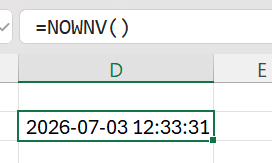
The NOWNV function returns the current system date and time. It returns the same data as the Excel NOW() function.
Overview
A small number of Excel functions are "volatile". Volatile functions trigger recalculation for every worksheet change. As a result, they can have a dramatic impact on worksheet performance. In mostly static workbooks (where not much changes between recalculations), the performance impact may not be particularly noticeable.
But in workbooks containing Velixo functions – where data must be retrieved from the ERP – adding a volatile function that causes Excel to perform extra calculations (and call upon Velixo to recalculate every Velixo function) can make a noticeable difference. In extreme cases, this can make a workbook almost unusable.
One of the most commonly used volatile Excel functions is the NOW() function. But while volatile, this function is extremely helpful in automating reports.
In order to provide the ability to retrieve the current date but avoid the volatile nature of the native Excel function, the Velixo NOWNV function only recalculates when the report is refreshed.
Syntax
=NOWNV()
Arguments
The TODAYNV function uses no arguments.
Example
=NOWNV()
Description: Returns today's date.
Result: