
Symptom
During a refresh, Velixo displays an error similar to:
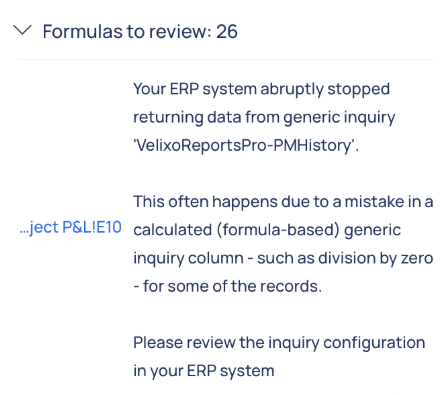
Cells using GI-based functions may display #N/A or partial/incomplete results.
Cause
A calculated/formula column in the ERP Generic Inquiry triggers an error (most commonly division by zero) for one or more records. When this happens, the ERP stops sending data mid-stream and returns malformed output. Velixo detects the interruption and displays the error shown above.
Resolution
-
Open the Inquiry displayed in the error message in the Acumatica interface (screen SM208000).
-
Review the inquiry setup to identify the potential issue among calculated columns, e.g., division by zero.
-
Wrap the problematic formula with a zero-check guard, e.g.,
=IIf([FieldB] = 0, 0, [FieldA] / [FieldB])) -
Save the Inquiry, then refresh in Velixo.
Mitigation tips for this type of error:
-
Test the GI unfiltered in the ERP first to ensure it returns a complete dataset without errors.
-
Temporarily apply filters in the GI to isolate rows causing the failure, then refine the formula.
-
If multiple calculated columns exist, disable them one by one to pinpoint the culprit.
Best practice: Always wrap calculations that can divide by a field with zero checks before using the GI with Velixo.