
Overview
By default, the filter expressions you specify in GI / GILOOKUPF Velixo functions are handled by your ERP, so as to reduce the amount of data that needs to be transferred between your ERP and your report.
Performing filtering through OData is very fast; however, it does have some limitations.
For example:
-
there is a limit to the number of characters that can be in the filter
-
filtering cannot be done on any calculated fields
-
if you have an older ERP version, certain OData functions (such as "startswith") may be unsupported
If your filtering efforts encounter one or more of these limitations, you may want to force Velixo to do the filtering, instead.
Client-side filtering may also help if you need to pull data from the same generic inquiry using multiple different OData filter expressions, all in the same spreadsheet.
Keep in mind though: lookups by e.g. document reference number, or a customer name may be much more performant using GILOOKUPF, because it allows you to keep at least some of the filtering on the server.
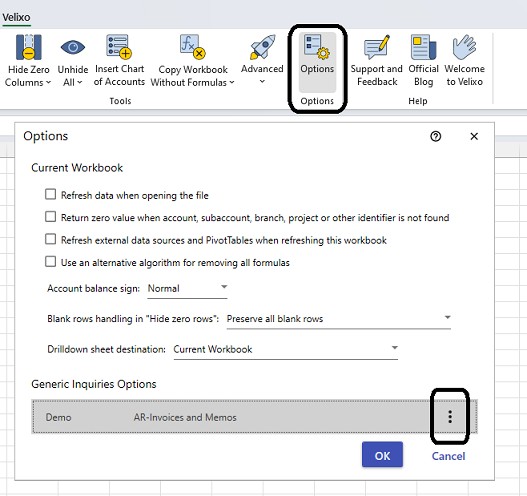
From the Velixo ribbon in Excel, select Options, then the three-dot kabob menu on the specific GI, and then Edit:
Then check the box for Always load the entire Generic Inquiry and filter the data locally:
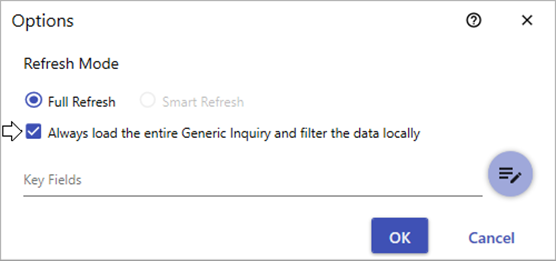
This will do exactly that: the entire data set from the inquiry will be downloaded, and then Velixo will do the filtering.
You can now refresh your report and the filtering of your GI() function(s) will be handled within Excel by Velixo.