
Overview
After you have requested changes to your Velixo License, those changes will be reflected once Velixo checks the license status (approximately once each day when you start Excel).
Activating Changes Immediately
To have your changes reflected immediately, you simple need to clear Velixo's local cache and restart Excel.
Select Clear Local Cache from the Advanced tool on the Velixo ribbon:
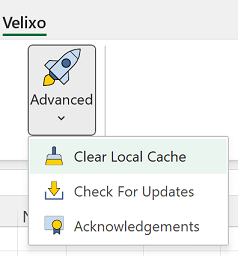
Then, close all Excel windows and then restart Excel.
Your license change should now be active.